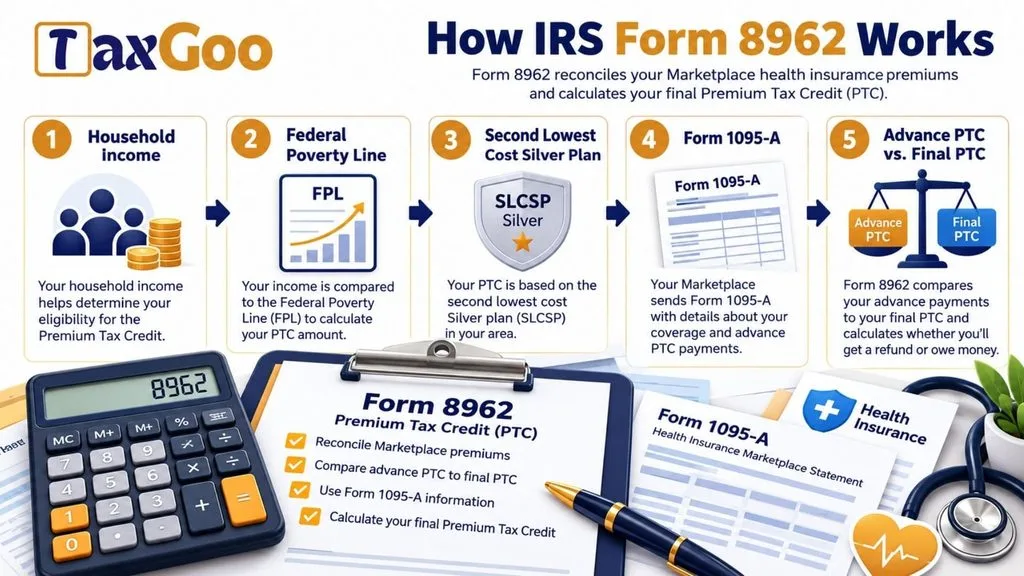
IRS Form 8962, officially called the Premium Tax Credit (PTC) form, is used to calculate and reconcile the premium tax credit available to eligible taxpayers who obtain qualifying health insurance coverage through the Health Insurance Marketplace. The premium tax credit is designed to help eligible individuals and families afford health insurance by reducing the amount they pay for monthly coverage. Some taxpayers receive advance payments of this credit directly through their insurance provider during the year, which lowers their monthly premium costs. However, the amount of advance assistance received may differ from the credit they are ultimately entitled to claim based on their actual household income and family circumstances. Form 8962 compares the premium tax credit allowed for the tax year with any advance payments already made on the taxpayer’s behalf. It determines whether the taxpayer can claim an additional credit on their federal income tax return or must repay some of the advance assistance received. The form also collects information about household income, tax family size, federal poverty guidelines, insurance premiums, benchmark plan costs, and monthly contributions toward health coverage. Additionally, it provides sections for taxpayers who share an insurance policy with another taxpayer or qualify to use an alternative calculation for the year of marriage. Completing Form 8962 accurately is important because the final calculation affects the taxpayer’s federal income tax return and may result in an additional premium tax credit or a repayment obligation.
How To File Form 8962
Form 8962 is generally submitted as part of the taxpayer’s federal individual income tax return. It is not intended to be filed as a separate tax return. The completed form must be attached to Form 1040, Form 1040-SR, or Form 1040-NR, depending on the taxpayer’s filing situation.
Taxpayers filing electronically should complete the relevant premium tax credit information through their tax preparation software so that Form 8962 is included with the electronic return. Those filing a paper return should include the completed form with their federal income tax documents.
Before starting, gather the following information:
- Form 1095-A: This statement provides information about Marketplace health insurance coverage, monthly premiums, the second lowest cost Silver plan (SLCSP), and advance premium tax credit payments.
- Income Information: Gather the financial information needed to calculate modified adjusted gross income (MAGI).
- Dependent Information: Prepare the modified adjusted gross income information for applicable dependents.
- Household Information: Determine your tax family size and the information needed to calculate household income.
- Federal Poverty Guidelines: Identify the applicable federal poverty line based on your location.
- Insurance Policy Details: Gather policy numbers and information about other taxpayers who share an insurance policy with you, if applicable.
- Marriage Information: If you are using the alternative calculation for the year of marriage, prepare the relevant information for yourself and your spouse.
Use the instructions for the applicable tax year when determining eligibility, calculating amounts, and applying special rules.
How To Complete Form 8962
Form 8962 for tax year 2025 contains five main parts. Each section addresses a different aspect of the premium tax credit calculation, including household contributions, credit reconciliation, repayment requirements, shared insurance policies, and special calculations for the year of marriage.
Taxpayer Information And Filing Status
Start by completing the identification information at the top of the form.
Tax Year
The form is designated for the 2025 tax year. Make sure you are using the correct version for the tax return being prepared.
Name Shown on Your Return
Enter your full name exactly as it appears on your federal income tax return. This helps ensure that the premium tax credit information is associated with the correct taxpayer.
Your Social Security Number
Enter your Social Security number in the space provided. Check the number carefully to avoid identification errors.
Statement A: Married Filing Separately
This statement addresses a special eligibility restriction. Generally, taxpayers filing as married filing separately cannot claim the premium tax credit unless they qualify for an applicable exception.
If you meet an exception described in the Form 8962 instructions, check the box provided. Otherwise, leave it unchecked. Review the applicable IRS rules before making this selection.
Part I: Annual And Monthly Contribution Amount
Part I determines the household contribution amount used when calculating the premium tax credit. It considers tax family size, modified adjusted gross income, household income, and the applicable federal poverty line.
Line 1: Tax Family Size
Enter the total number of individuals included in your tax family. Use the IRS definition and instructions to determine which individuals belong in your tax family for the premium tax credit calculation.
This information is important because household size affects the federal poverty guideline used to determine eligibility and calculate the applicable contribution amount.
Line 2a: Modified Adjusted Gross Income
Enter your modified adjusted gross income (MAGI) for the tax year. Use the calculation explained in the Form 8962 instructions.
MAGI is used to determine household income for premium tax credit purposes. Do not automatically assume that it is identical to the adjusted gross income shown on your tax return.
Line 2b: Dependents’ Modified Adjusted Gross Income
Enter the combined modified adjusted gross income of your dependents, as required under the applicable IRS rules.
If there are no dependent income amounts to include, follow the instructions for reporting zero.
Line 3: Household Income
Add the amounts reported on lines 2a and 2b.
The result represents household income for this calculation. Make sure both previous entries are correct before transferring the total to this line.
Line 4: Federal Poverty Line
Enter the applicable federal poverty line amount using the appropriate table provided in the Form 8962 instructions.
Select the checkbox that corresponds to your location:
- Box 4a, Alaska: Select this option if the applicable federal poverty guideline is for Alaska.
- Box 4b, Hawaii: Select this option if the applicable guideline is for Hawaii.
- Box 4c, Other 48 States and DC: Select this option if you use the federal poverty guideline for one of the other 48 states or the District of Columbia.
Use the correct table and household information when entering the amount.
Line 5: Household Income as a Percentage of the Federal Poverty Line
Calculate household income as a percentage of the federal poverty line.
Use the household income from line 3 and the federal poverty line from line 4. Follow the calculation method provided in the IRS instructions and enter the resulting percentage.
This percentage is used to determine the applicable figure on line 7.
Line 6: Reserved for Future Use
This line is reserved for future IRS use. Do not enter an amount or make a calculation here.
Line 7: Applicable Figure
Use the percentage reported on line 5 to locate the corresponding applicable figure in the table provided in the Form 8962 instructions.
Enter the applicable figure in this space. It will be used to calculate the household’s expected contribution toward health insurance premiums.
Line 8a: Annual Contribution Amount
Multiply the household income on line 3 by the applicable figure on line 7.
Round the result to the nearest whole dollar and enter it on line 8a.
This amount represents the calculated annual contribution toward the cost of health insurance coverage.
Line 8b: Monthly Contribution Amount
Divide the annual contribution amount reported on line 8a by 12.
Round the result to the nearest whole dollar and enter it on line 8b.
This monthly figure is used when calculating the premium tax credit separately for each month in Part II.
Part II: Premium Tax Credit Claim And Reconciliation Of Advance Payment Of Premium Tax Credit
Part II determines the actual premium tax credit allowed for the year and compares it with the advance payments already received. This section is important because it establishes whether the taxpayer is entitled to an additional credit or has received more assistance than allowed.
Policy Allocation And Calculation Method
Line 9: Allocation Of Policy Amounts Or Alternative Calculation For Year Of Marriage
This question asks whether you are allocating insurance policy amounts with another taxpayer or electing to use the alternative calculation for the year of marriage.
Select one of the following options:
- Yes: Select this option if you are allocating policy amounts with another taxpayer or want to use the alternative calculation for the year of marriage. Depending on your circumstances, proceed to Part IV, Allocation of Policy Amounts, or Part V, Alternative Calculation for Year of Marriage.
- No: Select this option if neither situation applies. Continue to line 10.
Read the instructions carefully before selecting an answer because your choice determines which additional sections you must complete.
Line 10: Selection Of Annual Or Monthly Calculation
This question determines whether you can calculate the premium tax credit using annual figures or must calculate it separately for each month.
The IRS instructions explain which calculation method applies to your situation.
Select the appropriate option:
- Yes: If the instructions allow you to use the annual calculation, select this option and continue to line 11. Calculate the annual premium tax credit there, skip lines 12 through 23, and proceed to line 24.
- No: If you must calculate the credit monthly, select this option and complete lines 12 through 23. Then continue to line 24.
Annual Premium Tax Credit Calculation
Line 11: Annual Totals
This line contains the annual calculation table. Complete the six columns using the information from Form 1095-A and Part I.
Column (a): Annual Enrollment Premiums
Enter the annual enrollment premiums reported on Form 1095-A, line 33A.
This amount represents the total annual premium cost used in the calculation.
Column (b): Annual Applicable SLCSP Premium
Enter the annual second lowest cost Silver plan (SLCSP) premium from Form 1095-A, line 33B.
This amount provides the benchmark premium used to calculate the premium tax credit.
Column (c): Annual Contribution Amount
Transfer the annual contribution amount from line 8a.
This is the amount the household is expected to contribute toward the cost of coverage for the year.
Column (d): Annual Maximum Premium Assistance
Subtract the amount in column (c) from the amount in column (b).
If the result is zero or less, enter zero.
This calculation determines the maximum premium assistance available based on the benchmark premium and household contribution.
Column (e): Annual PTC Allowed
Enter the smaller amount from column (a) or column (d).
This represents the annual premium tax credit allowed after comparing the enrollment premiums with the maximum premium assistance.
Column (f): Annual Advance Payment of PTC
Enter the advance premium tax credit amount reported on Form 1095-A, line 33C.
This represents the total advance assistance already paid during the year on your behalf.
Monthly Premium Tax Credit Calculation
Lines 12 Through 23: Monthly Calculations
If you selected the monthly calculation method on line 10, complete one row for each month of the tax year.
The monthly calculation table contains six columns. Each column uses specific information from Form 1095-A or the contribution amount calculated in Part I.
Column (a): Monthly Enrollment Premiums
Enter the monthly enrollment premium amounts from Form 1095-A, lines 21 through 32, column A.
Each amount must correspond to the month shown on the relevant line.
Column (b): Monthly Applicable SLCSP Premium
Enter the monthly second lowest cost Silver plan premium from Form 1095-A, lines 21 through 32, column B.
These figures are used to calculate the maximum premium assistance for each month.
Column (c): Monthly Contribution Amount
Enter the monthly contribution amount from line 8b.
If you are using an alternative monthly calculation for the year of marriage, use the applicable alternative contribution amount instead.
Column (d): Monthly Maximum Premium Assistance
Subtract column (c) from column (b).
If the result is zero or less, enter zero.
This amount represents the maximum premium assistance available for the particular month.
Column (e): Monthly PTC Allowed
Enter the smaller amount from column (a) or column (d).
This represents the premium tax credit allowed for that month.
Column (f): Monthly Advance Payment of PTC
Enter the advance premium tax credit payment reported on Form 1095-A, lines 21 through 32, column C.
Use the amount corresponding to each month.
Complete the monthly rows as follows:
Line 12: January
Enter the January enrollment premium, applicable SLCSP premium, monthly contribution, maximum premium assistance, allowed premium tax credit, and advance payment in their respective columns.
Line 13: February
Enter the corresponding February amounts using the February information from Form 1095-A and the applicable contribution calculation.
Line 14: March
Report the March insurance premiums, benchmark premium, contribution amount, allowed credit, and advance payment.
Line 15: April
Enter the relevant April figures in all six columns, following the same monthly calculation method.
Line 16: May
Report the May enrollment premium, applicable SLCSP premium, monthly contribution, maximum assistance, allowed credit, and advance payment.
Line 17: June
Enter the corresponding June amounts using the monthly information from Form 1095-A.
Line 18: July
Report all required July figures in the appropriate columns.
Line 19: August
Enter the August monthly premium and benchmark amounts, calculate the maximum assistance, and report the allowed credit and advance payment.
Line 20: September
Complete the six columns using the September insurance coverage information.
Line 21: October
Enter the October enrollment premium, applicable SLCSP premium, contribution amount, maximum assistance, allowed credit, and advance payment.
Line 22: November
Report the November figures in their respective columns using the same calculation process.
Line 23: December
Enter the final month’s insurance premium and other applicable figures to complete the annual monthly calculation.
Make sure every month is completed using the correct information. Do not automatically enter the same premium amount for every month because coverage costs and advance payments may change during the year.
Final Premium Tax Credit Calculation
Line 24: Total PTC
Enter the total premium tax credit allowed for the year.
If you used the annual calculation on line 11, transfer the amount from column (e) of that line.
If you used the monthly calculation, add the amounts in column (e) from lines 12 through 23 and enter the total here.
Line 25: Advance Payment of PTC
Enter the total advance premium tax credit payments received during the year.
If you completed the annual calculation, transfer the amount from line 11, column (f).
If you completed the monthly calculation, add the amounts in column (f) from lines 12 through 23.
Line 26: Net PTC
Compare the total premium tax credit on line 24 with the advance payments on line 25.
If line 24 is greater than line 25, subtract line 25 from line 24. Enter the difference on this line and transfer the amount to Schedule 3 (Form 1040), line 9.
If both amounts are equal, enter zero and stop completing the form.
If line 25 is greater than line 24, leave line 26 blank and continue to line 27.
Part III: Repayment Of Excess Advance Payment Of The Premium Tax Credit
Part III determines whether the taxpayer must repay excess advance premium tax credit payments. Complete this section when the advance assistance received during the year is greater than the final premium tax credit allowed.
Line 27: Excess Advance Payment of PTC
If line 25 is greater than line 24, subtract line 24 from line 25.
Enter the difference on line 27.
This amount represents the advance premium tax credit received in excess of the credit allowed for the tax year.
If line 25 is not greater than line 24, this repayment calculation does not apply.
Line 28: Repayment Limitation
Enter the repayment limitation applicable to your tax situation.
Use the repayment limitation rules and tables provided in the Form 8962 instructions to determine the correct amount.
Do not automatically enter the full excess advance payment from line 27 because the applicable repayment limitation may affect the amount owed.
Line 29: Excess Advance PTC Repayment
Compare the amounts on lines 27 and 28.
Enter the smaller of the two amounts on line 29.
Transfer this amount to Schedule 2 (Form 1040), line 1a. This is the amount of excess advance premium tax credit repayment included in the federal tax return.
Part IV: Allocation Of Policy Amounts
Part IV is used when insurance policy amounts must be allocated between taxpayers. This may apply when two taxpayers share a Marketplace insurance policy and need to divide the relevant policy amounts for their individual premium tax credit calculations.
The section provides space for up to four separate policy allocations. Each allocation requires information about the policy, the other taxpayer, the applicable months, and the percentages assigned to the allocation.
Allocation 1
Line 30(a): Policy Number
Enter the policy number shown on Form 1095-A, line 2.
Use the correct number to identify the insurance policy involved in the allocation.
Line 30(b): SSN of Other Taxpayer
Enter the Social Security number of the other taxpayer involved in the policy allocation.
Check the number carefully to ensure the allocation is associated with the correct individual.
Line 30(c): Allocation Start Month
Enter the first month for which the policy amounts are being allocated.
The month should correspond to the period covered by the allocation.
Line 30(d): Allocation Stop Month
Enter the final month included in the policy allocation.
Use the correct ending month so the allocation covers only the applicable period.
Line 30(e): Premium Percentage
Enter the percentage of the policy’s enrollment premium amounts assigned to the allocation.
Use the applicable allocation percentage determined under the IRS rules.
Line 30(f): SLCSP Percentage
Enter the percentage of the second lowest cost Silver plan premium amounts assigned to the allocation.
This percentage is applied to the relevant monthly benchmark premium amounts.
Line 30(g): Advance Payment of the PTC Percentage
Enter the percentage of advance premium tax credit payments assigned to the allocation.
This determines the portion of advance payments included in the allocation calculation.
Allocation 2
Line 31(a): Policy Number
Enter the policy number from Form 1095-A, line 2, for the second policy allocation.
Line 31(b): SSN of Other Taxpayer
Enter the Social Security number of the other taxpayer involved in this allocation.
Line 31(c): Allocation Start Month
Enter the first month covered by the second allocation.
Line 31(d): Allocation Stop Month
Enter the last month covered by the second allocation.
Line 31(e): Premium Percentage
Enter the applicable percentage of enrollment premiums assigned to the second allocation.
Line 31(f): SLCSP Percentage
Enter the applicable percentage of benchmark SLCSP premiums assigned to this allocation.
Line 31(g): Advance Payment of the PTC Percentage
Enter the applicable percentage of advance premium tax credit payments assigned to the second allocation.
Allocation 3
Line 32(a): Policy Number
Enter the policy number shown on Form 1095-A, line 2, for the third allocation.
Line 32(b): SSN of Other Taxpayer
Provide the Social Security number of the other taxpayer associated with the third allocation.
Line 32(c): Allocation Start Month
Enter the beginning month of the third allocation period.
Line 32(d): Allocation Stop Month
Enter the ending month of the third allocation period.
Line 32(e): Premium Percentage
Enter the percentage of enrollment premiums assigned to the third allocation.
Line 32(f): SLCSP Percentage
Enter the percentage of SLCSP premium amounts assigned to the third allocation.
Line 32(g): Advance Payment of the PTC Percentage
Enter the percentage of advance premium tax credit payments assigned to the third allocation.
Allocation 4
Line 33(a): Policy Number
Enter the policy number from Form 1095-A, line 2, for the fourth allocation.
Line 33(b): SSN of Other Taxpayer
Enter the Social Security number of the other taxpayer involved in this allocation.
Line 33(c): Allocation Start Month
Provide the first month covered by the fourth allocation.
Line 33(d): Allocation Stop Month
Enter the final month included in the fourth allocation.
Line 33(e): Premium Percentage
Enter the percentage of enrollment premiums assigned to this allocation.
Line 33(f): SLCSP Percentage
Enter the percentage of applicable benchmark premiums assigned to the fourth allocation.
Line 33(g): Advance Payment of the PTC Percentage
Enter the percentage of advance premium tax credit payments assigned to this allocation.
Completing Policy Allocations
Line 34: Have You Completed All Policy Amount Allocations?
This question determines whether all required policy allocations have been reported.
Select the appropriate option:
- Yes: Select this option when all required policy allocations have been completed. Multiply the applicable Form 1095-A amounts by their corresponding allocation percentages. Combine the allocated amounts with any policy amounts that were not allocated. Calculate a combined total for each month and enter the results on lines 12 through 23, columns (a), (b), and (f). Then calculate columns (c) through (e) and continue to line 24.
- No: Select this option if additional policy allocations still need to be reported. Follow the Form 8962 instructions for reporting allocations that cannot be included in the available spaces.
Make sure that the policy amounts are assigned correctly before continuing with the premium tax credit calculation.
Part V: Alternative Calculation For Year Of Marriage
Part V provides an alternative calculation for taxpayers who qualify to use special rules for the year they got married.
The section allows alternative entries for the taxpayer and spouse. These amounts are used when determining the monthly contribution and calculating the premium tax credit under the applicable marriage-year rules.
Complete line 35, line 36, or both, as appropriate under the IRS instructions. Eligibility for this election is addressed in the instructions for line 9.
Alternative Calculation Entries
Line 35: Alternative Entries for Your SSN
This line records the alternative calculation information associated with your Social Security number.
Complete the following columns:
Column (a): Alternative Family Size
Enter the alternative family size applicable to your calculation.
Use the family size determined under the special rules for the year of marriage.
Column (b): Alternative Monthly Contribution Amount
Enter the alternative monthly contribution amount calculated under the applicable IRS method.
This amount is used instead of the regular monthly contribution amount where the alternative calculation applies.
Column (c): Alternative Start Month
Enter the first month for which the alternative calculation applies to your Social Security number.
Column (d): Alternative Stop Month
Enter the final month for which the alternative calculation applies.
Spouse’s Alternative Calculation
Line 36: Alternative Entries for Your Spouse’s SSN
This line provides the corresponding alternative calculation information for your spouse.
Complete the following columns:
Column (a): Alternative Family Size
Enter the alternative family size applicable to your spouse’s calculation.
Column (b): Alternative Monthly Contribution Amount
Enter the alternative monthly contribution amount determined for your spouse under the applicable rules.
Column (c): Alternative Start Month
Enter the first month covered by the alternative calculation for your spouse.
Column (d): Alternative Stop Month
Enter the last month covered by the alternative calculation for your spouse.
After completing the applicable entries on lines 35 and 36, use the instructions for Part V to determine the amounts needed for the monthly calculations on lines 12 through 23.
Final Review Before Filing
Before submitting Form 8962 with your federal income tax return, review every section to make sure the information is complete and consistent with your supporting documents.
Use the following checklist:
- Confirm that you are using the correct 2025 version of Form 8962.
- Enter your name exactly as it appears on your federal income tax return.
- Verify your Social Security number.
- Review the married filing separately restriction and check the exception box only when applicable.
- Confirm the correct tax family size on line 1.
- Verify your modified adjusted gross income on line 2a.
- Include the required dependents’ modified adjusted gross income on line 2b.
- Check the household income calculation on line 3.
- Select the correct federal poverty line table on line 4.
- Verify the household income percentage on line 5.
- Leave reserved line 6 blank.
- Confirm the applicable figure on line 7.
- Check the annual and monthly contribution calculations on lines 8a and 8b.
- Answer the policy allocation and marriage-year calculation question on line 9 correctly.
- Select the appropriate annual or monthly calculation method on line 10.
- Verify the annual premium tax credit calculation on line 11 or complete all applicable monthly calculations on lines 12 through 23.
- Check the total premium tax credit on line 24.
- Verify the advance premium tax credit payments on line 25.
- Calculate the net premium tax credit or determine whether repayment is required on line 26.
- Complete Part III when excess advance payments must be reconciled.
- Verify the repayment limitation on line 28 and the repayment amount on line 29 when applicable.
- Complete all relevant policy allocation fields on lines 30 through 33.
- Answer line 34 and follow the additional allocation instructions if necessary.
- Complete the applicable alternative calculation entries on lines 35 and 36 if eligible.
- Compare the amounts entered on Form 8962 with your Form 1095-A.
- Transfer the applicable credit or repayment amount to the correct schedule of your federal tax return.
- Attach Form 8962 to the appropriate Form 1040, Form 1040-SR, or Form 1040-NR.
Form 8962 is an important part of reconciling Marketplace health insurance assistance with your actual tax-year information. Carefully reviewing household income, insurance premiums, advance payments, and applicable special calculations can help prevent reporting mistakes and incorrect credit or repayment amounts. If a calculation or eligibility requirement is unclear, use the detailed instructions for the 2025 form before filing.