Navigating state tax regulations can often feel overwhelming for business owners, but understanding the correct documentation is essential for compliance and financial efficiency. Arizona Form 5000, officially known as the Transaction Privilege Tax Exemption Certificate, serves as a critical tool for businesses operating within the state. Unlike a standard sales tax, Arizona imposes a “transaction privilege tax” (TPT) on vendors for the privilege of doing business, and this form is the legal instrument used to document specific exemptions from that tax liability. Its primary purpose is to establish a valid basis for state and city tax deductions or exemptions during a purchase. When a buyer claims an exemption—such as purchasing equipment for manufacturing or buying goods for certain government contracts—they must complete this certificate and provide it to the vendor. The vendor then retains this document as proof that the transaction was legitimately exempt from tax. It acts as a shield for the vendor, protecting them from liability if the state audits the transaction, provided they accepted the certificate in good faith. Importantly, incomplete certificates are invalid, meaning every section must be meticulously filled out to ensure the exemption holds up under scrutiny. Whether you are a purchaser needing to justify a tax-free buy or a vendor needing to verify a customer’s claim, mastering this form is non-negotiable for smooth business operations in Arizona.
How To File Form 5000
Filing this form is different from submitting a standard tax return to the government. You do not mail this certificate to the Department of Revenue. Instead, the process is a direct exchange between the buyer and the seller.
- Completion: The purchaser (the person or business buying the item) must fill out the form completely.
- Submission: The purchaser hands the signed and completed certificate to the vendor (the seller) at the time of the sale.
- Retention: The vendor must keep this certificate on file. It serves as their proof for why they did not collect tax on that specific transaction.
- Duration: The certificate can apply to a single purchase or cover a specified period, depending on what is indicated on the form.
How to Complete Arizona Form 5000
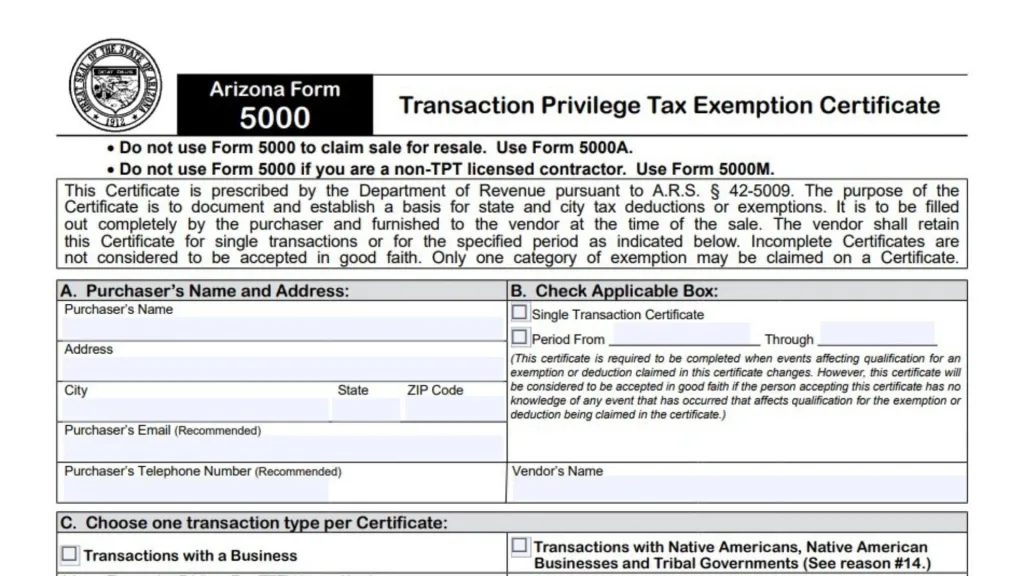
Section A: Purchaser’s Name And Address
This section identifies who is claiming the exemption.
- Purchaser’s Name: Print the full legal name of the business or individual making the purchase.
- Address: Enter the complete business mailing address.
- City, State, ZIP Code: Fill in the corresponding city, state, and postal code.
- Purchaser’s Email: Providing an email address is recommended for contact purposes.
- Purchaser’s Telephone Number: Providing a phone number is also recommended.
- Vendor’s Name: Write the name of the seller who is accepting this certificate.
Section B: Check Applicable Box
Here, you define the scope of the certificate. You must choose one of the following options:
- Single Transaction Certificate: Check this box if the exemption applies to just one specific purchase.
- Period From [Date] Through [Date]: Check this box if the certificate covers multiple transactions over a specific timeframe.
- Note: If you choose a period, you are responsible for updating the certificate if your situation changes. However, vendors can accept this in good faith unless they know of a change that disqualifies the exemption.
Section C: Choose One Transaction Type Per Certificate
Select the category that best describes the purchaser’s business status. You must choose only one and provide the relevant ID numbers.
- Transactions with a Business: Select this if you are a standard commercial entity.
- Arizona Transaction Privilege Tax (TPT) License Number: Enter your state TPT license number.
- SSN / EIN: Enter your Social Security Number or Employer Identification Number.
- Other Tax License Number: If applicable, list any other relevant tax license.
- If no license, provide reason: Explain why you do not have a license if one is not provided.
- Precise Nature of Purchaser’s Business: Briefly describe what your business does.
- Transactions with Native Americans, Native American Businesses and Tribal Governments: Select this for tribal-related transactions.
- Tribal Business License Number OR Tribal Number: Enter the appropriate identification number.
- Name of Tribe: Specify the tribe associated with the transaction.
- Tribal Government: Check this box if the purchaser is the tribal government itself.
- Transactions with a U.S. Government Entity: Select this for federal government purchases (referencing reasons #9 and #10 in Section D).
- Transaction with a Foreign Diplomat: Select this for diplomatic purchases (referencing reason #15 in Section D).
Section D: Reason For Exemption
You must check exactly one box that corresponds to your specific exemption. If you need to claim a different exemption, use the “Other Deduction” lines at the bottom.
- Leasing/Renting: For tangible personal property that will be leased or rented out as part of your normal business.
- Contracting Projects: For property that will be incorporated into a taxable contracting, maintenance, repair, or alteration project.
- Restaurant Supplies: For food, drink, or condiments bought by a restaurant.
- Pipelines: For pipes or valves (4+ inches diameter) used to transport oil, gas, water, or coal slurry.
- Railroad Equipment: For rolling stock, rails, ties, and signal control gear.
- Machinery and Equipment: For items used directly in:
- Manufacturing, processing, or fabricating.
- Job printing.
- Refining or metallurgy.
- Commercial ore/mineral extraction.
- Commercial oil/gas drilling or extraction.
- Income Producing Capital Equipment: For equipment intended to be leased (valid for Cities only).
- Institutional Food: For food/drink consumed in prisons, jails, or correctional facilities, or purchased by school districts for public schools during school hours.
- Sales to U.S. Government (Manufacturer): For property sold/leased to the federal government by a manufacturer, modifier, assembler, or repairer (Retail, rental, and mining classes only).
- Sales to U.S. Government (Retailer): For claiming 50% of gross proceeds from retail sales directly to the federal government.
- Utilities for Manufacturers/Smelters: For electricity or gas sold to qualified manufacturing/smelting businesses. (Requires Form 5014 attachment).
- International Operations Centers: For electricity or gas sold to certified international operations centers. (Must attach certification).
- Data Centers: For equipment sold to certified computer data centers. (Must attach certification).
- Native American Transactions: For sales/leases to affiliated Native Americans where the order is placed from and delivered to the reservation.
- Foreign Diplomat: For holders of a U.S. State Department Diplomatic Tax Exemption Card.
- Other Deduction (State): Use this line for state exemptions not listed above. You must cite the specific Arizona Revised Statute (A.R.S.) and describe the deduction.
- Other Cities Deduction: Use this line for city-specific exemptions not listed above. You must cite the Model City Tax Code (M.C.T.C.) authority and describe the deduction.
Section E: Description Of Property Or Service
- Describe the tangible personal property or service purchased or leased and its use below:
- Provide a clear, detailed description of what you are buying and how it will be used. If the space provided is insufficient, you may attach additional pages.
Section F: Certification
This is the legal binding section of the form.
- Vendor’s Responsibility: Vendors who accept this form in good faith are relieved of the burden of proof. However, if a vendor knows the certificate is false, they remain liable.
- Purchaser’s Liability: If the information is incorrect, the purchaser is liable for the tax, penalties, and interest. Willful misuse is a felony.
- Name of Signer: Print the full name of the person signing the form.
- Signature of Purchaser: The authorized person must sign here.
- Date: Enter the date of signing.
- Title: Enter the job title of the signer.
- Your Name: Re-enter the name as shown on Page 1 (Purchaser’s Name).
- Arizona Transaction Privilege Tax License Number: Re-enter the purchaser’s TPT license number.