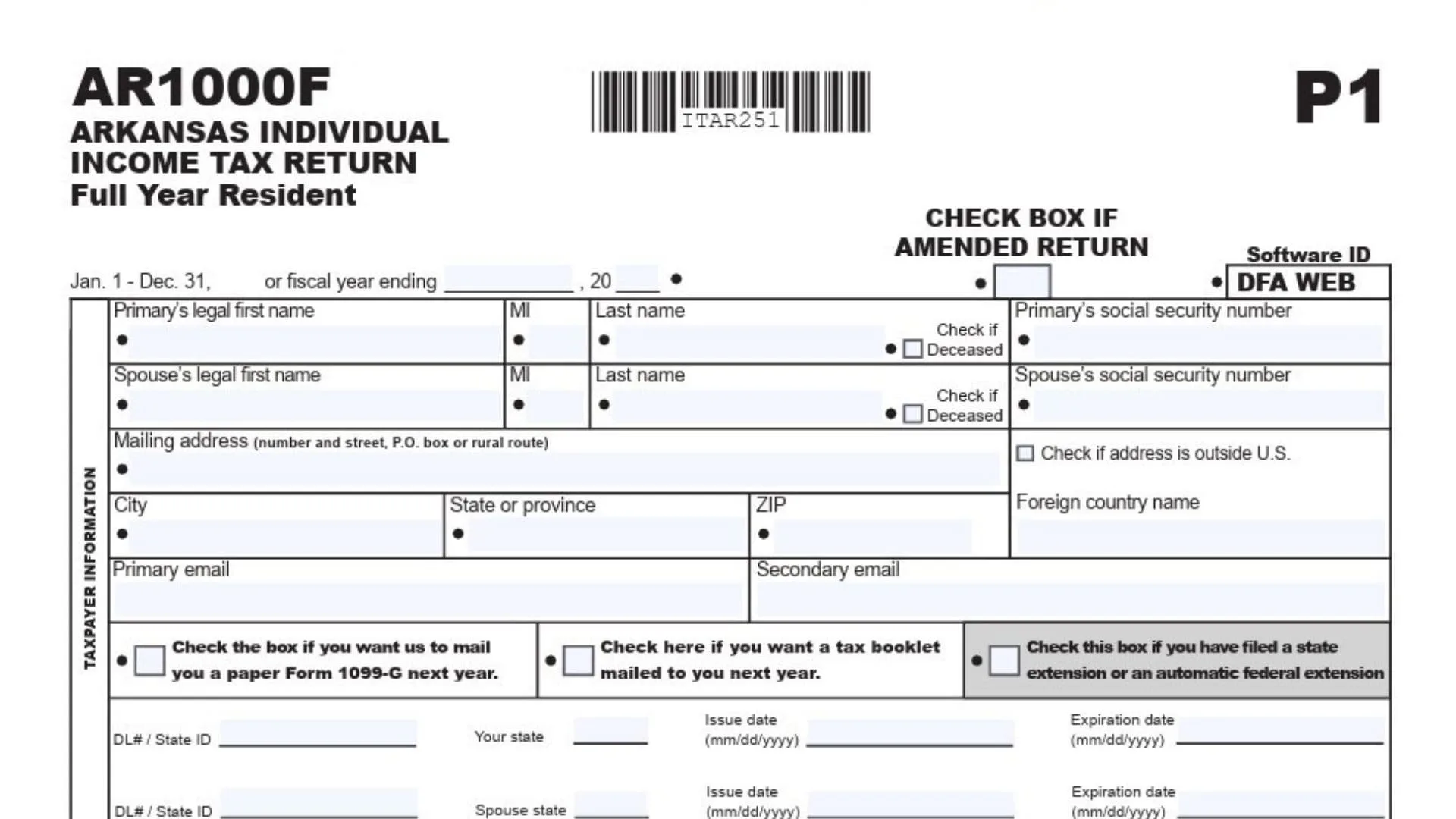
Tax season can feel overwhelming, but if you’re an Arkansas resident, the Arkansas Form AR1000F is your main ticket to reporting income, claiming deductions, and settling up with the state. This comprehensive guide is all about making the “Arkansas Form AR1000F” process simple and manageable—no more second-guessing which box to check or where to enter your numbers. We’ll break down every section, give you line-by-line instructions, and answer the most common questions. Whether you’re a first-time filer or a seasoned pro, this guide to the Arkansas Form AR1000F will help you file confidently, maximize your credits, and avoid the usual tax-time headaches.
Who Needs To File AR1000F?
You’ll need to file AR1000F if:
- You were a full-year resident of Arkansas
- Your income is above the state’s filing threshold
- You have Arkansas tax withheld from your pay
- You want to claim state tax credits or refunds
Part-year residents or non-residents use different forms (like AR1000NR).
What Do You Need To Complete AR1000F?
To fill out the AR1000F successfully, gather:
- Social Security Numbers for you and your family
- Income documents (W-2, 1099, etc.)
- Records for deductions and credits (mortgage interest, education expenses, etc.)
- Last year’s Arkansas return (for reference)
- Direct deposit info (for refunds)
How To File The AR1000F
You can file AR1000F:
- Online: Use the Arkansas Department of Finance and Administration’s e-file system for fast refunds.
- By Mail: Download the form from the Arkansas DFA website and mail it in.
- With A Tax Preparer: Many professionals can electronically file your AR1000F for you.

How to Complete Arkansas Form AR1000F
Page 1: Personal Information & Filing Status
1. Tax Year:
At the very top, fill in the calendar year ending (should be 2024).
2. Filing Status:
Check the appropriate box:
- Single
- Married Filing Joint
- Head of Household (with qualifying dependent)
- Married Filing Separately on Same Return
- Married Filing Separately on Different Returns (enter spouse name/SSN above)
- Surviving Spouse with Dependent Child (enter year spouse died)
3. Name & Address:
- Enter your legal first name, MI, and last name.
- Enter your spouse’s legal name (if applicable).
- Mailing address: number, street, P.O. box, or rural route.
- City, state, ZIP code, and foreign country (if applicable).
- Check the box if your address is outside the U.S.
4. Social Security Numbers:
- Enter your SSN and your spouse’s SSN.
5. Dependents:
- List each dependent’s first and last name, SSN, and relationship to you. (Don’t list yourself or spouse.)
6. Age and Special Conditions:
- Check boxes for yourself/spouse if age 65 or older, blind, or deaf.
- If filing as Head of Household or Surviving Spouse, provide the name of the qualifying person.
7. Tax Credits:
- Multiply the number of personal credits (boxes checked) by $29 and enter on 7A.
- Multiply the number of dependents by $29 and enter on 7B.
- Add 7A + 7B for Total Personal Tax Credits (7C).
8. Email & Extensions:
- Enter your primary and secondary email.
- Check the extension box if you filed for a state or federal extension.
- Check if you want a tax booklet or paper Form 1099-G mailed next year.
Page 2: Income, Adjustments, and Tax Computation
9. Wages, Salaries, Tips (Line 8):
Enter total from your W-2s. Attach copies.
10. Interest Income (Line 9):
Enter total interest. If over $1,500, attach AR4.
11. Dividend Income (Line 10):
Enter total dividends. If over $1,500, attach AR4.
12. Alimony/Separate Maintenance Received (Line 11):
Enter total.
13. Business/Professional Income (Line 12):
Attach federal Schedule C.
14. Other Gains/Losses (Line 13):
See instructions for qualifying transactions.
15. Capital Gains/Losses (Line 14):
From stocks, bonds. Attach federal Schedule D.
16. Non-Qualified IRA Distributions/Taxable Annuities (Line 15):
Attach all 1099-Rs.
17. Employer Pension/Qualified IRA Distributions (Lines 18A and 18B):
Enter amounts for yourself and spouse; see instructions and attach 1099-Rs. Subtract $6,000 from each if eligible.
18. Rents, Royalties, Estates, Trusts (Line 19):
Attach federal Schedule E.
19. Farm Income (Line 20):
Attach federal Schedule F.
20. Unemployment Income (Line 21):
Enter total amount.
21. Other Income/Depreciation Differences (Line 22):
Attach Form AR-OI.
22. Total Income (Line 23):
Add lines 8 through 22.
23. Total Adjustments (Line 24):
Attach Form AR1000ADJ for adjustments like educator expenses, IRA deductions, etc.
24. Adjusted Gross Income (Line 25):
Subtract line 24 from line 23.
25. Deductions (Line 27):
Choose one:
- Standard Deduction (see instructions for amount)
- Itemized Deductions (attach AR3)
Subtract deductions from AGI to get Net Taxable Income.
26. Tax Table (Line 29):
Use the Arkansas tax table for your filing status and taxable income.
27. Lump Sum Distribution Averaging (Line 31):
If applicable, attach AR1000TD and enter tax.
28. Additional Tax on IRA/Qualified Plan Withdrawals (Line 32):
See instructions.
29. Total Tax (Line 33):
Add lines 30-32.
30. Personal Tax Credits (Line 34):
From line 7C, page 1.
31. Child Care Credit (Line 35):
Attach AR2441.
32. Other Credits (Line 36):
Attach AR1000TC.
33. Total Credits (Line 37):
Add lines 34-36.
34. Net Tax (Line 38):
Subtract line 37 from line 33. If negative, enter 0.
Page 3: Payments, Refunds, and Amount Due
35. Arkansas Income Tax Withheld (Line 39):
Attach copies of W-2, 1099R, W2-G, 1099-PT, and/or AR-K1.
36. Estimated Tax Paid or Credit Forward (Line 40):
Enter amount from prior year.
37. Payment with Extension (Line 41):
If you paid with an extension, enter here.
38. Amended Return Payments (Line 42):
If this is an amended return, enter previous payments.
39. Total Payments (Line 44):
Add lines 39-43.
40. Amended Return Previous Refund (Line 45):
If amended, enter previous refund.
41. Adjusted Total Payments (Line 46):
Subtract line 45 from line 44.
42. Overpayment/Refund (Line 47):
If line 46 is more than line 38, enter the difference.
43. Amount Applied to Next Year (Line 48):
Enter amount to apply to next year’s estimated tax.
44. Check-Off Contributions (Line 49):
Attach AR1000CO if making contributions.
45. Amount To Be Refunded (Line 50):
Subtract lines 48 and 49 from line 47.
46. Amount Due (Line 51):
If line 46 is less than line 38, enter the difference.
If over $1,000, see penalty box 52A for Underpayment Penalty.
47. Early Childhood Program (Line 52C):
If applicable, attach AR1000EC and AR2441.
48. Direct Deposit:
Enter routing and account numbers for up to two U.S. bank accounts. Indicate checking or savings.
Check the box if either deposit will ultimately be placed in a foreign account.
Final Steps: Signature & Mailing
- Signatures: Both taxpayer and spouse (if filing jointly) must sign and date the return.
- Paid Preparer: If applicable, the preparer should also sign, date, and enter their information.
- Discussion Consent: Indicate if the Revenue Division may discuss the return with your preparer.
- Mailing:
- Refunds: AR State Income Tax, P.O. Box 1000, Little Rock, AR 72203-1000
- Tax Due/No Tax: AR State Income Tax, P.O. Box 2140, Little Rock, AR 72203-2140
Pay online: Visit ATAP Arkansas for secure payments, filing, and account management.
FAQs
Who should file Arkansas Form AR1000F?
Any full-year resident of Arkansas with taxable income.
Can I file AR1000F electronically?
Yes, Arkansas allows electronic filing for faster processing.
What documents do I need for AR1000F?
W-2s, 1099s, documentation for deductions/credits, and last year’s return for reference.