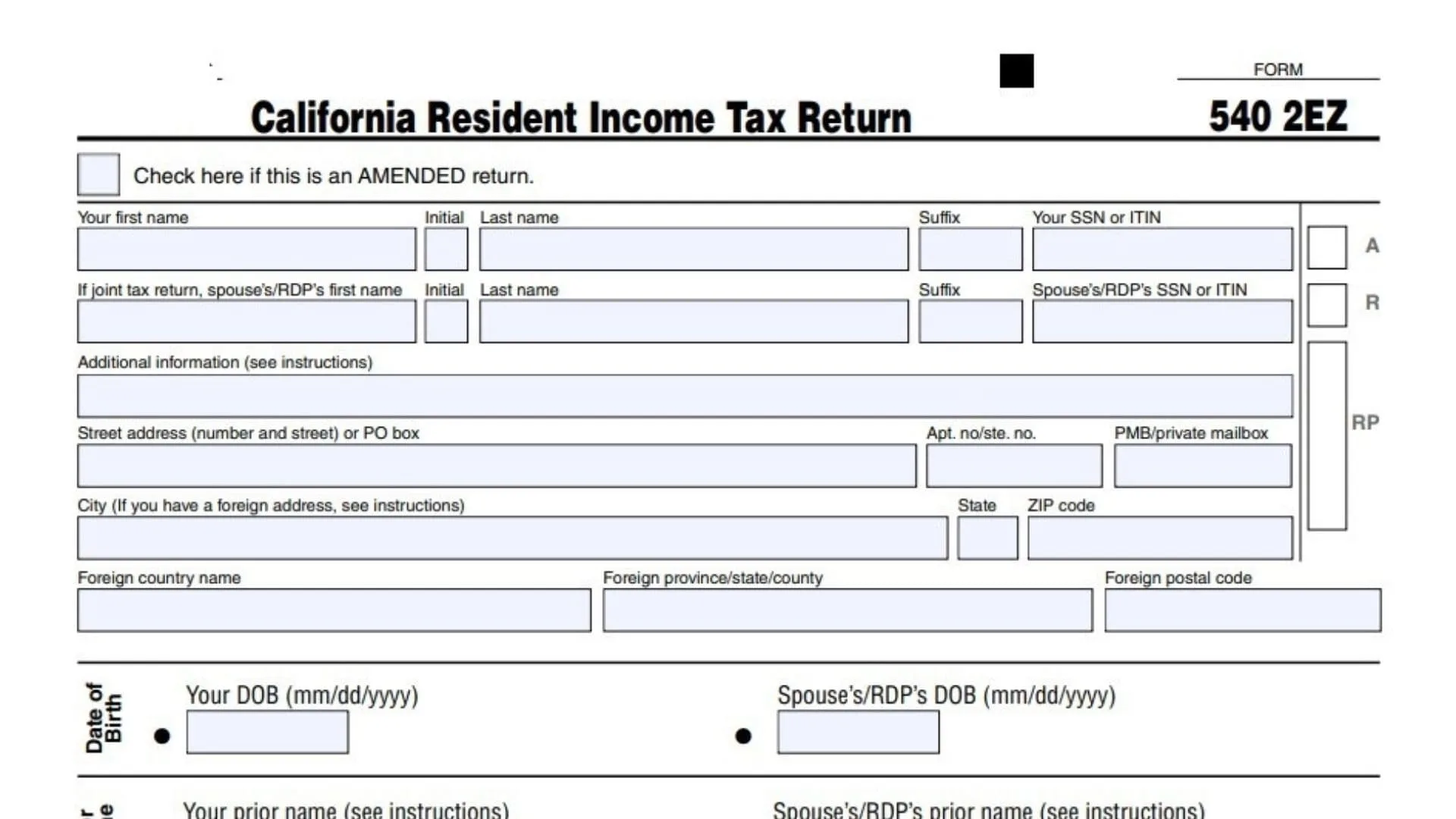
California Form 540-2EZ serves as the streamlined income tax return option for California residents whose financial situations remain uncomplicated throughout the tax year. This five-page form, officially titled the California Resident Income Tax Return, provides an accessible pathway for single filers earning up to $100,000 and married couples or registered domestic partners filing jointly with combined income up to $200,000 to fulfill their state tax obligations without navigating the complexities of the standard Form 540. The form accommodates taxpayers who receive wages reported on W-2 forms, modest amounts of interest and dividend income, pension distributions, and capital gains distributions from mutual funds, but excludes those with business income, rental properties, significant investment activities, or complex deduction scenarios. Understanding who qualifies to use Form 540-2EZ represents the first critical step—you must be a full-year California resident, claim the standard deduction rather than itemizing, have three or fewer dependents, and avoid most tax credits beyond the basic renter’s credit, senior exemption, and refundable credits like the Earned Income Tax Credit. The California Franchise Tax Board designed this form to reduce filing burden for eligible taxpayers while maintaining accuracy in tax collection and refund processing.
Quick Setup Before You Start
- Use whole dollars only (round cents to the nearest dollar).
- Have these ready: W-2(s) (use Box 16 and 17), 1099-INT (Box 1), 1099-DIV (Box 1a and 2a), and 1099‑R (Box 2a and Box 14 if withholding).
- Fill in your name and SSN/ITIN on each side where it asks “Your name” and “Your SSN or ITIN.”

How to Complete California Form 540-2EZ
Side 1: Identification, Address, Filing Status
Amended Return Checkbox
- Check “AMENDED return” only if you already filed this year’s 540‑2EZ and you’re correcting it.
- Otherwise, leave it blank.
Name And SSN/ITIN Lines
- Enter your first name, initial, last name, suffix, and SSN/ITIN exactly as shown on your SSN card/ITIN letter.
- If filing jointly, enter your spouse/RDP’s name and SSN/ITIN on the joint line.
Additional Information Line
- Use this only if you need to add extra identifying details requested in the instructions.
- If you don’t have a special note, leave it blank.
Mailing Address Lines
- Enter your mailing street address (or PO box), apartment/suite/PMB if you have one, city, state, and ZIP code.
- If you have a foreign address, fill in the foreign country/province/postal code boxes too.
Date Of Birth And Prior Name
- Enter your DOB in mm/dd/yyyy format; if joint, enter your spouse/RDP’s DOB too.
- Only enter a prior name if you used a different legal name in the past and need it for matching records.
Principal/Physical Residence Area
- If your mailing address is also where you physically live, check the “same as principal/physical residence” box.
- If not, enter your physical residence address and your county at time of filing.
California Filing Status Differs Box
- Check this box only if your California filing status is different from your federal filing status.
- If they match, leave it unchecked.
Filing Status (Check One)
- Check exactly one: Single, Married/RDP filing jointly, Head of household (STOP note applies), or Qualifying surviving spouse/RDP (enter year of death).
- Make sure this matches your situation for the tax year because it affects your tax table on line 17.
Line 6: Can Someone Claim You As A Dependent?
- Check the box if someone else can claim you (or your spouse/RDP on a joint return) as a dependent.
- If you check it, you must use the dependent worksheet instruction when you get to line 17.
Side 2: Exemptions, Income, Credits, Use Tax
Line 7: Senior
- Enter 1 if you (or your spouse/RDP) are 65 or older; enter 2 if both are 65 or older.
- If neither is 65+, leave it blank or enter 0 based on your preference when filing.
Line 8: Dependents (Number And Details)
- Enter the number of dependents you’re claiming (do not include yourself or your spouse/RDP).
- For up to three dependents, fill in first name, last name, SSN, and relationship.
Line 9: Total Wages (W‑2 Box 16)
- Add your California wages from all W‑2s using Box 16, then enter the total.
- If filing jointly, include both spouses’/RDPs’ Box 16 totals.
Line 10: Total Interest Income (1099‑INT Box 1)
- Add interest amounts from Form 1099‑INT Box 1 and enter the total.
- If you have multiple 1099‑INTs, include them all.
Line 11: Total Dividend Income (1099‑DIV Box 1a)
- Add ordinary dividends from Form 1099‑DIV Box 1a and enter the total.
- Do not include capital gain distributions here (those go on line 13).
Line 12: Total Pension Income (Taxable Amount)
- Enter the taxable pension amount (from 1099‑R taxable amount, not the gross).
- If you have more than one 1099‑R, add the taxable amounts together first.
Line 13: Capital Gains Distributions (1099‑DIV Box 2a)
- Enter total capital gain distributions from mutual funds using 1099‑DIV Box 2a.
- This line is for distributions, not for reporting your own investment sales.
Line 16: Total Income
- Add lines 9, 10, 11, 12, and 13.
- Enter the total on line 16.
Line 17: Tax From The 2EZ Table
- Use the 2EZ table for your filing status to find the tax on the amount from line 16, then enter it here.
- If you checked line 6, stop and use the dependent worksheet method instead of the normal table.
Line 18: Senior Exemption
- If line 7 is 1, enter 153; if line 7 is 2, enter 306.
- If line 7 is blank/0, enter 0.
Line 19: Nonrefundable Renter’s Credit
- Enter the renter’s credit amount only if you qualify under the instructions.
- If you don’t qualify, enter 0.
Line 20: Credits
- Add line 18 and line 19.
- Enter the total credits on line 20.
Line 21: Tax After Credits
- Subtract line 20 from line 17.
- If the result is zero or less, enter 0.
Line 22: Total Tax Withheld
- Add state tax withheld from W‑2 Box 17 and 1099‑R Box 14 (if any), then enter the total.
- If filing jointly, include both spouses’/RDPs’ withholding.
Line 23a: Earned Income Tax Credit (EITC)
- Enter your California EITC amount after you compute it using the instructions.
- If you don’t qualify, enter 0.
Line 23b: Young Child Tax Credit (YCTC)
- Enter your YCTC amount if you qualify and calculate it per the instructions.
- Otherwise, enter 0.
Line 23c: Foster Youth Tax Credit (FYTC)
- Enter your FYTC amount if you qualify and calculate it per the instructions.
- Otherwise, enter 0.
Line 25: Total Payments
- Add line 22 plus lines 23a, 23b, and 23c.
- Enter the total on line 25.
Line 26: Use Tax (Do Not Leave Blank)
- Enter the use tax you owe (or 0 if you owe none).
- If you enter 0, check the box that matches your situation: “No use tax is owed” or “You paid your use tax obligation directly to CDTFA.”
Side 3: Health Coverage Penalty, Balances, Contributions
Line 27: Individual Shared Responsibility (ISR) Penalty
- If you and your household had full-year qualifying health coverage, check the box.
- If you don’t check the box, calculate the ISR penalty per instructions and enter the amount (or 0 if none).
Line 28: Payments Balance
- If line 25 is more than line 26, subtract line 26 from line 25.
- Enter the result on line 28.
Line 29: Use Tax Balance
- If line 26 is more than line 25, subtract line 25 from line 26.
- Enter the result on line 29.
Line 30: Payments After ISR Penalty
- If line 28 is more than line 27, subtract line 27 from line 28.
- Enter the result on line 30.
Line 31: ISR Penalty Balance
- If line 27 is more than line 28, subtract line 28 from line 27.
- Enter the result on line 31.
Line 32: Overpaid Tax
- If line 30 is more than line 21, subtract line 21 from line 30.
- Enter the result on line 32.
Line 33: Tax Due
- If line 30 is less than line 21, subtract line 30 from line 21.
- Enter the result on line 33.
Contribution Codes (400–449)
- For any fund you want to support, enter a dollar amount next to its code.
- Leave others blank or enter 0.
Line 34: Total Contributions
- Add all contribution amounts you entered for codes 400 through 449.
- Enter the total on line 34.
Side 4: Amount Owed Or Refund, Direct Deposit, Voter/Health Info
Line 35: Amount You Owe
- Add lines 29, 31, 33, and 34.
- Enter the total on line 35, and don’t send cash if you mail a payment.
Line 36: Refund Or No Amount Due
- If you have an overpayment, subtract line 34 from line 32.
- Enter the result on line 36.
Line 37: Direct Deposit (First Account)
- If you want direct deposit, enter routing number, account number, check checking or savings, and enter the amount to deposit to this account.
- This amount can be all of line 36 or part of it.
Line 38: Direct Deposit (Second Account)
- If splitting the refund, enter the second routing and account numbers and the second deposit amount.
- Lines 37 and 38 together should equal your refund on line 36.
Voter Registration Checkbox
- Check the box if you want voter registration information.
- If not, leave it blank.
Health Coverage Info (Covered California)
- Check Yes if you want information on no-cost or low-cost coverage and allow limited sharing with Covered California.
- Check No if you don’t want that.
Side 5: Signatures, Third-Party Designee, Paid Preparer, Organ Donor
Organ Donor Election
- Check the box for the primary taxpayer and/or spouse/RDP if you want to register (or update) as an organ and tissue donor.
- If you don’t want to, leave the boxes unchecked.
Sign Here (Required)
- Sign and date the return; if filing jointly, both spouses/RDPs must sign.
- Enter one email address and a preferred phone number.
Third Party Designee
- Check Yes if you want the FTB to talk to someone else about this return.
- If Yes, print their name and phone number; otherwise check No.
Paid Preparer Section
- If you paid a preparer, they complete their name, phone, signature, firm info, PTIN, and FEIN.
- If you prepared it yourself, leave this section blank.