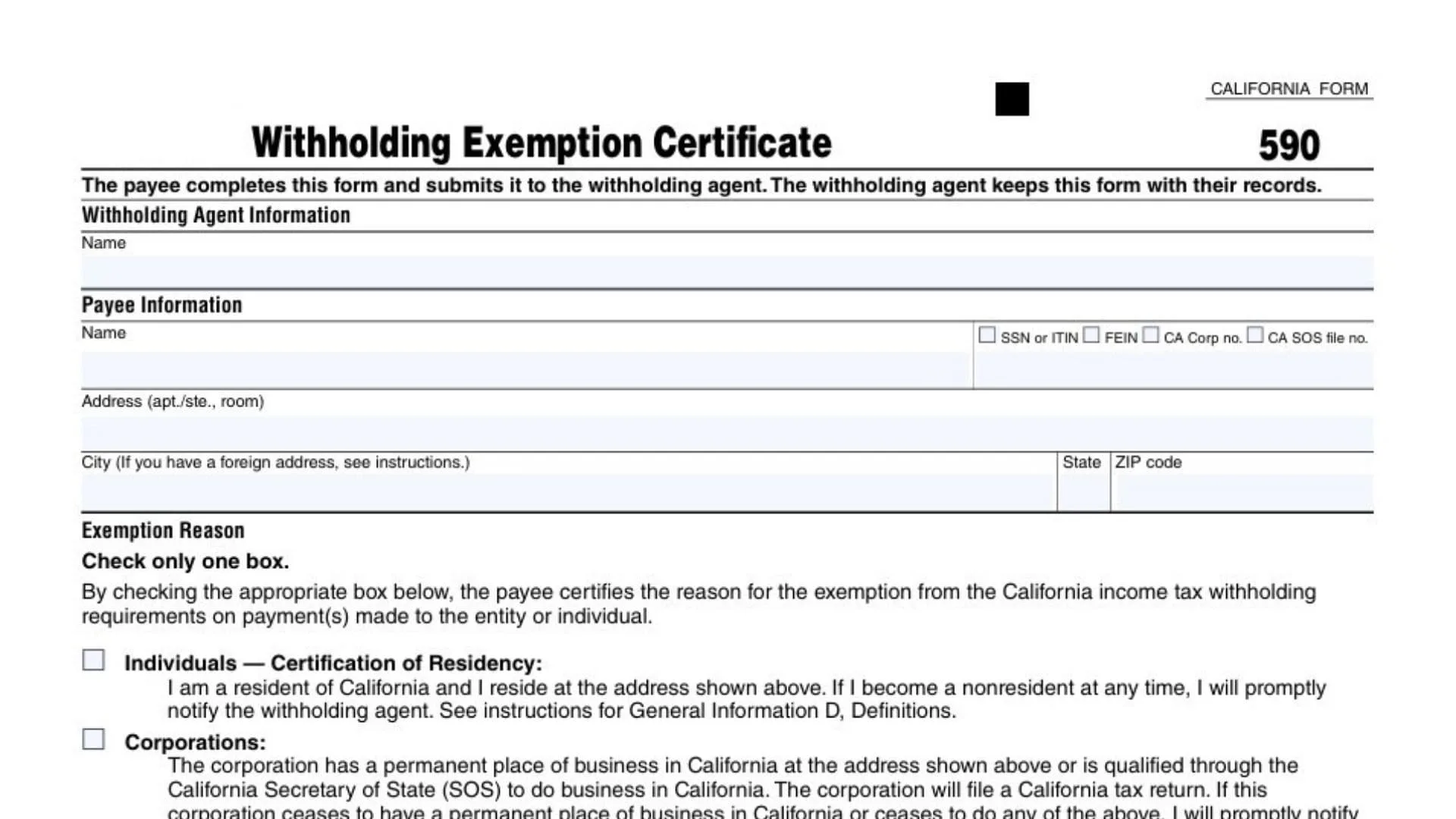
California Form 590, commonly searched as the CA Form 590 Withholding Exemption Certificate, is the document a payee (the person or business getting paid) provides to a withholding agent (the payer) to certify that California state income tax withholding should not be taken out of certain payments. In many situations—especially when payments are made to people or businesses that are not clearly California residents or not clearly registered/doing business in California—the payer may be required to withhold California tax unless the payee provides a valid exemption certificate. Form 590 is how the payee documents, under penalty of perjury, the specific reason they are exempt from California withholding requirements, such as being a California resident individual, a corporation or LLC with a California business presence and filing obligation, a qualifying California trust or estate, an insurance company or qualified retirement plan, a qualifying tax-exempt entity, or (in a special case) a nonmilitary spouse who meets Military Spouse Residency Relief Act rules. The withholding agent does not send this form in with a tax return in normal use; instead, they keep it in their records to support why they did not withhold California tax from the payments made to the payee.
How To File California Form 590
- The Payee Completes The Form. The person/entity receiving the payment fills out the form and signs it.
- The Payee Gives The Completed Form To The Withholding Agent. Deliver it before or at the time payments begin (or as soon as the withholding agent requests it).
- The Withholding Agent Keeps The Form On File. In typical use, it’s retained for recordkeeping and audit support.
- Update It If Facts Change. If your residency, entity status, registration, or exemption basis changes, you must promptly notify the withholding agent (and usually provide an updated form or other documentation).

How To Complete California Form 590
Who Files And Who Keeps The Form
“The payee completes this form and submits it to the withholding agent.”
Action item: If you are the payee, you complete it and provide it to the payer (the withholding agent).
“The withholding agent keeps this form with their records.”
Action item: If you are the withholding agent, do not mail it routinely—retain it in your files as support for non-withholding.
Withholding Agent Information
Name And Identification
“Withholding Agent Information”
This section identifies the payer (the business or person who would otherwise withhold California tax).
“Name”
Enter the withholding agent’s legal name (individual name or business/entity name).
“□ SSN or ITIN □ FEIN □ CA Corp no. □ CA SOS file no.”
Check the box that matches the ID number you are providing for the withholding agent, then enter that number in the space provided on the form line.
- Use SSN or ITIN if the withholding agent is an individual.
- Use FEIN if the withholding agent is a business with a federal employer ID.
- Use CA Corp no. if you’re using a California corporation number.
- Use CA SOS file no. if you’re using a California Secretary of State filing number.
Address Lines
“Address (apt./ste., room)”
Enter the withholding agent’s street address. Include apartment, suite, or room number if applicable.
“City (If you have a foreign address, see instructions.) State ZIP code”
Enter the city, state, and ZIP code for the withholding agent’s address. If the address is outside the U.S., follow the special foreign-address instructions that apply to this form.
Exemption Reason
“Exemption Reason”
This section is where the payee states why California withholding does not apply.
“Check only one box.”
Choose exactly one exemption reason category. Do not check multiple boxes—even if more than one might be true—because the form is designed for a single certified basis.
“By checking the appropriate box below, the payee certifies the reason for the exemption…”
By selecting a box, you are making a formal certification that the exemption reason is accurate for the payments being made.
Certificate Of Payee (Signature And Legal Certification)
“CERTIFICATE OF PAYEE: Payee must complete and sign below.”
If you are the payee, you must finish this section and sign—an unsigned form generally should not be accepted by a withholding agent.
Privacy Notice Lines
“Our privacy notice can be found…”
Informational only. This tells you where to find the privacy notice and how to request it by mail.
Phone Instructions Line (800.338.0505 … form code 948 …)
Informational only. Use it only if you want the privacy notice mailed to you.
Penalty-Of-Perjury Declaration
“Under penalties of perjury, I declare that I have examined the information on this form…”
Read carefully. Signing means you are legally affirming the details you provided are accurate and complete to the best of your knowledge.
“I further declare… if the facts… change, I will promptly notify the withholding agent.”
This is the “update requirement.” If something changes (residency, entity status, registration, exemption qualification), you must tell the payer quickly—don’t wait until year-end.
Printed Name, Title, And Contact
“Type or print payee’s name and title __________________ Telephone ________”
- Enter the payee’s printed name (individual or authorized representative name).
- Enter the signer’s title if signing on behalf of a business/entity (for example: Owner, Partner, Manager, Treasurer, CFO).
- Provide a telephone number where you can be reached if the withholding agent needs verification.
Payee Signature And Date
“Payee’s signature ▶”
Sign here. The signature should be from:
- the individual payee, or
- an authorized signer for the entity (officer/manager/partner/trustee/executor, as applicable).
“Date ______________________”
Enter the date you sign the certificate. Use a clear month/day/year format and keep it consistent with your records.
Payee Information (Choose The Correct Certification Box)
“Payee Information”
This is where you select the payee type and certify the matching statement. Pick the one that fits your situation.
Individuals — Certification Of Residency
“□ Individuals — Certification of Residency:”
Check this if the payee is an individual claiming California residency for withholding purposes.
Residency Statement (“I am a resident of California and I reside at the address shown above…”)
By checking, you are certifying you currently live in California at the address you provided. If you later become a nonresident, you must notify the withholding agent promptly.
Reference To Definitions
This line points you to definitions used for residency determination. If your situation is complicated (moving mid-year, multiple homes, etc.), review the definitions before certifying.
Corporations
“□ Corporations:”
Check this if the payee is a corporation claiming exemption based on California presence/qualification and filing.
Corporate Statement (Permanent Place Of Business Or Qualified Through SOS; Will File A Return)
You are certifying the corporation:
- has a permanent place of business in California at the address shown, or is qualified with the California Secretary of State to do business in California, and
- will file a California tax return.
Change Notification Clause
If the corporation later no longer has a California business presence or no longer meets the conditions, it must notify the withholding agent promptly.
Partnerships Or Limited Liability Companies (LLCs)
“□ Partnerships or Limited Liability Companies (LLCs):”
Check this if the payee is a partnership or LLC claiming exemption based on California presence/registration and filing.
Partnership/LLC Statement (Permanent Place Of Business Or Registered With SOS; Subject To CA Laws; Will File A Return)
You are certifying the entity:
- has a permanent place of business in California at the address shown or is registered with the California Secretary of State,
- is subject to California laws, and
- will file a California tax return.
LLP Note
This clarifies that for withholding purposes, a limited liability partnership is treated the same as other partnerships.
Insurance Companies, IRAs, Or Qualified Pension/Profit-Sharing Plans
“□ Insurance Companies, Individual Retirement Arrangements (IRAs), or Qualified Pension/Profit-Sharing Plans:”
Check this if the payee is one of these types and qualifies under the stated category.
Entity Statement (“The entity is an insurance company, IRA, or a federally qualified pension or profit-sharing plan.”)
By checking, you are certifying you fit this classification.
California Trusts
“□ California Trusts:”
Check this if the payee is a trust claiming exemption based on California residency ties and a California filing obligation.
Trust Statement (Resident Trustee And Resident Noncontingent Beneficiary; Will File CA Fiduciary Return)
You are certifying:
- at least one trustee is a California resident, and
- at least one noncontingent beneficiary is a California resident, and
- the trust will file a California fiduciary income tax return.
Change Notification Clause
If the trustee or noncontingent beneficiary becomes a nonresident, you must promptly tell the withholding agent.
Estates — Certification Of Residency Of Deceased Person
“□ Estates — Certification of Residency of Deceased Person:”
Check this if the payee is an estate and the decedent was a California resident at death.
Executor Statement (Decedent Was CA Resident; Estate Will File CA Fiduciary Return)
By checking, the executor certifies the decedent’s residency at the time of death and that the estate will file a California fiduciary tax return.
Nonmilitary Spouse Of A Military Servicemember
“□ Nonmilitary Spouse of a Military Servicemember:”
Check this if the payee is the nonmilitary spouse and qualifies under the Military Spouse Residency Relief Act.
MSRRA Statement (“…I meet the Military Spouse Residency Relief Act (MSRRA) requirements.”)
By checking, you are certifying you meet the MSRRA conditions applicable to your situation, and you should ensure you actually qualify before selecting this box.
Tax-Exempt Entities
“□ Tax-Exempt Entities:”
Check this if the payee is an entity that is tax-exempt and qualifies for exemption from withholding under the relevant California rules.
“Internal Revenue Code Section 501(c) _____ (insert letter) or (insert number).”
Fill in the specific 501(c) subsection that applies to your entity (for example, 501(c)(3), 501(c)(6), etc.) using the exact letter/number format requested.
Entity Tax-Exempt Warning Line (“Individuals cannot be tax-exempt entities.”)
This clarifies that individuals do not use the tax-exempt entity category on this form.
California R&TC Exempt Statement (“The entity is exempt from tax under California Revenue and Taxation Code (R&TC) Section 23701_____”)
Enter the California exemption code section number/suffix in the blank as requested (the exact 23701 designation that applies).
Loss Of Exemption Notification Clause (“If this entity ceases to be exempt from tax, I will promptly notify the withholding agent.”)
If your exemption status changes, you must inform the withholding agent right away so withholding can be handled correctly.