The Colorado Individual Estimated Income Tax Payment Form DR0104EP is a specific tax document designed for individuals who need to pay taxes on income that is not subject to standard withholding, such as earnings from self-employment, interest, dividends, or rental properties. While traditional employee wages typically have taxes deducted automatically, other forms of income do not, meaning you may be required to make these estimated payments if your withholdings are insufficient to cover your liability. According to the general rule outlined in the instructions, you generally must make these payments if you expect to owe more than $1,000 in net tax for the 2026 tax year after subtracting any other withholding or credits you might have. Failing to remit these payments on time can result in an Estimated Tax Penalty, although exceptions exist for farmers and fishermen who pay in full by March 1. It is important to note that these payments are strictly for prepayment credit on your upcoming return and cannot be refunded until the full 2026 Colorado income tax return is filed.
How To File The DR 0104EP
The most efficient way to handle these payments is electronically. The state encourages taxpayers to “Go Green” by using the official Revenue Online portal, which allows you to file taxes, remit payments, and monitor your accounts instantly. If you choose to pay online through the state’s website, you do not need to file the paper DR 0104EP form. However, if you are unable to pay online and must send a check or money order, you should use the physical payment form found at the bottom of the document.

How To Complete Form DR0104EP
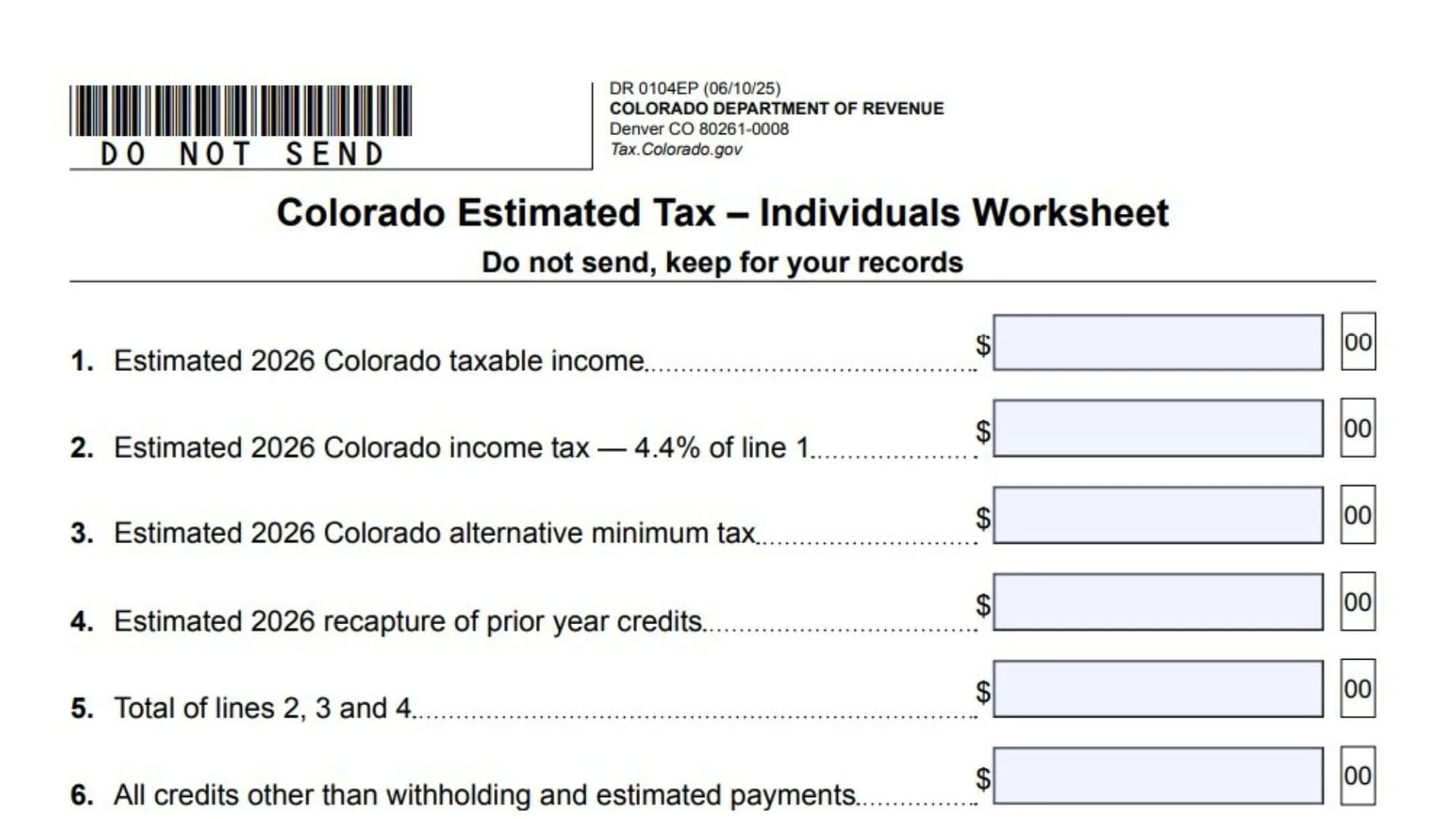
Before filling out the payment voucher, you should use the “Colorado Estimated Tax – Individuals Worksheet” provided in the document to calculate exactly how much you owe. Keep this worksheet for your records; do not mail it.
Line 1: Estimated 2026 Colorado Taxable Income
Enter the total amount of taxable income you expect to earn in Colorado for the 2026 tax year.
Line 2: Estimated 2026 Colorado Income Tax
Calculate your estimated tax liability by multiplying the amount from Line 1 by 4.4% (0.044).
Line 3: Estimated 2026 Colorado Alternative Minimum Tax
If you are liable for the Alternative Minimum Tax, enter the estimated amount here.
Line 4: Estimated 2026 Recapture Of Prior Year Credits
Enter any amount you expect to owe regarding the recapture of credits claimed in previous years.
Line 5: Total Of Lines 2, 3, And 4
Add the values from Lines 2, 3, and 4 and enter the sum here. This represents your total estimated tax liability.
Line 6: All Credits Other Than Withholding And Estimated Payments
Enter the total value of any tax credits you expect to claim, excluding standard withholding and estimated payments you are currently calculating.
Line 7: Subtract Line 6 From Line 5
Deduct the credits on Line 6 from your total liability on Line 5.
Line 8: Estimated 2026 Colorado Wage Or Nonresident Real Estate Withholding Tax
Enter the total amount of Colorado tax you expect to be withheld from your wages or from nonresident real estate transactions during the year.
Line 9: Net Estimated Tax
Subtract Line 8 from Line 7. This is the total estimated tax you need to pay for the year.
Payment Schedule
Once you have your Net Estimated Tax from Line 9, you will typically divide this amount into quarterly payments. The worksheet provides a schedule for four payments:
- Payment 1: Due April 15
- Payment 2: Due June 15
- Payment 3: Due September 15
- Payment 4: Due January 15, 2027
If you have an overpayment from 2025 Colorado Estimated Income Tax Payment Form” found on the last page.
SSN Or ITIN
Enter your Social Security Number or Individual Taxpayer Identification Number in the first box.
Your Last Name, First Name, Middle Initial
Clearly print your full legal name in the designated boxes.
Spouse SSN Or ITIN
If you file jointly, enter your spouse’s Social Security Number or ITIN.
Spouse Last Name, First Name, Middle Initial
If applicable, print your spouse’s full name.
Address, City, State, ZIP
Enter your current mailing address. The instructions note that the specific ZIP code 80261-0008 is exclusive to the Department of Revenue, so a street address is technically not required if using that ZIP, but providing your full address is standard practice.
Amount Of Payment
Enter the specific dollar amount of the check or money order you are enclosing. Ensure this matches the written amount on your check exactly.
Mailing Instructions
When you are ready to send your payment, adhere to the following guidelines:
- Make the check or money order payable to the “Colorado Department of Revenue.”
- Write your Social Security number (or ITIN) and the phrase “2026 DR 0104EP” on the memo line of your check.
- Do not send cash.
- Do not staple or attach the check to the form; place them loosely in the envelope.
- Mail the form and payment to the address listed on the form:
Colorado Department of Revenue
Denver, CO 80261-0008