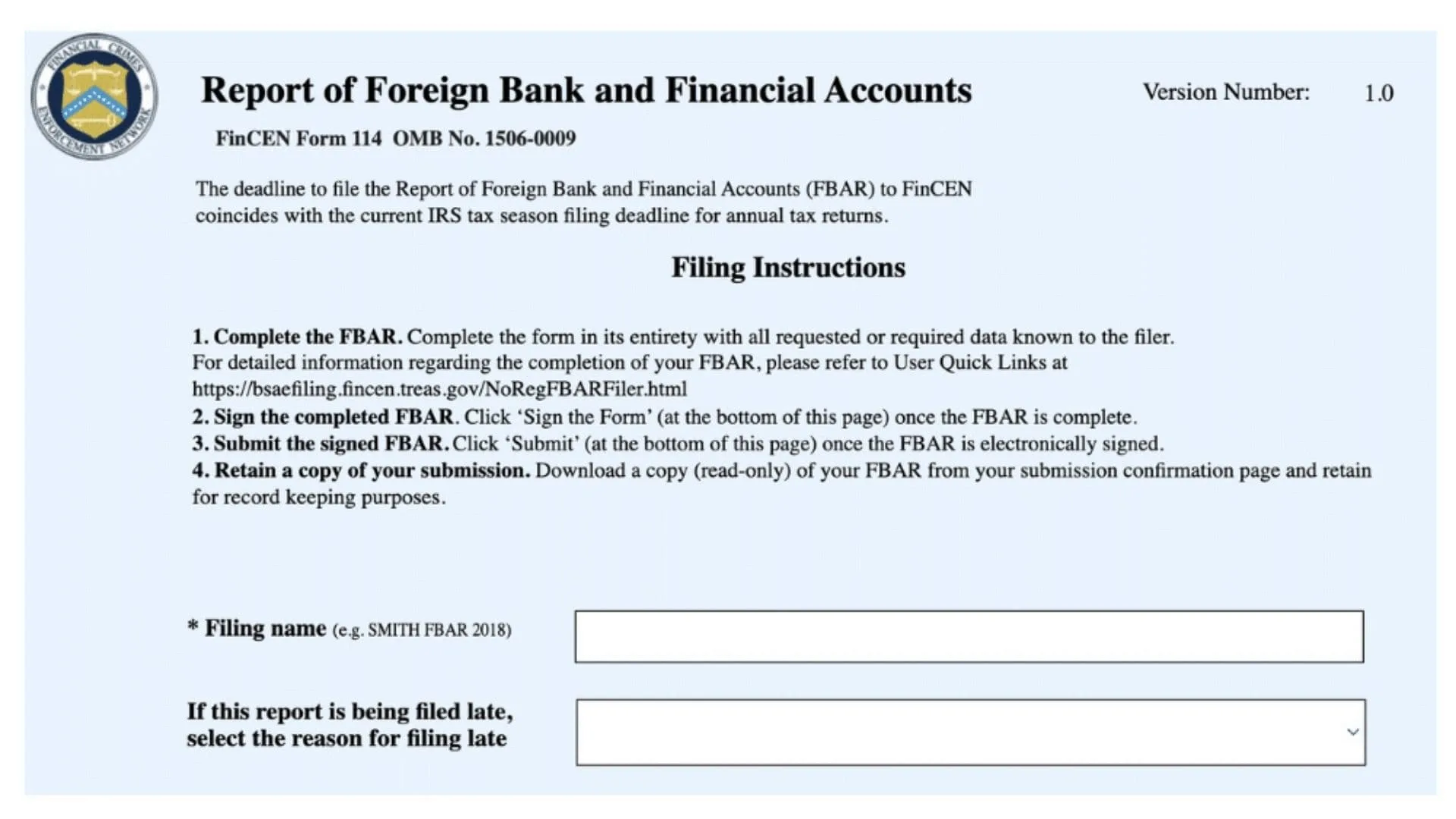
FinCEN Form 114, officially known as the Report of Foreign Bank and Financial Accounts (FBAR), is a mandatory annual filing required by the United States Department of the Treasury for U.S. persons who hold financial interests in or have signature authority over foreign financial accounts when the combined maximum value of those accounts exceeds $10,000 at any point during the calendar year. This form serves as a critical tool for the Financial Crimes Enforcement Network (FinCEN) to monitor and track foreign financial holdings of U.S. citizens, residents, corporations, partnerships, limited liability companies, trusts, and estates, helping to prevent money laundering, tax evasion, and other financial crimes. The FBAR must be filed electronically through FinCEN’s BSA E-Filing System by April 15th of the year following the calendar year being reported, with an automatic extension granted to October 15th without needing to request it. The form requires detailed information about each foreign financial account including the financial institution name and address, account number, account type (bank, securities, brokerage, or other), and the maximum account value in U.S. dollars during the reporting year. Foreign financial accounts include not only traditional bank accounts but also securities accounts, brokerage accounts, mutual funds, annuities with cash value, life insurance policies with cash value, and certain retirement accounts held outside the United States. The Social Security Administration uses self-employment information reported through related tax calculations to help determine Social Security benefits, and failing to file an FBAR when required can result in severe civil and criminal penalties including substantial fines and potential imprisonment in cases of willful non-compliance.
How To File FinCEN Form 114 (FBAR)
The FBAR must be filed electronically through the BSA E-Filing System, which is accessible at the FinCEN BSA E-Filing website. Individual filers do not need to register for an account and can use the no-registration option to file their FBAR directly, while institutions, attorneys, CPAs, and enrolled agents filing on behalf of clients must register for a User ID and password before submitting any reports. Before beginning the filing process, gather all necessary documentation including account statements showing maximum balances for the year, financial institution names and complete addresses, account numbers, and any foreign tax identification documents if you do not have a U.S. Taxpayer Identification Number. Once logged into the system, select the option to prepare and submit an individual FBAR, which will open the electronic form where you must complete all applicable sections including the header page with filing name and submission type, Part I with your personal or entity information, and the appropriate subsequent parts based on your account ownership and signature authority status. The system requires you to complete the form in one session as there is no save-as-draft feature for individual filers, so ensure you have all information ready before starting. After entering all required data in the yellow-highlighted mandatory fields, electronically sign the form by clicking the sign button and acknowledging the electronic signature statement, then upload and submit the completed form through the system to receive an immediate confirmation screen with a tracking ID and a follow-up acknowledgement email within two business days.

FinCEN Form 114 Line-By-Line Instructions
Header Page (Cover Page)
Filing Name
- Create and enter a unique identifying name for this particular report that you will use to track the filing status in the BSA E-Filing system, such as “John Smith 2025 FBAR” or your entity name followed by the year.
Submission Type — New Report Or Amendment
- Select “New report” if this is your first time filing for this calendar year.
- Select “Amendment” if you are correcting or updating a previously filed FBAR for this year, and you will need to provide your Prior Report BSA Identifier from your original filing confirmation.
Authorized Third Party Filing Checkbox
- Check this box if an authorized third party (such as a CPA, attorney, or enrolled agent) is filing this report on your behalf, then complete the third party section on the first page.
Late Filing Reason (If Filing After October 15th)
- If you are filing this report after the October 15th extended deadline, select the reason for the late filing from the dropdown list.
- If none of the provided reasons apply, select “Other” and provide a written explanation in the text box.
- If filing late due to a previous FinCEN filing waiver, select “Other” and identify the waiver by its official number in the text field.
Part I — Filer Information
Line 1 — Calendar Year Being Reported
- Enter the four-digit calendar year for which you are filing this report in the format YYYY (for example, 2025).
- If amending a prior report, also select “Amendment” from the Submission Type dropdown on the header page and enter your Prior Report BSA Identifier (or enter 00000000000000 if you do not know it).
Line 2 — Type Of Filer
- Check box “a” if you are an individual filing for yourself (including individuals reporting only signature authority).
- Check box “b” if the filer is a partnership.
- Check box “c” if the filer is a corporation.
- Check box “d” if filing a consolidated FBAR on behalf of a parent corporation that owns more than 50 percent interest in other entities required to file.
- Check box “e” and specify the filer type in the space provided if you are a trust, estate, limited liability company, tax-exempt entity, or disregarded entity (for disregarded entities, enter the entity type followed by “(D.E.)” such as “limited liability company (D.E.)”).
Line 3 — U.S. Taxpayer Identification Number
- Enter your U.S. Taxpayer Identification Number, which is typically your Social Security Number (SSN), Individual Taxpayer Identification Number (ITIN), or Employer Identification Number (EIN).
- If you do not have a U.S. TIN, skip this line and complete Line 4 instead.
Line 3a — TIN Type
- Select the appropriate entry from the dropdown to indicate what type of taxpayer identification number you entered in Line 3 (SSN, ITIN, or EIN).
Line 4 — Foreign Identification (Complete Only If Line 3 Is Not Applicable)
- Complete this line only if you do not have a United States Taxpayer Identification Number.
Line 4a — Type Of Foreign Document
- Select “Passport,” “Foreign TIN,” or “Other” from the dropdown to indicate the type of official foreign government document you are using to verify your nationality or residence.
- If you select “Other,” enter a description of the document type in the text field provided.
Line 4b — Document Number
- Enter the identification number from the foreign document you selected in Line 4a.
Line 4c — Country Of Issue
- Select the two-letter country code from the dropdown list to indicate which country issued the document.
Line 5 — Individual’s Date Of Birth
- Enter the filer’s date of birth in the format MM/DD/YYYY, using a zero before any single-digit month or day (for example, June 1, 1948 would be entered as 06/01/1948).
Line 6 — Last Name Or Organization Name
- If you are an individual, enter your last name (surname or family name) in this field.
- If the filer is an organization (corporation, partnership, trust, estate, or LLC), enter the complete organization name in this field and leave Lines 7, 8, and 8a blank.
Line 7 — First Name
- If you are an individual filer, enter your first name (given name) in this field.
- Leave this field blank if the filer is an organization.
Line 8 — Middle Initial
- If you are an individual filer and you have a middle name, enter the first letter of your middle name in this field.
- Leave this field blank if you have no middle name or if the filer is an organization.
Line 8a — Suffix
- If your name includes a suffix (such as Jr., Sr., II, III, etc.), enter it in this field.
- Leave this field blank if you have no suffix.
Line 9 — Mailing Address (Number, Street, And Apt. Or Suite No.)
- If you are an individual residing in the United States, enter the street address of your United States residence (not a post office box) including apartment or suite number if applicable.
- If you are an individual residing outside the United States, enter your United States mailing address if you have one, or enter your foreign residence address if you do not have a U.S. mailing address.
- If the filer is an entity, enter the entity’s United States mailing address, or enter the foreign mailing address if the entity does not have a U.S. mailing address.
Line 10 — City
- Enter the city name corresponding to the address in Line 9, spelling out the full city name without abbreviations.
Line 11 — State
- If the address is in the United States, enter the two-letter state or territory abbreviation using official U.S. Postal Service abbreviations.
- If the address is in Canada, use the Canada Post Corporation three-letter province code.
- If the address is in Mexico, use the ISO 3166-2 three-letter state code.
- Leave this field blank if the address is in another foreign country.
Line 12 — ZIP/Postal Code
- Enter the ZIP code (for U.S. addresses) or foreign postal code without any formatting, special characters, spaces, or hyphens.
- For U.S. ZIP codes, enter either five or nine digits (nine-digit ZIP codes cannot end with four zeroes or four nines).
Line 13 — Country
- Enter the two-letter ISO 3166-1 country code from the dropdown list for the country where the address is located.
Line 14a — Does The Filer Have A Financial Interest In 25 Or More Financial Accounts?
- Check “Yes” if you have a financial interest in 25 or more foreign financial accounts, and enter the total number of accounts in the space provided.
- If you check “Yes,” do not complete Part II or Part III, but you must maintain detailed records of all account information and provide it if requested by FinCEN or the IRS.
- Check “No” if you have a financial interest in fewer than 25 foreign financial accounts.
Line 14b — Does The Filer Have Signature Authority Over But No Financial Interest In 25 Or More Financial Accounts?
- Check “Yes” if you have signature authority only (with no financial interest) over 25 or more foreign financial accounts, and enter the total number of accounts in the space provided.
- If you check “Yes,” complete Part IV (items 34 through 43) for each person on whose behalf you have signature authority, but do not complete Part II or Part III.
- Check “No” if you have signature authority only over fewer than 25 accounts.
Part II — Information On Financial Account(s) Owned Separately
Complete Part II for each foreign financial account that you own separately (not jointly with another person). If you own multiple separate accounts, complete additional Part II sections by clicking the “+” sign on the electronic form.
Line 15 — Maximum Value Of Account During Calendar Year
- Enter the maximum value of this specific account in U.S. dollars during the calendar year being reported, rounding up to the next whole dollar amount.
- To determine maximum value, review your account statements to find the greatest value of currency or non-monetary assets during the year, convert any foreign currency to U.S. dollars using the Treasury Financial Management Service exchange rate for December 31 of the reporting year, and round up.
- If the calculated maximum value results in a negative amount, enter zero (0).
Line 15a — Amount Unknown
- Check this box only if you are unable to determine the value of the account and you have fewer than 25 accounts (as indicated in Line 14a).
Line 16 — Type Of Account
- Select “Bank,” “Securities,” or “Other” from the dropdown list to describe the type of account.
- If you select “Other,” enter a brief description of the account type in the space provided (such as mutual fund, life insurance with cash value, annuity, etc.).
Line 17 — Name Of Financial Institution In Which Account Is Held
- Enter the complete full name of the foreign financial institution, bank, brokerage, or other entity where this account is maintained.
Line 18 — Account Number Or Other Designation
- Enter the account number or other identifying designation that the financial institution uses for this account, without any formatting, spaces, or special characters.
Line 19 — Mailing Address Of Financial Institution
- Enter the street address (number, street, and suite number if applicable) of the financial institution where the account is held.
Line 20 — City
- Enter the city name where the financial institution is located, spelling out the full city name without abbreviations.
Line 21 — State, If Known
- If the financial institution address includes a state or province designation and you know it, enter it here using the appropriate two or three-letter code.
- Leave blank if not applicable or unknown.
Line 22 — Foreign Postal Code, If Known
- If the financial institution is located in a foreign country and you know the postal code, enter it here without formatting or special characters.
- Leave blank if not applicable or unknown.
Line 23 — Country
- Select the two-letter ISO 3166-1 country code from the dropdown list for the country where the financial institution is physically located.
Part III — Information On Financial Account(s) Owned Jointly
Complete Part III for each foreign financial account that you own jointly with one or more other persons (such as a joint account with your spouse or another family member). If you own multiple joint accounts, complete additional Part III sections by clicking the “+” sign on the electronic form.
Note For Joint Filers Who Are Spouses
- If both spouses complete and sign Form 114a (the Record of Authorization to Electronically File FBARs), only one spouse needs to file a single FBAR reporting all jointly owned accounts instead of each spouse filing separately.
- Keep the completed Form 114a with your records; do not send it to FinCEN.
Line 24 — Maximum Value Of Account During Calendar Year
- Enter the maximum value of this joint account in U.S. dollars during the calendar year being reported, rounding up to the next whole dollar amount, using the same valuation method described in Line 15.
Line 24a — Amount Unknown
- Check this box only if you are unable to determine the value of the joint account and you have fewer than 25 accounts total.
Line 25 — Type Of Account
- Select “Bank,” “Securities,” or “Other” from the dropdown list to describe the type of joint account.
- If you select “Other,” enter a brief description of the account type in the space provided.
Line 26 — Name Of Financial Institution In Which Joint Account Is Held
- Enter the complete full name of the foreign financial institution where this joint account is maintained.
Line 27 — Joint Account Number Or Other Designation
- Enter the account number or identifying designation that the financial institution uses for this joint account, without formatting or special characters.
Line 28 — Mailing Address Of Financial Institution
- Enter the street address of the financial institution where the joint account is held.
Line 29 — City
- Enter the city name where the financial institution maintaining the joint account is located.
Line 30 — State, If Known
- If applicable and known, enter the state or province code for the financial institution address.
- Leave blank if not applicable or unknown.
Line 31 — Foreign Postal Code, If Known
- If applicable and known, enter the foreign postal code for the financial institution address without formatting.
- Leave blank if not applicable or unknown.
Line 32 — Country
- Select the two-letter country code for the country where the financial institution is physically located.
Line 33 — Number Of Joint Owners
- Enter the total number of persons who jointly own this account (including yourself).
Lines 34-42 (Repeated For Each Joint Owner) — Joint Owner Information
For each person with whom you jointly own the account, complete the following information fields:
Line 34 — Joint Owner Last Name Or Organization Name
- Enter the last name of the joint owner, or if the joint owner is an organization, enter the organization name.
Line 35 — Joint Owner First Name
- Enter the first name of the joint owner if the joint owner is an individual.
- Leave blank if the joint owner is an organization.
Line 36 — Joint Owner Middle Initial
- Enter the middle initial of the joint owner if the joint owner is an individual and has a middle name.
- Leave blank if not applicable or if the joint owner is an organization.
Line 36a — Joint Owner Suffix
- Enter any name suffix of the joint owner (such as Jr., Sr., II, etc.) if applicable.
- Leave blank if not applicable.
Line 37 — Joint Owner U.S. Taxpayer Identification Number
- Enter the joint owner’s U.S. TIN (SSN, ITIN, or EIN) if they have one.
- If the joint owner does not have a U.S. TIN, skip this line and complete Line 38 instead.
Line 37a — Joint Owner TIN Type
- Select the type of taxpayer identification number entered in Line 37 (SSN, ITIN, or EIN).
Line 38 — Joint Owner Foreign Identification (Complete Only If Line 37 Is Not Applicable)
- Complete this line only if the joint owner does not have a U.S. Taxpayer Identification Number.
Line 38a — Type Of Foreign Document
- Select “Passport,” “Foreign TIN,” or “Other” to indicate the type of foreign identification document.
- If “Other,” provide a description in the text field.
Line 38b — Foreign Document Number
- Enter the identification number from the joint owner’s foreign document.
Line 38c — Country Of Issue For Foreign Document
- Select the two-letter country code for the country that issued the joint owner’s foreign identification document.
Line 39 — Joint Owner Mailing Address
- Enter the joint owner’s complete street address including apartment or suite number if applicable.
Line 40 — Joint Owner City
- Enter the city name for the joint owner’s address.
Line 41 — Joint Owner State
- Enter the two or three-letter state, province, or territory code for the joint owner’s address if applicable.
- Leave blank for addresses in countries other than the U.S., Canada, or Mexico.
Line 42 — Joint Owner ZIP/Postal Code
- Enter the ZIP code or foreign postal code for the joint owner’s address without formatting.
Line 43 — Joint Owner Country
- Select the two-letter country code for the country of the joint owner’s address.
Part IV — Information On Financial Account(s) For Which Filer Has Signature Authority But No Financial Interest
Complete Part IV only if you have signature authority over foreign financial accounts but do not have a financial interest (ownership) in those accounts. This typically applies to employees or officers who can control account transactions on behalf of their employer or another person.
Lines 34-43 — Account Owner Information
- For each account where you have signature authority only, complete items 34 through 43 to provide the name, taxpayer identification (or foreign identification), and address information for each person or entity on whose behalf you have signature authority, using the same field instructions as described in the Joint Owner section above.
Note On Signature Authority Reporting
- Certain employees and officers of regulated financial institutions, publicly traded companies, and other specified entities may be exempt from reporting signature authority accounts under specific conditions listed in the instructions exceptions section.
Part V — Consolidated Filing Information (For Parent Corporations Filing On Behalf Of Subsidiaries)
Complete Part V only if you are filing a consolidated FBAR as a parent corporation or entity that owns directly or indirectly more than 50 percent interest in one or more other U.S. entities that are required to file FBARs.
Lines 34-42 (Repeated For Each Subsidiary) — Subsidiary Entity Information
- For each U.S. entity included in the consolidated FBAR, complete items 34 through 42 to provide the entity name, taxpayer identification, and address information for each subsidiary or entity covered by this consolidated filing.
- If the consolidated group has a financial interest in 25 or more accounts, you need only complete the identity information for account owners in Part V and do not need to complete the detailed account information, but you must maintain detailed records of all accounts and provide the information if requested by FinCEN or the IRS.
Signature Section
Filer Signature
- Click the “Sign the Form” button to electronically sign your FBAR.
- When prompted with the acknowledgment statement “I acknowledge that I am electronically signing the BSA report,” click “Yes” to confirm.
- A PIN is not required to electronically sign the individual FBAR.
Line 44 — Date Of Signature
- The system will automatically populate the date when you electronically sign the form.
Line 45 — Filer Title
- If you are signing as an individual for your own accounts, you may leave this blank or enter “Individual.”
- If you are a parent or guardian signing on behalf of a child who cannot sign their own FBAR, enter “Parent/Guardian filing for child.”
- If you are an officer of a corporation or entity, enter your official title.
- If a third party preparer is signing on behalf of the filer under authorization from Form 114a, enter the preparer’s professional title.
Line 46 — Filer Phone Number
- Enter a contact telephone number where you can be reached, entering the number as a continuous string of digits without formatting, parentheses, spaces, or hyphens.
- For numbers in the North American Numbering Plan (U.S., Canada, and certain other countries), do not precede the number with “1.”
Submission And Confirmation
Upload And Submit
- After completing all required fields and electronically signing the form, save the completed FBAR PDF to your computer.
- Return to the BSA E-Filing System, click the upload button, browse to locate your saved FBAR file, attach it to the upload page, and click “Submit” to send your FBAR to FinCEN.
Confirmation And Record Keeping
- Upon successful submission, you will receive an immediate confirmation screen displaying a tracking ID in the format FF14-00000000X.
- You will also receive a confirmation email with your tracking information immediately after submission.
- Within two business days, you will receive a separate acknowledgement email indicating your FBAR has been processed and a BSA_Identifier has been assigned.
- Save and retain all confirmation emails and a copy of your filed FBAR for at least five years from April 15th of the year following the calendar year reported (or from the date filed if after April 15th).