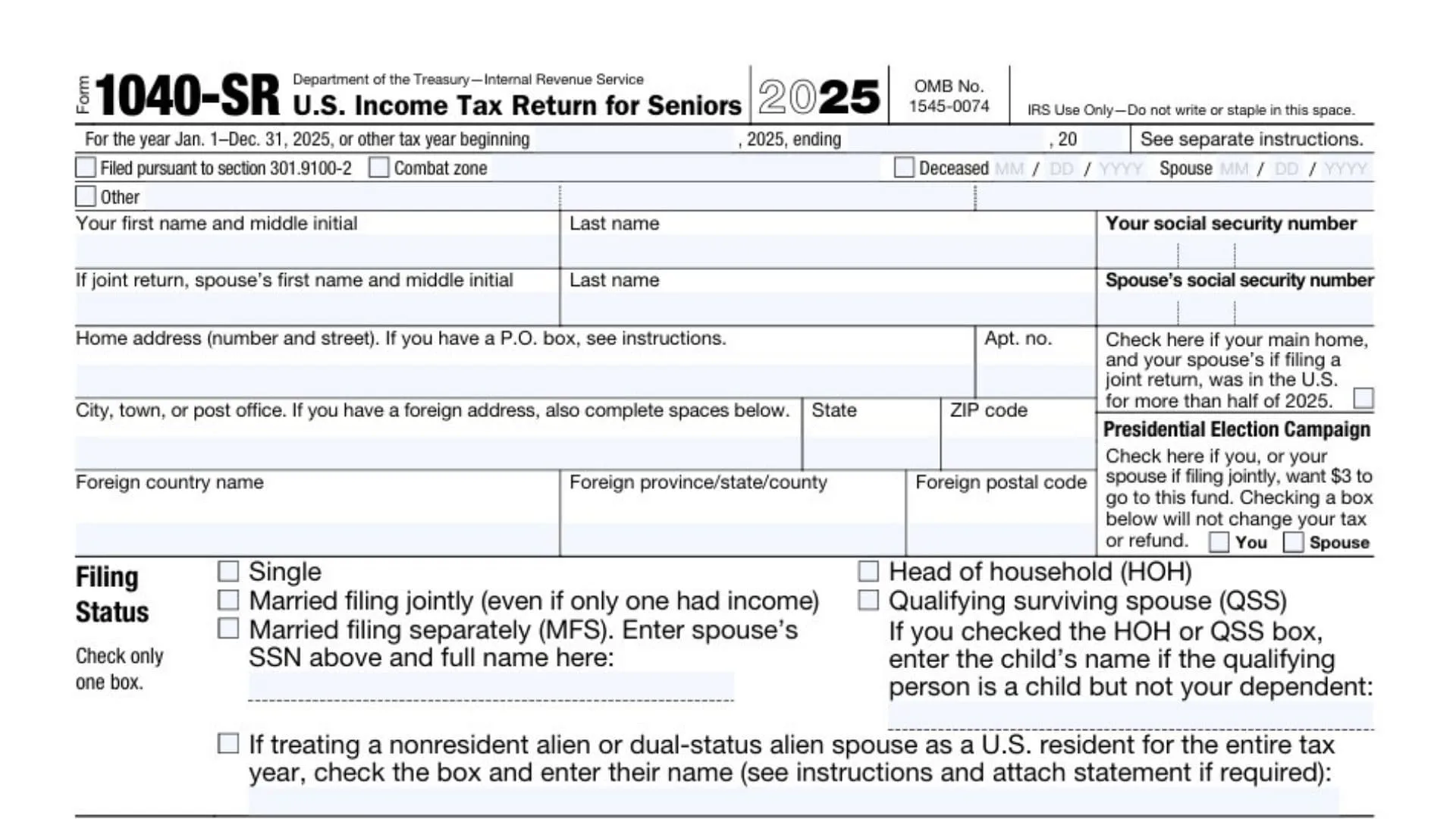
Navigating the complexities of tax season can be daunting, but the Form 1040-SR U.S. Income Tax Return for Seniors is designed specifically to make the process more accessible for taxpayers aged 65 or older. This version of the standard tax form features larger print and a dedicated Standard Deduction Chart directly on the document, making it easier to read and complete for those claiming retirement income, Social Security benefits, and other common financial elements for seniors. Whether you are filing Single, Married Filing Jointly, or as a Qualifying Surviving Spouse, utilizing the 2025 Form 1040-SR ensures you are using a document tailored to your specific needs while still capturing all the essential data required by the Internal Revenue Service. By understanding how to properly report digital assets, dependents, and various sources of income ranging from wages to pensions, you can ensure your filing is accurate and potentially maximize your tax refund or minimize the amount you owe.
What Is Form 1040-SR?
The Form 1040-SR is an official IRS tax return document available exclusively to taxpayers who were born before January 2, 1961. While it captures the same financial information as the traditional Form 1040—reporting income, calculating deductions, and determining tax liability—it is structurally optimized for senior citizens. The most notable difference is the enhanced legibility due to a larger font size and better spacing. Furthermore, unlike the standard form where you must look up standard deduction amounts in separate instructions, Form 1040-SR includes a helpful Standard Deduction Chart on the last page. This chart allows filers to quickly determine their deduction amount based on their filing status and whether they (or their spouse) are over 65 or blind. It serves as a comprehensive tool for reporting everything from IRA distributions and annuities to Social Security benefits, ensuring that seniors can manage their tax obligations with a form built for their convenience.
How To File Form 1040-SR
Filing this form follows the same general procedures as the standard Form 1040. You can choose to mail a paper copy to the address listed in the instructions for your specific state, or you can file electronically using tax software. Many seniors benefit from e-filing as it reduces mathematical errors and speeds up processing times. If you are working with a tax professional, they can file this specific version on your behalf if you meet the age requirement. Ensure all attached schedules, such as Schedule B for interest or Schedule D for capital gains, are included if your financial situation requires them.

How To Complete Form 1040-SR
Personal Information And Filing Status
Begin by entering your first name, middle initial, last name, and social security number in the top boxes. If filing jointly, provide the same information for your spouse. Enter your current home address, including city, state, and ZIP code. There are specific boxes for foreign addresses if applicable.
Under the Filing Status section, check exactly one box that applies to your situation: Single, Married Filing Jointly, Married Filing Separately (enter spouse’s name and SSN), Head of Household (HOH), or Qualifying Surviving Spouse (QSS). If you selected HOH or QSS, you must enter the child’s name if the qualifying person is a child but not your dependent.
Digital Assets And Dependents
In the Digital Assets section, you must answer “Yes” or “No” to the question regarding whether you received, sold, exchanged, or disposed of a digital asset (or a financial interest in one) at any time during 2025.
For Dependents, list the first and last name, social security number, and relationship to you for up to four dependents. There are checkboxes to indicate if a dependent qualifies for the Child Tax Credit or Credit for Other Dependents. You must also check boxes if the dependent lived with you for more than half the year and if they lived in the U.S.
Income (Lines 1a through 1z)
Line 1a: Enter the total amount from box 1 of your Form(s) W-2.
Line 1b: Report household employee wages that were not reported on a W-2.
Line 1c: Enter tip income that was not reported on line 1a.
Line 1d: Report Medicaid waiver payments not included on Form W-2.
Line 1e: Enter taxable dependent care benefits from Form 2441, line 26.
Line 1f: Enter employer-provided adoption benefits from Form 8839, line 31.
Line 1g: Report wages from Form 8919, line 6.
Line 1h: Enter other earned income, specifying the type and amount.
Line 1i: Enter any nontaxable combat pay election.
Line 1z: Add lines 1a through 1h to get your total wage-related income.
Income (Lines 2a through 8)
Line 2a: Enter tax-exempt interest amounts.
Line 2b: Enter taxable interest amounts.
Line 3a: Enter qualified dividends.
Line 3b: Enter ordinary dividends.
Line 4a: Report total IRA distributions.
Line 4b: Enter the taxable amount of your IRA distributions.
Line 5a: Report total pensions and annuities.
Line 5b: Enter the taxable amount of these pensions and annuities.
Line 6a: Enter total Social Security benefits received.
Line 6b: Enter the taxable amount of your Social Security benefits.
Line 7a: Enter capital gains or losses (attach Schedule D if required). Check the box if Schedule D is not required or if reporting a child’s capital gain/loss.
Line 8: Enter additional income from Schedule 1, line 10.
Total Income And Adjusted Gross Income
Line 9: Add lines 1z, 2b, 3b, 4b, 5b, 6b, 7a, and 8. This figure is your Total Income.
Line 10: Enter adjustments to income from Schedule 1, line 26.
Line 11a: Subtract line 10 from line 9 to determine your Adjusted Gross Income.
Line 11b: Enter the amount from line 11a again here.
Tax And Credits (Lines 12 through 15)
Line 12a: Check the appropriate box if someone can claim you or your spouse as a dependent.
Line 12b: Check if your spouse itemizes on a separate return.
Line 12c: Check if you were a dual-status alien.
Line 12d: This section is crucial for Form 1040-SR. Check the boxes if you were born before January 2, 1961, or are blind. Do the same for your spouse if filing jointly.
Line 12e: Enter your Standard Deduction or itemized deductions (from Schedule A). You can calculate your standard deduction using the chart on the last page of the form based on the checkboxes in Line 12d.
Line 13a: Enter the Qualified Business Income deduction from Form 8995 or 8995-A.
Line 13b: Enter additional deductions from Schedule 1-A, line 38.
Line 14: Add lines 12e, 13a, and 13b.
Line 15: Subtract line 14 from line 11b. If the result is zero or less, enter -0-. This is your Taxable Income.
Tax Calculation (Lines 16 through 24)
Line 16: Enter your tax amount. Check the box if the tax comes from Form 8814, Form 4972, or another source.
Line 17: Enter the amount from Schedule 2, line 3.
Line 18: Add lines 16 and 17.
Line 19: Enter the Child Tax Credit or Credit for Other Dependents from Schedule 8812.
Line 20: Enter the amount from Schedule 3, line 8.
Line 21: Add lines 19 and 20.
Line 22: Subtract line 21 from line 18. If zero or less, enter -0-.
Line 23: Enter other taxes, including self-employment tax, from Schedule 2, line 21.
Line 24: Add lines 22 and 23. This represents your Total Tax.
Payments And Refundable Credits (Lines 25 through 33)
Line 25a: Enter federal income tax withheld from Forms W-2.
Line 25b: Enter federal income tax withheld from Forms 1099.
Line 25c: Enter federal income tax withheld from other forms.
Line 25d: Add lines 25a through 25c.
Line 26: Enter 2025 estimated tax payments and any amount applied from your previous year’s tax return.
Line 27a: Enter your Earned Income Credit (EIC).
Line 27b: Check here for clergy filing Schedule SE.
Line 27c: Check this box if you do not want to claim the EIC.
Line 28: Enter the Additional Child Tax Credit from Schedule 8812.
Line 29: Enter the American Opportunity Credit from Form 8863, line 8.
Line 30: Enter the Refundable Adoption Credit from Form 8839, line 13.
Line 31: Enter the amount from Schedule 3, line 15.
Line 32: Add lines 27a, 28, 29, 30, and 31 for your total other payments and refundable credits.
Line 33: Add lines 25d, 26, and 32. This is your Total Payments figure.
Refund (Lines 34 through 36)
Line 34: If line 33 is more than line 24, subtract line 24 from line 33. This is the amount you overpaid.
Line 35a: Enter the amount of line 34 you want refunded to you. Check the box if Form 8888 is attached.
Line 35b-d: Enter your routing number, account type (Checking or Savings), and account number for direct deposit.
Line 36: Enter the amount of line 34 you want applied to your 2026 estimated tax.
Amount You Owe (Lines 37 through 38)
Line 37: If line 24 is more than line 33, subtract line 33 from line 24. This is the amount you owe.
Line 38: Enter any estimated tax penalty calculated.
Third Party Designee And Signatures
If you want to allow another person to discuss this return with the IRS, check “Yes” in the Third Party Designee section and provide their name, phone number, and PIN.
Finally, in the Sign Here section, sign and date the return. Enter your occupation. If filing jointly, your spouse must also sign, date, and enter their occupation. There is a section at the bottom for a Paid Preparer to sign and provide their firm’s information if applicable.
Standard Deduction Chart
The last page contains the Standard Deduction Chart. You do not fill this out; instead, you use it to calculate the correct number for Line 12e. You sum the number of boxes checked in Line 12d (for age and blindness) and cross-reference that number with your filing status (Single, Married Filing Jointly, etc.) to find your specific standard deduction amount.