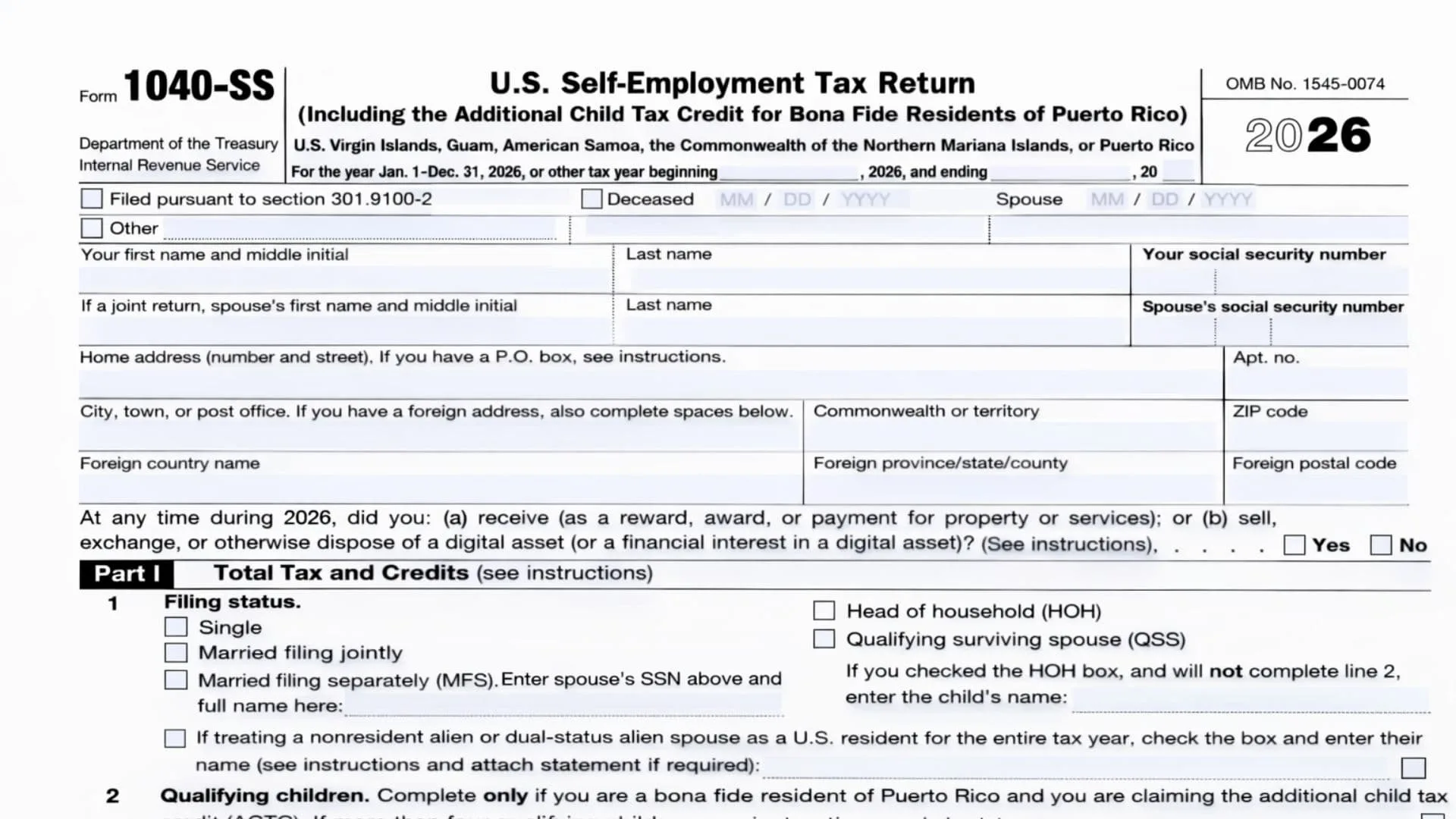
IRS Form 1040-SS is a U.S. self-employment tax return designed mainly for eligible residents of certain U.S. territories who generally are not otherwise required to file a U.S. income tax return, but who still need to report net earnings from self-employment to the United States and pay self-employment (SE) tax when it applies. It also serves an important records purpose: the Social Security Administration uses the self-employment information reported through the SE-tax calculation process to help determine Social Security benefits, and the SE tax can apply regardless of age or whether the person already receives Social Security or Medicare benefits. In addition, the form includes a dedicated section for bona fide residents of Puerto Rico who qualify to claim the Additional Child Tax Credit (ACTC), allowing those eligible filers to calculate the credit using the worksheet-style Part II and then carry the final ACTC amount back to the payments/credits area in Part I.
How To File Form 1040-SS
Prepare the form for the correct tax year and complete all identity, address, tax, payment, and signature areas, attaching any required schedules and forms that apply to your situation (for example, Schedule SE and any other listed attachments tied to your entries). If you file on paper, the IRS provides specific mailing addresses for Forms 1040-SS depending on whether you include a payment: one address is used when no payment is enclosed, and a different address is used when a payment is enclosed. For filers who are not enclosing a payment, the IRS address shown is “Department of the Treasury, Internal Revenue Service, Austin, TX 73301-0215, USA,” and for filers enclosing a payment, the IRS address shown is “Internal Revenue Service, P.O. Box 1303, Charlotte, NC 28201-1303, USA.”irs+1

Form 1040-SS Line-By-Line Instructions (Top, Part I, And Signature Areas)
Top Of The Form (Before Part I)
- Tax Year And Short-Year Dates: Use this form for the stated year, and if you are filing for a non-calendar (short) tax year, fill in the beginning and ending date fields shown near the top.
- Filed Pursuant To Section 301.9100-2: Only complete this statement area if it applies to your filing situation; otherwise leave it blank.
- Deceased / Spouse / Other Date Boxes: If the taxpayer, spouse, or another person indicated by the form’s “Other” area is deceased, enter the date of death in the month/day/year boxes provided for the applicable label.
- Your Name And SSN: Enter your first name, middle initial, last name, and your Social Security number in the spaces provided.
- Spouse Name And SSN (If Joint Return): If filing jointly, enter your spouse’s first name, middle initial, last name, and spouse’s Social Security number in the spouse fields.
- Home Address Lines: Enter your home address (street number and street name), and add an apartment number if you have one.
- City/Town/Post Office And Territory: Enter your city (or town/post office), your commonwealth or territory, and the ZIP code in the fields shown.
- Foreign Address Lines (If Applicable): If you have a foreign address, complete the foreign country name, foreign province/state/county, and foreign postal code lines.
- Digital Asset Question (Yes/No): Mark “Yes” or “No” to indicate whether, at any time during the year, you received digital assets as payment/award/reward for property or services, or you sold/exchanged/disposed of a digital asset (or an interest in one).
- “OMB No.” / Catalog Number / Creation Date Lines: These printed identifiers are not entry lines for you to fill out.
- “Disclosure, Privacy Act, And Paperwork Reduction Act Notice” Line: This is an informational statement and does not require an entry.
Part I — Total Tax And Credits
Line 1 — Filing Status
- Check exactly one filing status box (Single; Married filing jointly; Married filing separately; Head of household; or Qualifying surviving spouse).
- If you choose Married filing separately, enter your spouse’s SSN above (in the spouse SSN area) and enter your spouse’s full name on the line provided in line 1.
- If you check Head of household and you will not complete line 2, enter the child’s name in the space provided on line 1.
- If you are treating a nonresident alien or dual-status alien spouse as a U.S. resident for the entire tax year, check the box and enter the spouse’s name as indicated, and attach any required statement if that rule applies to you.
Line 2 — Qualifying Children (Only For Certain Puerto Rico Filers Claiming ACTC)
- Complete line 2 only if you are a bona fide resident of Puerto Rico and you are claiming the Additional Child Tax Credit.
- If you have more than four qualifying children, follow the form’s instruction cue to check the “more than four” indicator and provide the additional child information as directed by the instructions.
- For each listed qualifying child (1 through 4), enter (a) first name, (b) last name, (c) SSN, and (d) relationship in the corresponding columns.
Line 3 — Self-Employment Tax
- Enter your self-employment tax from Schedule SE (Form 1040), line 12, and attach Schedule SE (Form 1040) and any applicable schedules.
Line 4 — Household Employment Taxes
- If you owe household employment taxes, enter the amount and attach Schedule H (Form 1040).
Line 5 — Additional Medicare Tax
- If you owe Additional Medicare Tax, enter the amount and attach Form 8959.
Line 6a — Employee Social Security And Medicare Tax On Tips Not Reported
- If you owe employee Social Security/Medicare tax on tips not reported to your employer, enter the amount and attach Form 4137.
Line 6b — Uncollected Employee Tax On Tips
- If you have uncollected employee Social Security and Medicare tax on tips, enter the amount on line 6b.
Line 6c — Uncollected Employee Tax On Wages
- If you have uncollected employee Social Security and Medicare tax on wages, enter the amount and attach Form 8919.
Line 6d — Uncollected Employee Tax On Group-Term Life Insurance
- If you have uncollected employee Social Security and Medicare tax on group-term life insurance, enter the amount on line 6d.
Line 6e — Total Other Taxes
- Add lines 6a through 6d and enter the total on line 6e.
Line 7 — Total Tax
- Add lines 3, 4, 5, and 6e, and enter the result on line 7.
Line 8 — Estimated Tax Payments
- Enter your 2025 estimated tax payments plus any amount applied from your 2024 return.
- If estimated payments were made with a former spouse, enter that former spouse’s SSN on the line provided.
Line 9 — Extension Payment
- Enter any amount you paid with a request for an extension of time to file.
Line 10 — Additional Child Tax Credit
- Enter the Additional Child Tax Credit from Part II, line 19.
Line 11a — Additional Medicare Tax Withheld
- Enter Additional Medicare Tax withheld and attach Form 8959 if required by your situation.
Line 11b — Excess Social Security Tax Withheld
- Enter any excess Social Security tax withheld.
Line 12 — Total Payments And Credits
- Add lines 8 through 11b and enter the total on line 12.
Line 13 — Overpayment
- If line 12 is greater than line 7, subtract line 7 from line 12 and enter the overpayment amount on line 13.
Line 14a — Refund Amount
- Enter the portion of line 13 you want refunded to you on line 14a, and if you attach Form 8888, check the box shown on line 14a.
Line 14b, 14c, 14d — Direct Deposit Details
- Enter your routing number on line 14b.
- Check the account type box (Checking or Savings) on line 14c.
- Enter your account number on line 14d.
Line 15 — Amount Applied To Next Year
- Enter the portion of line 13 you want applied to 2026 estimated tax on line 15.
Line 16 — Amount You Owe
- If line 7 is greater than line 12, subtract line 12 from line 7 and enter the amount due on line 16.
Third Party Designee Section
- Authorization Choice: Answer whether you want to allow another person to discuss this return with the IRS by checking “Yes” or “No.”
- If “Yes”: Fill in the designee’s name, phone number, and a personal identification number (PIN) in the fields provided.
Sign Here Section
- Signatures: The taxpayer must sign and date the return, and if filing a joint return, the spouse must also sign and date.
- Phone And IP PIN Fields: Enter a daytime phone number, and if the IRS issued you an Identity Protection PIN, enter it in the designated box (and do the same for your spouse if applicable).
- Recordkeeping Reminders: Follow the “keep a copy” reminder and any joint-return instruction cues printed in this area.
Paid Preparer Use Only (If Applicable)
- Preparer Information: If a paid preparer completes the return, the preparer fills in their name, signature, date, PTIN, and firm details (firm name, phone, address, EIN) as applicable.
- Self-Employed Checkbox: If the preparer is self-employed, the preparer checks the box indicated in this section.
Part II Line-By-Line Instructions (Puerto Rico Bona Fide Residents Claiming ACTC)
Line 1 — Qualifying Child Requirement
- Indicate whether you have at least one qualifying child under age 17 who has the required Social Security number; if “No,” you stop because you can’t claim the credit, and if “Yes,” continue to line 2.
Line 2 — Count Of Qualifying Children And Base Amount
- Enter the number of qualifying children under age 17 with the required Social Security number, and apply the per-child amount shown on the line (the line displays a multiplication by $1,700).
Line 3 — Modified Adjusted Gross Income
- Enter your modified adjusted gross income on line 3.
Line 4 — Filing Status Threshold Amount
- Enter the threshold amount that matches your filing status: $400,000 for Married filing jointly, and $200,000 for all other filing statuses.
Line 5 — Income Above Threshold (If Any)
- If line 3 is more than line 4, subtract line 4 from line 3 and then round the result up to the next $1,000 if it is not already a multiple of $1,000 (using the rounding-up approach described on the form).
- If line 3 is not more than line 4, leave line 5 blank as directed and follow the form’s instruction to carry the amount forward to the next specified line.
Line 6 — Phaseout Calculation
- Multiply the amount on line 5 by 5% (0.05) and enter the result on line 6.
Line 7 — Qualifying Child Credit Amount
- Multiply the number of qualifying children from line 2 by $2,200 and enter the result on line 7.
Line 8 — Other Dependents Amount
- Enter the number of other dependents (including children who aren’t under age 17), multiply by $500, and enter the result on line 8.
Line 9 — Total Potential Credit
- Add lines 7 and 8 and enter the total on line 9.
Line 10 — Compare Line 9 And Line 6
- If line 9 is not more than line 6, you stop because you can’t claim the credit.
- If line 9 is more than line 6, subtract line 6 from line 9 and enter the result on line 10.
Line 11 — Limit Based On Line 2 Or Line 10
- Enter the smaller of line 2 or line 10 on line 11.
Line 12a — Half Of Self-Employment Tax
- Enter one-half of the self-employment tax from Part I, line 3.
Line 12b — Half Of Additional Medicare Tax On Self-Employment Income
- Enter one-half of the Additional Medicare Tax on self-employment income from Form 8959, line 13.
Line 12c — Total Of Line 12a And 12b
- Add lines 12a and 12b and enter the total on line 12c.
Line 13a — Withheld Social Security/Medicare/Additional Medicare Taxes (Puerto Rico Forms)
- Enter any withheld Social Security, Medicare, and Additional Medicare taxes from Puerto Rico Form(s) 499R-2/W-2PR, attach copies, and if filing jointly, include your spouse’s amounts with yours.
Line 13b — Amount From Part I Line 6a (If Any)
- Enter any amount reported on Part I, line 6a (employee Social Security and Medicare tax on tips not reported) from Form 4137.
Line 13c — Amount From Part I Line 6c (If Any)
- Enter any amount reported on Part I, line 6c (uncollected employee Social Security and Medicare tax on wages) from Form 8919.
Line 13d — Amounts From Part I Lines 6b And 6d (If Any)
- Enter the amounts reported on Part I, lines 6b and 6d (uncollected employee Social Security tax and Medicare tax on tips and group-term life insurance).
Line 13e — Additional Medicare Tax On Medicare Wages
- Enter any Additional Medicare Tax on Medicare wages from Form 8959, line 7.
Line 13f — Total Of Line 13a Through 13e
- Add lines 13a through 13e and enter the total on line 13f.
Line 14 — Combined Total
- Add lines 12c and 13f and enter the result on line 14.
Line 15 — Additional Medicare Tax Withheld
- Enter any Additional Medicare Tax withheld from Form 8959, line 22.
Line 16 — Subtract Line 15 From Line 14
- Subtract line 15 from line 14 and enter the result on line 16.
Line 17 — Excess Social Security Tax Withheld (From Part I)
- Enter any amount from Part I, line 11b on line 17.
Line 18 — Compare Line 16 And Line 17
- If line 16 is not more than line 17, you stop because you can’t claim the credit.
- If line 16 is more than line 17, subtract line 17 from line 16 and enter the result on line 18.
Line 19 — Additional Child Tax Credit (Final Amount)
- Enter the smaller of line 11 or line 18 as your Additional Child Tax Credit, and enter that same amount on Part I, line 10.