The IRS Form 1040-V, officially titled the “Payment Voucher for Individuals,” is a specific document designed for taxpayers who owe federal income tax and choose to pay their balance by check or money order. Essentially, it serves as a transmittal form that ensures your payment is credited to the correct tax account and tax year when the IRS receives it by mail. If you have calculated your taxes for the 2026 tax year on Form 1040, 1040-SR, or 1040-NR and found a balance on the “Amount you owe” line, this voucher must accompany your physical payment. While the IRS strongly encourages electronic payments—which are faster, more secure, and provide immediate confirmation—Form 1040-V remains the standard requirement for those who prefer traditional mail-in methods. It is critical to note that if you decide to pay your taxes electronically through the IRS website, you generally do not need to file this form.
How to File 1040-V Tax Form
When writing your check or money order, ensure it is payable to “United States Treasury”—do not make it out to the IRS. To help the agency process your funds, write your name, current address, and daytime phone number on the payment itself. Crucially, you must also include your Social Security Number (SSN) or Individual Taxpayer Identification Number (ITIN). If you are filing a joint return, use the SSN that appears first on your tax return. Additionally, write the tax year and form number on the memo line (e.g., “2026 Form 1040″). Enter the dollar amount clearly as “$ XXX.XX” without using dashes or lines. Do not staple your check to the voucher or your tax return; simply place them loose in the envelope.
Mailing Addresses
Where you send your payment depends entirely on where you live. Use the table below to find the correct P.O. Box for your residence:
| If You Live In… | Mail Your Payment To… |
|---|---|
| Alabama, Florida, Georgia, Louisiana, Mississippi, North Carolina, South Carolina, Tennessee, Texas | Internal Revenue Service P.O. Box 1214 Charlotte, NC 28201-1214 |
| Alaska, Arizona, Arkansas, California, Colorado, Connecticut, Delaware, District of Columbia, Hawaii, Idaho, Illinois, Indiana, Iowa, Kansas, Kentucky, Maine, Maryland, Massachusetts, Michigan, Minnesota, Missouri, Montana, Nebraska, Nevada, New Hampshire, New Jersey, New Mexico, New York, North Dakota, Ohio, Oklahoma, Oregon, Pennsylvania, Rhode Island, South Dakota, Utah, Vermont, Virginia, Washington, West Virginia, Wisconsin, Wyoming | Internal Revenue Service P.O. Box 931000 Louisville, KY 40293-1000 |
| A foreign country, American Samoa, Puerto Rico, or use an APO/FPO address, or file Form 2555/4563, or are a dual-status alien or nonpermanent resident of Guam or the U.S. Virgin Islands | Internal Revenue Service P.O. Box 1303 Charlotte, NC 28201-1303 |
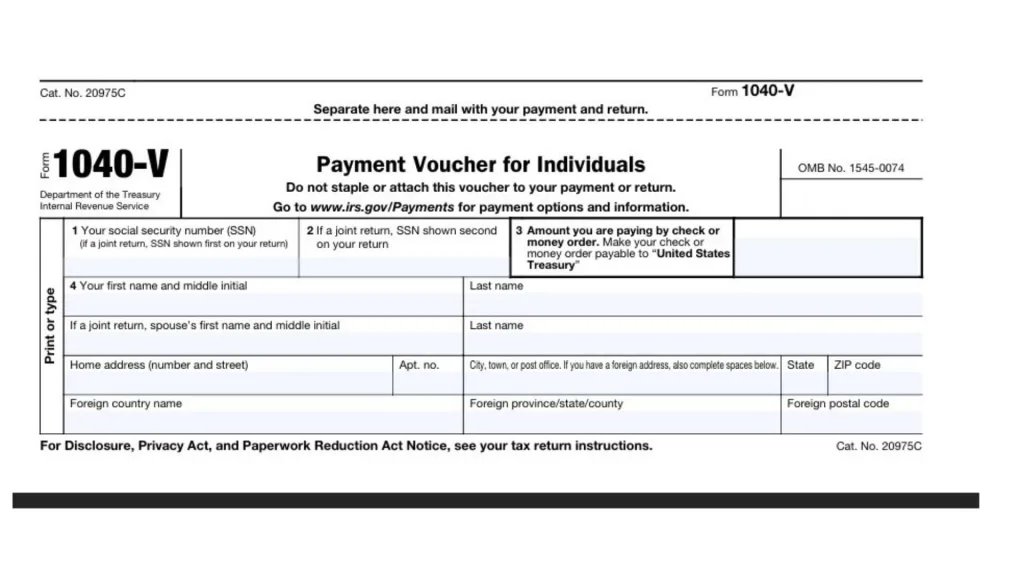
How To Complete 1040-V Tax Form
Below are the specific instructions for filling out each box on the 2026 Form 1040-V. Ensure all information is printed or typed clearly.
Box 1: Your Social Security Number (SSN)
Enter your valid Social Security Number in this box. If you are filing a joint tax return with your spouse, you must enter the SSN that is listed first on your tax return to ensure the payment is applied to the correct joint account.
Box 2: Spouse’s Social Security Number
If you are filing a joint return, enter the SSN that is listed second on your tax return. If you are filing individually, you can leave this box blank.
Box 3: Payment Amount
Enter the exact amount of dollars and cents you are paying with your attached check or money order. Remember, if you choose to pay online at the official IRS payments website, you do not need to fill out this box or use this form at all.
Box 4: Name And Address
Enter your full name and complete address exactly as they appear on your tax return.
- Name: Enter your first name, middle initial, and last name. If filing jointly, include your spouse’s first name, middle initial, and last name in the designated space.
- Address: Fill in your home address, including number, street, and apartment number if applicable.
- City, State, and ZIP: Clearly print your city, town, or post office, followed by your state and ZIP code.
- Foreign Address: If you reside outside the United States, complete the specific spaces for foreign country name, province/state/county, and foreign postal code.