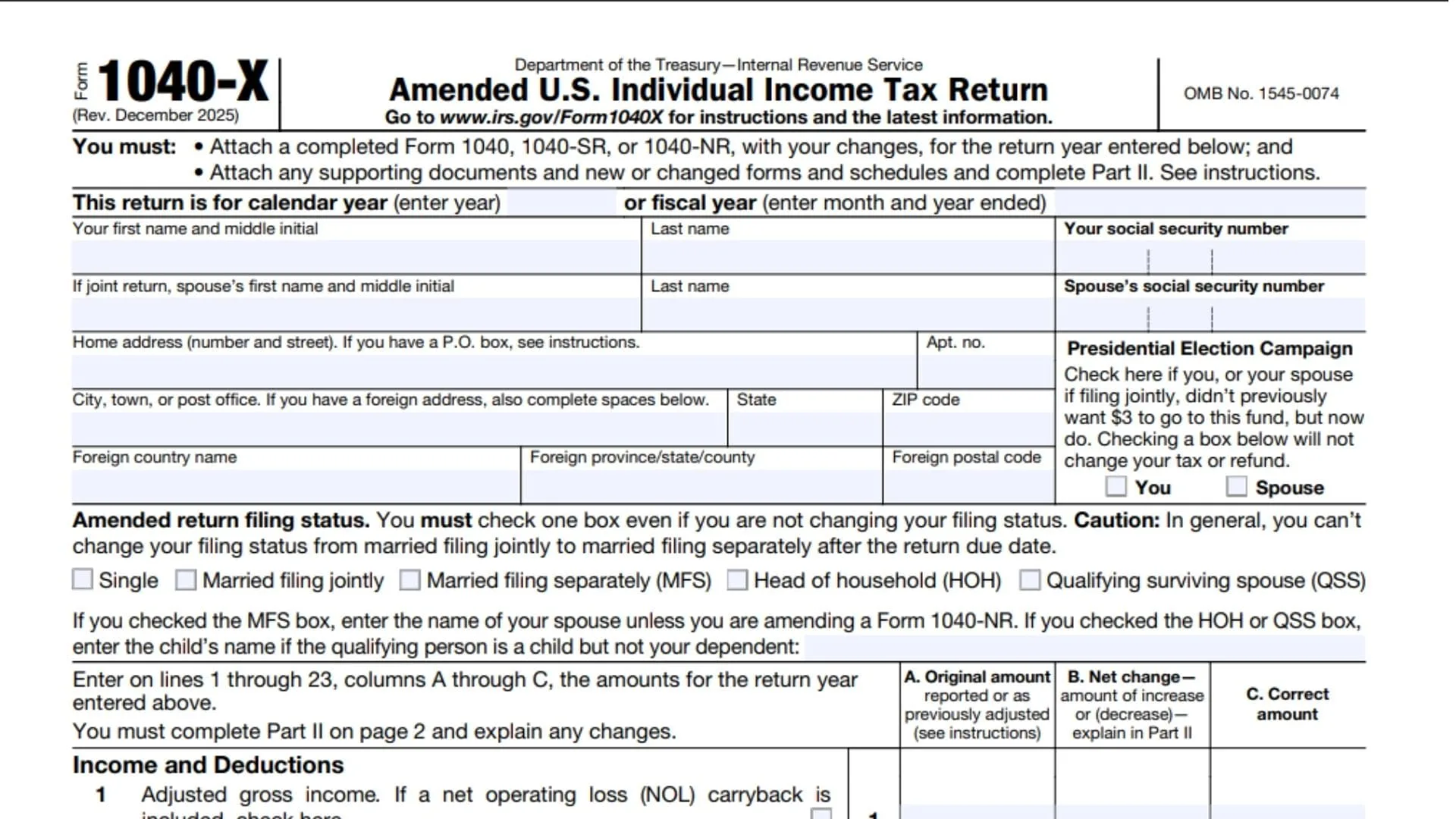
IRS Form 1040-X is the “Amended U.S. Individual Income Tax Return,” designed for taxpayers who need to make corrections or changes to a previously filed tax return. If you’ve filed your tax return and then realize there were mistakes or overlooked deductions or credits, this form allows you to amend those errors. Whether you need to adjust your filing status, correct your income, or update your deductions, IRS Form 1040-X gives you the ability to fix any discrepancies in your tax filing and ensure your return is accurate. This form is essential for anyone who needs to correct their tax return, and it can be used for federal income tax returns such as Form 1040, 1040-SR, or 1040-NR. It is critical to complete this form properly to avoid penalties or audits.
How to File IRS Form 1040-X
Filing IRS Form 1040-X is an important process for anyone looking to amend a previous return. The form must be filed through the IRS system after you’ve identified the changes needed. Here’s how you can file the form:
- Obtain Form 1040-X: The first step is to download or request IRS Form 1040-X from the official IRS website. You’ll need to complete the form with the necessary information about your previously filed return and the corrections you want to make.
- Gather Your Original Tax Return: You’ll need a copy of your original tax return (Form 1040, 1040-SR, or 1040-NR) as well as any supporting documents or new schedules that you want to amend. If you are making any changes that require additional forms or schedules, these must be attached as well.
- Fill Out the Amended Return: Begin by providing the correct information for your tax year at the top of Form 1040-X. Enter your personal information, including your name, Social Security number, and address. Then, review the sections of the form where you’ll be correcting your previous return.
- Provide an Explanation of Changes: In Part II of the form, you will need to provide a detailed explanation for why you are filing the amended return. Be specific about what changes you made and why those changes were necessary.
- Submit the Amended Form: After completing the form, you’ll submit it either electronically (if applicable) or via mail to the appropriate IRS address, which will be specified in the form’s instructions. Note that while you can amend your return electronically in some cases, others might require a paper filing.
- Wait for IRS Processing: After submitting Form 1040-X, it can take several weeks for the IRS to process your amended return. You can track the status of your amendment using the IRS “Where’s My Amended Return?” online tool.

How to Complete IRS Form 1040-X
Part I: Basic Information
- First Name and Middle Initial, Last Name: Enter your legal name as it appears on your original tax return.
- Social Security Number (SSN): Enter your SSN as reported on the original tax return.
- Address: Provide your current address, including street number, city, state, and ZIP code.
- If Filing Jointly, Spouse’s Information: If you are amending a joint return, enter your spouse’s full name and SSN.
Part II: Amended Return Filing Status
- Check the Filing Status Box: Even if you aren’t changing your filing status, you must select one of the options from Single, Married Filing Jointly, Married Filing Separately, Head of Household, or Qualifying Surviving Spouse. If you’re changing your filing status, be sure to explain it in Part II.
- Filing Status Amendments: If you were previously married and are now filing separately or you were head of household and are now filing jointly, mark the relevant box and provide the necessary details, such as the name of your spouse or dependent.
Part III: Income and Deductions
- Adjusted Gross Income (AGI): Enter the adjusted gross income (AGI) from your original return.
- Itemized or Standard Deduction: Select whether you used the standard deduction or itemized deductions and report the amount you initially claimed.
- Taxable Income: Subtract deductions from your AGI to determine taxable income.
- Business Income and Deductions: If applicable, provide changes to your business income and deductions.
- Taxable Income After Deductions: Ensure that you subtract business-related deductions correctly to get the final taxable income amount.
Part IV: Tax Liability
- Tax: Enter the method used to figure your tax. This includes using tax tables or another method provided in the instructions.
- Credits: Enter any credits applied to reduce the amount of tax owed, such as the Child Tax Credit or Earned Income Credit.
- Other Taxes: Include any additional taxes that apply, such as self-employment tax, additional Medicare tax, or others.
- Total Tax: Calculate your total tax liability by adding all applicable taxes and subtracting any credits.
Part V: Payments
- Federal Income Tax Withheld: Enter the federal income tax that was previously withheld from your paycheck.
- Estimated Payments: If you made estimated tax payments or applied an overpayment from a previous year, enter these figures.
- Other Payments: Include any other payments made, including those for self-employment taxes, etc.
- Total Payments: Sum all the payments to find the total.
Part VI: Refund or Amount You Owe
- Refund Amount: If your total payments exceed your tax liability, you may be eligible for a refund. Enter the amount.
- Amount You Owe: If your tax liability is higher than the total payments, enter the amount you owe.
- Refund Application: Indicate whether you want your refund applied to your next year’s estimated tax.
Part VII: Explanation of Changes
Provide a detailed explanation in the space provided for why you’re filing the amended return. This section is essential for clarity.
Key Takeaways for Filing IRS Form 1040-X
IRS Form 1040-X is your tool for making corrections to an already filed tax return. By following the instructions line by line, you ensure the IRS understands the changes you’ve made and processes your amendments correctly. Once filed, the IRS will review your submission, and any necessary refunds or additional payments will be processed. Be thorough in your explanation and ensure that all the amounts are correct to avoid delays in your amended return.

Frequently Asked Questions (FAQs)
What is IRS Form 1040-X used for?
IRS Form 1040-X is used to amend a previously filed tax return if you need to correct mistakes, claim additional deductions, or report changes.
How do I know if I need to file IRS Form 1040-X?
If you realize that there were errors or missing information on your originally filed tax return, you should file Form 1040-X to correct those mistakes.
How long does it take for the IRS to process Form 1040-X?
It typically takes the IRS 8 to 12 weeks to process an amended return. You can track the status using the “Where’s My Amended Return?” tool on the IRS website.
Can I file IRS Form 1040-X online?
Yes, you can e-file Form 1040-X if the IRS allows it for your specific tax situation. Otherwise, you will need to file the form by mail.