
Form 1098-T is a tuition statement used to report education payment information for a student who attended an eligible educational institution. Schools generally provide this form to help students, or the people who claim them as dependents, determine whether they may qualify for education-related tax benefits. The form reports key amounts connected to qualified tuition and related expenses, along with scholarships, grants, prior-year adjustments, enrollment status, and certain insurance reimbursements or refunds. It is not the same thing as a tax return, and it does not automatically create a credit by itself. Instead, it serves as an information document that supports the tax reporting process when figuring out education credits and related tax items. Because several amounts on the form can affect a taxpayer’s eligibility or calculation, each entry should be reviewed carefully before it is used on an income tax return. Schools, insurers in limited cases, and students all rely on this form to track education-related payments and adjustments for the calendar year, so accuracy matters at every step.
Who Uses Form 1098-T?
This form is mainly used by eligible educational institutions that must report tuition-related information for enrolled students. In some cases, an insurer may also be involved when it makes reimbursements or refunds of qualified tuition and related expenses. Students receive their copy for recordkeeping and to help prepare their tax return, especially when claiming education credits. Tax preparers and parents who claim a student as a dependent may also use the form when working through education benefit rules.
How To File Form 1098-T
The filer, usually the school, prepares the form with the institution’s identifying information, the student’s identifying information, and the required annual amounts shown in the numbered boxes. Copy A is the version filed with the IRS, and the student receives Copy B for their own records and tax preparation. If the filer has to submit enough information returns to meet the filing threshold, electronic filing may be required. A filer should also make sure the IRS-filed copy is in the proper format and that the student copy is furnished on time. The student does not generally file Form 1098-T itself as a stand-alone return, but uses the information from it when completing the appropriate tax forms for education credits.
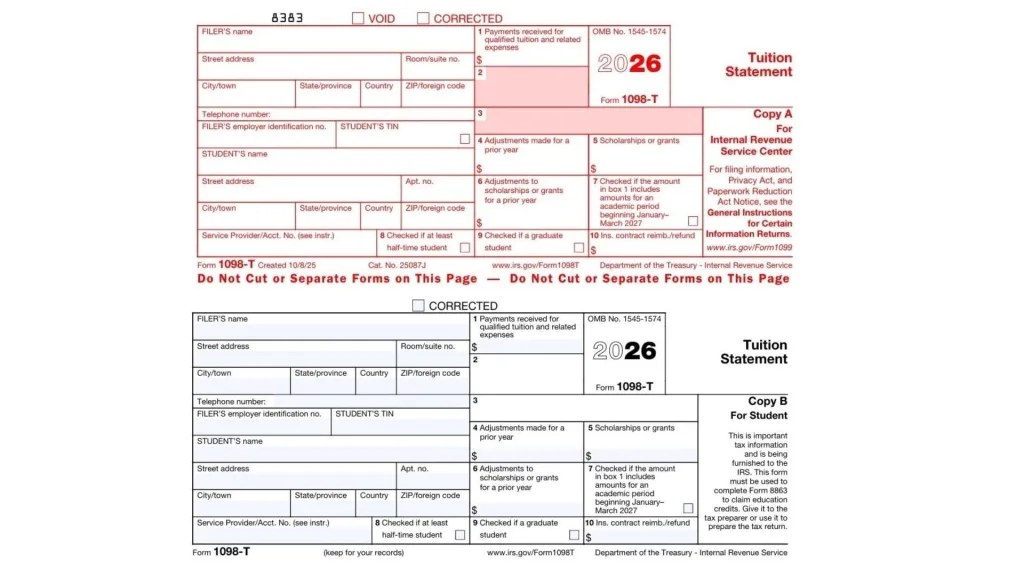
How To Complete Form 1098-T
VOID: Mark this only if the form is being voided. This is used when a form was prepared by mistake and needs to be canceled rather than corrected.
CORRECTED: Check this box if you are issuing a corrected version of a previously filed form. Use it when the original form had incorrect information that now needs to be fixed.
FILER’S Name: Enter the full legal name of the institution or other filer responsible for issuing the form. This should match the filer’s records and tax identification information.
Street Address: Enter the filer’s street address. Use the official mailing address associated with the institution or reporting entity.
Room/Suite No.: If the filer’s address includes a room, suite, or unit number, enter it here. If not, leave it blank.
City/Town: Enter the filer’s city or town.
State/Province: Enter the filer’s state or province.
Country: Enter the filer’s country, when applicable.
ZIP/Foreign Code: Enter the filer’s ZIP code or foreign postal code.
Telephone Number: Enter a contact phone number for the filer. This should be a number that can be used to answer questions about the statement itself.
FILER’S Employer Identification No.: Enter the filer’s employer identification number exactly as assigned. This identifies the institution or reporting entity for tax reporting purposes.
STUDENT’S TIN: Enter the student’s taxpayer identification number. This may be a Social Security number or another valid taxpayer identification number. On the student copy, only part of the number may appear for privacy, but the full number is reported to the IRS.
STUDENT’S Name: Enter the student’s full name as it appears in the filer’s records.
Street Address: Enter the student’s street address.
Apt. No.: If the student’s mailing address includes an apartment number or unit number, place it here.
City/Town: Enter the student’s city or town.
State/Province: Enter the student’s state or province.
Country: Enter the student’s country, when applicable.
ZIP/Foreign Code: Enter the student’s ZIP code or foreign postal code.
Service Provider/Acct. No.: Enter the service provider or account number if one is used to distinguish the student’s account. This field helps identify the specific record connected to the student.
Line 1: Report the total payments received during the calendar year for qualified tuition and related expenses. Reduce this amount by any reimbursements or refunds made during the same year that relate to those same payments.
Line 2: This line is reserved for future use. Do not enter an amount unless future instructions specifically require it.
Line 3: This line is reserved for future use. Leave it blank unless later guidance changes that rule.
Line 4: Enter any adjustment made during the current year for qualified tuition and related expenses that were reported on a prior-year Form 1098-T. This line is used for prior-year corrections or reductions tied to earlier reported amounts.
Line 5: Enter the total scholarships or grants that were administered and processed by the educational institution for the student during the calendar year. These amounts may affect the education credit calculation.
Line 6: Enter adjustments made during the current year to scholarships or grants that were reported for a prior year. This line is used when earlier scholarship or grant figures need to be revised.
Line 7: Check this box if the amount shown in Line 1 includes payments for an academic period that begins in January, February, or March of the following year. This alerts the student that some reported payments apply to an upcoming academic term.
Line 8: Check this box if the student was enrolled at least half-time during the calendar year. This means the student carried at least one-half of the normal full-time academic workload for their course of study.
Line 9: Check this box if the student was enrolled in a graduate-level program. This includes study leading to a graduate degree, graduate certificate, or another recognized graduate-level credential.
Line 10: Enter the total amount of reimbursements or refunds of qualified tuition and related expenses made by an insurer. This amount may affect the student’s allowable education credit.
What Each Line Means For The Student
The form helps the student, or the person claiming the student, evaluate whether education credits may be available. Payments in Line 1 are often one of the starting points for that analysis, while Lines 5, 6, and 10 can reduce or otherwise affect the benefit. Lines 8 and 9 are also important because some education benefits depend on enrollment status and whether the student is in undergraduate or graduate study. Line 4 can matter if earlier-year figures were adjusted and a prior tax benefit may need to be revisited.
Common Mistakes To Avoid
A common mistake is assuming the form alone determines the exact tax credit. It does not. Another frequent issue is placing prior-year changes in the wrong box, or forgetting to reduce current-year amounts when required. Filers should also be careful with student identification information, because missing or incorrect numbers can create processing problems. Students should not ignore checkboxes such as half-time status or graduate status, because those details can affect eligibility for certain tax benefits.
Final Filing Tips
Make sure the student’s identifying information is complete and accurate before the form is issued. Double-check that each amount is placed in the correct numbered line and that prior-year adjustments are not mixed with current-year figures. If a correction is needed after filing, use the corrected form process rather than creating a duplicate. For students, keep the form with tax records and compare it carefully with personal payment records, scholarship records, and any insurance reimbursements before completing a tax return.