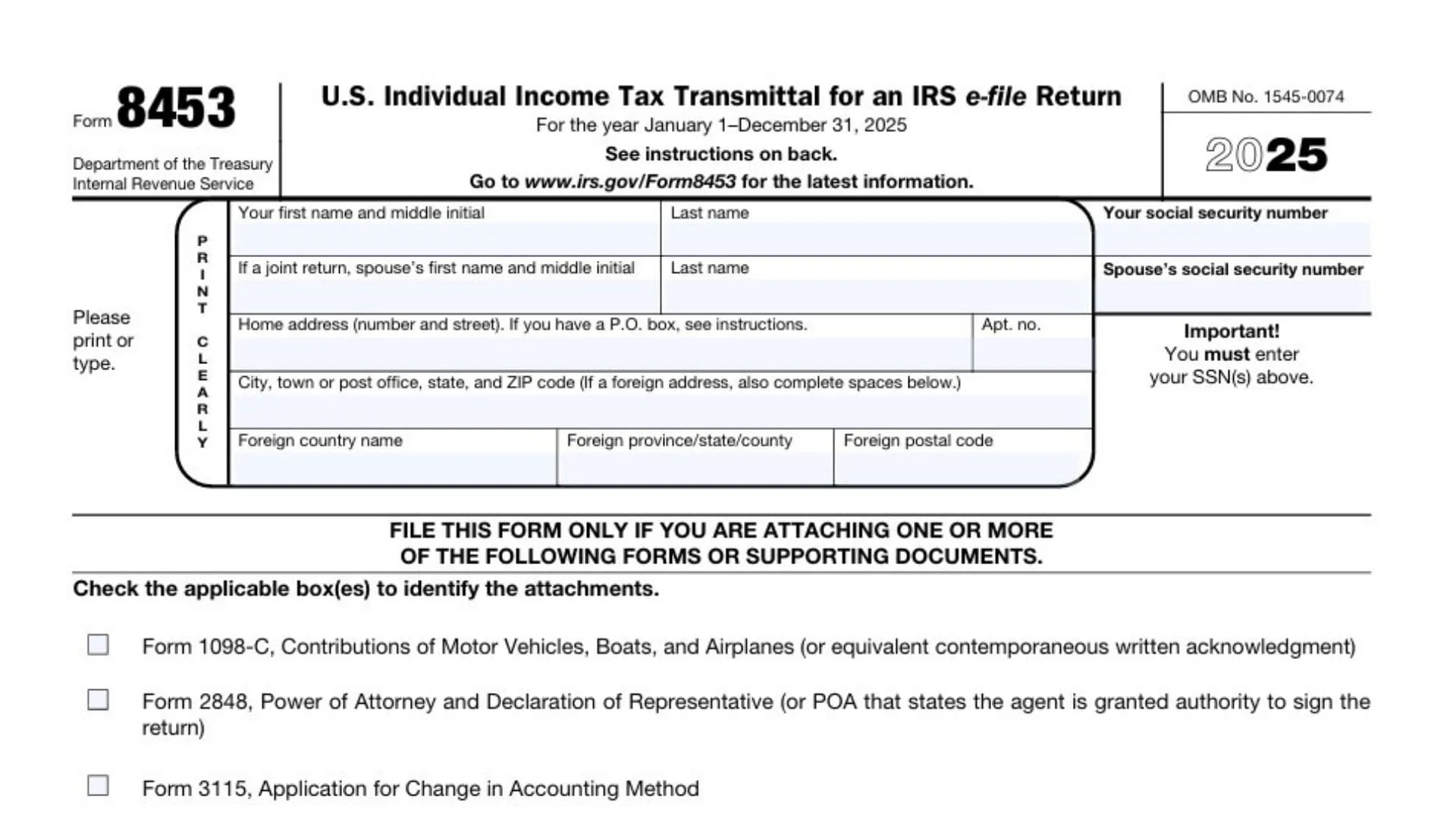
Form 8453 is a crucial document for anyone filing taxes electronically. This form serves as a declaration that the taxpayer is electronically submitting their return and authorizes the IRS to process it. If you’re filing a return using e-filing, you’ll likely need Form 8453 to provide additional information or signatures for documents that can’t be electronically filed. While it may seem like just another form in the tax process, Form 8453 is an essential part of the IRS e-file system. In this article, we will dive deep into the Form 8453, explaining its purpose, when and how to use it, and tips for filing it correctly. By the end, you’ll have a clear understanding of why Form 8453 is necessary and how it fits into the larger picture of your tax filing.
What is Form 8453?
Form 8453 is used in the process of filing taxes electronically with the IRS. Its primary function is to authenticate and validate the electronic transmission of your tax return, providing the IRS with any signatures or additional information that can’t be electronically included. The form ensures that your e-filed tax return is properly authorized and that any supporting documents that need to be physically signed are in order. This form is particularly important for those submitting Form 1040, but can also apply to other forms when they need to be filed electronically.
For taxpayers using e-filing, Form 8453 essentially acts as a backup for the electronic submission process, ensuring all signatures, documents, and authorizations are collected properly.
When Do You Need to Use Form 8453?
While e-filing is incredibly convenient, there are specific situations in which Form 8453 must be used:
- When Filing Form 1040: If you’re e-filing a Form 1040 (U.S. Individual Income Tax Return) and need to submit paper documents that can’t be electronically filed, Form 8453 is used to authorize these documents.
- For Supporting Documentation: Sometimes, tax filers may need to submit additional documents (such as forms or schedules) that cannot be filed online. Form 8453 is used to authorize the inclusion of these documents in the electronic filing.
- If Filing an Amended Return: If you’re filing an amended return electronically, Form 8453 is required to finalize the submission of the amended return, especially if there are attachments or signatures that need to be included.
- If You’re Using a Paid Preparer: If you’re working with a tax preparer who files electronically on your behalf, Form 8453 is also used to provide consent and authorization for submitting your return through e-filing.

How to Fill Out Form 8453
Filling out Form 8453 is relatively straightforward, but it requires careful attention to detail. The form typically asks for basic identifying information, such as your name, address, and taxpayer identification number (TIN), as well as the specific forms and documents you’re submitting electronically. Here’s a quick overview of the key sections:
Part I: Taxpayer Information
This section requires your name, address, and Social Security Number (SSN) or Employer Identification Number (EIN) if applicable.
Part II: Income Tax Return Information
Here, you will provide details regarding the specific return you are filing (e.g., Form 1040). You’ll need to check the appropriate box to indicate which form you’re submitting.
Part III: Authorization
The taxpayer must sign and date the form, authorizing the IRS to process the return. If you’re using a paid preparer, they must also sign the form.
Part IV: Additional Documents
If there are any additional documents that need to be included with your e-filed return (such as forms that cannot be filed electronically), you will indicate them in this section.
Where and How to Submit Form 8453
Once you’ve filled out Form 8453, you need to submit it according to the IRS instructions. Typically, you’ll send the form by mail to the IRS along with the physical documents that need to be attached. However, if you’re filing through a tax preparer, they will assist you in submitting the form through their e-filing system.
If you are e-filing your tax return and submitting supporting documentation, make sure to review the IRS e-filing instructions. Sometimes the form will need to be submitted directly to the IRS, while other times, it might be submitted by your tax preparer as part of their filing process.
Common Mistakes to Avoid When Filing Form 8453
Although Form 8453 is relatively simple, there are a few common mistakes that taxpayers should watch out for:
- Forgetting to Sign the Form: One of the most common errors is forgetting to sign the form. This step is essential for validating the submission.
- Incorrect Information: Be sure that all the information on the form matches what is on your tax return. Any discrepancies could delay the processing of your return.
- Missing Supporting Documents: If you’re submitting paper documents, make sure all the required documentation is included. Missing documents could cause delays in your tax filing.
- Not Submitting the Form on Time: Submit Form 8453 by the IRS deadline to avoid penalties or delays. If your tax preparer is handling the submission, make sure they send it in on time.

FAQs
What is Form 8453 used for?
Form 8453 is used to authorize the IRS to process an electronic tax return, especially when additional documents or signatures are required.
Do I need to file Form 8453 with my tax return?
Yes, if you’re submitting a paper document or additional forms that cannot be electronically filed, you need to file Form 8453.
Can I file Form 8453 without a tax preparer?
Yes, you can file Form 8453 independently, especially if you’re e-filing your return and need to provide additional documents.