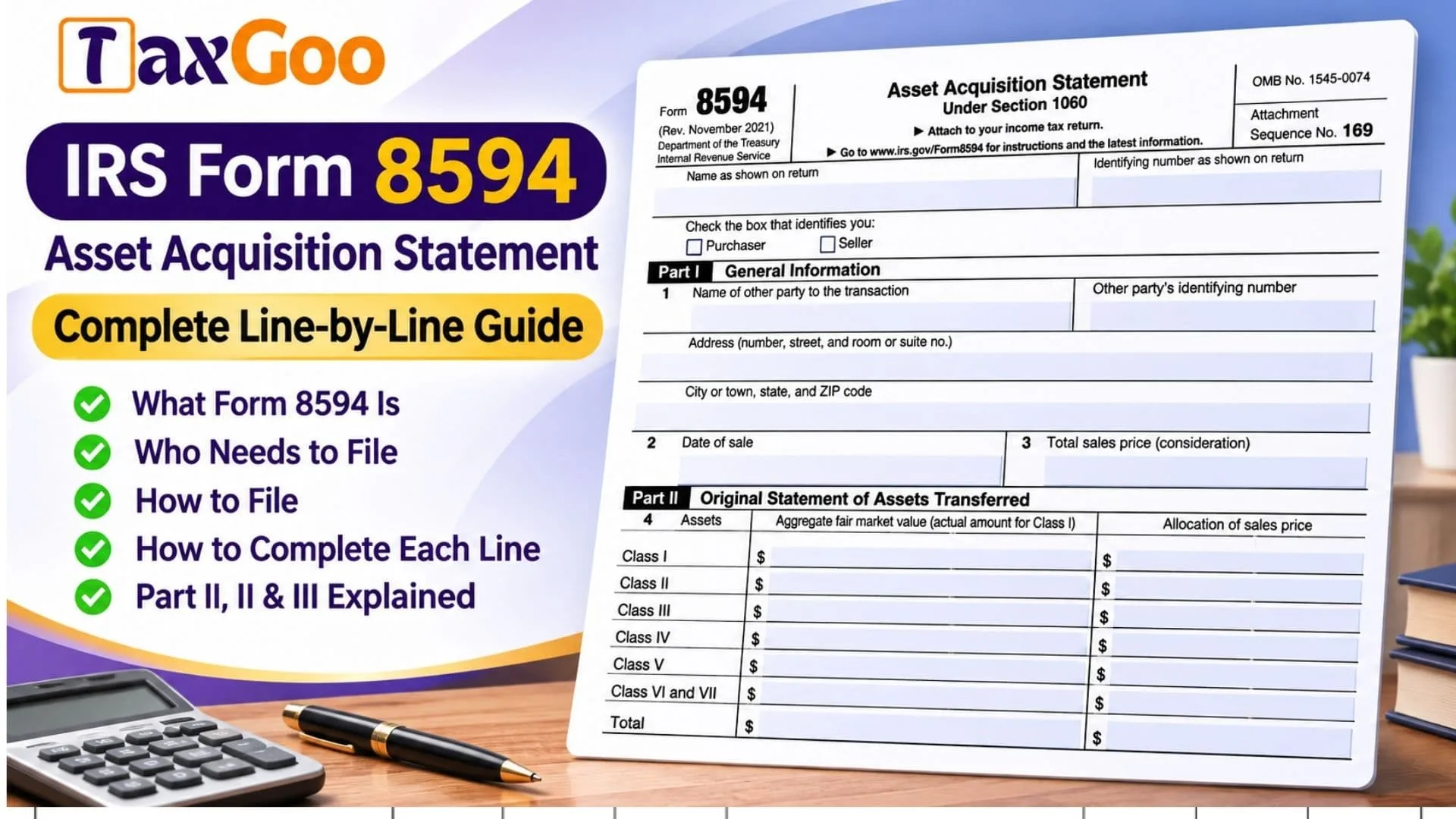
IRS Form 8594, officially titled Asset Acquisition Statement Under Section 1060, is a federal tax form used to report the purchase or sale of a business, or a group of business assets, when the transaction qualifies as an applicable asset acquisition under Internal Revenue Code Section 1060. The form helps the Internal Revenue Service understand how the total purchase price is distributed among the assets transferred in the transaction. Both the purchaser and seller generally use Form 8594 to identify the other party, report the transaction date and total consideration, and disclose the fair market value and allocated purchase price of different asset classes. These assets may include cash, securities, inventory, equipment, buildings, intangible property, goodwill, and going-concern value. Proper allocation matters because the buyer and seller may have different tax consequences depending on how the purchase price is assigned. For example, a purchaser may use the allocated amounts to establish the tax basis of acquired assets, while the seller may use them to determine gain or loss on the assets sold. Form 8594 also asks whether the parties agreed to an allocation in writing and whether the transaction involved additional agreements, such as a noncompete covenant, employment contract, or lease. If the purchase price changes after the original filing, the form provides a supplemental reporting section to update the allocation. Accurate completion helps ensure that the transaction is reported consistently and that the tax treatment of the transferred assets is properly documented.
Who Must File IRS Form 8594?
Form 8594 generally applies to both the purchaser and seller in an applicable asset acquisition.
An applicable asset acquisition typically involves transferring a group of assets that constitutes a trade or business, where the purchaser’s tax basis in the acquired assets is determined by the amount paid.
You may need to file Form 8594 if you:
- Purchase an operating business through an asset acquisition.
- Sell a business consisting of multiple assets.
- Acquire business assets that include goodwill or going-concern value.
- Sell business property as part of a transaction covered by Section 1060.
- Need to report an allocation of the total purchase price among transferred assets.
- Previously reported an applicable asset acquisition and must update the allocation because the consideration changed.
Both parties generally report their respective allocations, even though the tax consequences may differ.
Not every sale of business property requires Form 8594. For example, an ordinary sale of a single asset may fall outside the applicable asset acquisition rules.
How to File Form 8594
IRS Form 8594 is generally attached to the federal income tax return for the tax year in which the applicable asset acquisition occurs.
The form is not ordinarily submitted as a separate annual income tax return.
Where to Submit Form 8594
Attach the completed Form 8594 to the appropriate federal income tax return and submit it to the Internal Revenue Service.
The applicable return depends on the taxpayer’s business structure and filing requirements. It may include an individual, partnership, corporation, or other business income tax return.
The purchaser and seller generally file their own Form 8594 with their respective returns.
If filing electronically, include the form using tax software that supports the required attachment.
If filing on paper, include the completed form with the relevant income tax return and any required supporting statements.
When to File Form 8594
Form 8594 is generally filed with the income tax return for the tax year that includes the acquisition date.
The deadline therefore follows the filing deadline of the applicable income tax return, including any valid extension.
If the consideration changes in a later tax year, a supplemental statement may be required with the return for the year in which the change is taken into account.
Documents Needed Before Completing Form 8594
Prepare the following information before beginning:
- The legal names and tax identification numbers of the purchaser and seller.
- The address of the other party involved in the transaction.
- The date the business or assets were sold.
- The total purchase price or consideration.
- The signed asset purchase agreement or sales contract.
- Any written agreement allocating the purchase price among assets.
- A complete list of transferred assets.
- Fair market value information for the transferred assets.
- The purchase price allocation by asset class.
- Details of related agreements, including noncompete covenants, leases, or employment contracts.
- Records of any later purchase price adjustments.
- Information from a previously filed Form 8594, if completing a supplemental statement.
Having these records ready will make the allocation calculations easier and help prevent inconsistencies between the buyer’s and seller’s reporting.

How to Complete IRS Form 8594
Form 8594 contains three main parts:
- Part I: General Information
- Part II: Original Statement of Assets Transferred
- Part III: Supplemental Statement
Complete the identifying information first, followed by the applicable transaction and allocation sections.
Taxpayer Identification and Filing Information
Before Part I, the form asks for identifying information and your role in the transaction.
Name as Shown on Return
Enter the taxpayer’s name exactly as it appears on the federal income tax return to which Form 8594 will be attached.
For an individual taxpayer, use the name reported on the individual income tax return. For a business entity, use the appropriate legal name reported on its return.
Identifying Number as Shown on Return
Enter the tax identification number used on the associated federal income tax return.
This may be a Social Security number, Individual Taxpayer Identification Number, or Employer Identification Number, depending on the taxpayer.
Make sure the identifying number matches the accompanying return.
Purchaser Checkbox
Check this box if you are the party acquiring the business or group of assets.
As the purchaser, you will report the acquisition details and the allocation of the purchase price among the acquired assets.
Seller Checkbox
Check this box if you are the party selling the business or group of assets.
As the seller, you will report the transaction and the corresponding allocation of the consideration received.
Select the box that accurately describes your role in the transaction.
Part I: General Information
Part I identifies the other party involved in the acquisition and records the date and total consideration.
Transaction Parties and Identification
Line 1: Name of the Other Party
Enter the legal name of the other party involved in the transaction.
If you are the purchaser, provide the seller’s name.
If you are the seller, provide the purchaser’s name.
Use the name associated with the other party’s tax records whenever possible.
Line 1: Other Party’s Identifying Number
Enter the other party’s taxpayer identification number.
This may be an SSN, ITIN, or EIN, depending on the type of taxpayer.
Line 1: Street Address
Enter the other party’s street address, including the building number and street name.
Line 1: Room or Suite Number
Include the room, unit, or suite number when applicable.
Line 1: City or Town
Enter the city or town associated with the other party’s address.
Line 1: State
Provide the appropriate state information.
Line 1: ZIP Code
Enter the postal ZIP code for the other party’s address.
Sale Date and Total Consideration
Line 2: Date of Sale
Enter the date on which the applicable asset acquisition took place.
Use the transaction’s actual sale or closing date, as appropriate to the acquisition.
For example, if the business sale was completed on September 15, 2025, enter that date.
The date helps identify the tax year in which the transaction must be reported.
Line 3: Total Sales Price (Consideration)
Enter the total consideration associated with the applicable asset acquisition.
Consideration generally includes the amounts treated as paid or received for the transferred assets under the applicable tax rules.
Depending on the transaction, this may include cash payments, qualifying assumed liabilities, and other forms of consideration.
For example, if the total consideration for the acquired business is $750,000, enter $750,000.
The amount on line 3 provides the starting point for allocating the purchase price among the transferred assets in Part II.
Part II: Original Statement of Assets Transferred
Part II reports the original allocation of the consideration among the different classes of assets acquired or sold.
This section is particularly important because different asset classes can receive different federal income tax treatment.
Understanding the Asset Allocation Table
Line 4: Assets Transferred
Line 4 contains a table for reporting the asset classes, their aggregate fair market values, and the portion of the sales price assigned to each class.
The table has three columns.
Assets Column
This column identifies the asset classes used for the transaction.
Aggregate Fair Market Value Column
Enter the combined fair market value of the assets belonging to each class. For Class I, the form specifically requests the actual amount rather than a separate estimated fair market value.
Fair market value generally represents the price property would command in a transaction between willing, informed parties acting without compulsion.
Allocation of Sales Price Column
Enter the portion of the total consideration allocated to each asset class under the applicable allocation rules.
The allocated amount may differ from the aggregate fair market value, particularly where the total consideration and the combined asset values are not identical.
Class I: Cash and Cash Equivalents
Line 4: Class I Aggregate Value
Enter the actual amount of Class I assets transferred.
Class I generally includes cash and certain cash-equivalent items, such as bank deposits.
Line 4: Class I Sales Price Allocation
Enter the amount of consideration allocated to Class I assets.
For example, if the acquired business includes $20,000 in transferred cash, the Class I amount would generally be $20,000.
Class II: Certain Marketable Financial Assets
Line 4: Class II Aggregate Fair Market Value
Enter the combined fair market value of assets classified as Class II.
This category generally includes certain actively traded personal property, such as qualifying marketable securities, and certain other specified financial assets.
Line 4: Class II Sales Price Allocation
Enter the consideration allocated to Class II assets.
The allocation should follow the applicable asset acquisition rules and should not exceed the amount permitted for this class.
Class III: Certain Financial Assets
Line 4: Class III Aggregate Fair Market Value
Enter the combined fair market value of assets assigned to Class III.
This class generally includes certain financial assets, such as accounts receivable and debt instruments, that do not belong in an earlier asset class.
Line 4: Class III Sales Price Allocation
Enter the amount of the total consideration allocated to Class III assets.
Use the applicable classification and valuation rules to determine the correct amount.
Class IV: Inventory
Line 4: Class IV Aggregate Fair Market Value
Enter the total fair market value of the inventory and other property classified as Class IV.
Inventory may include merchandise held for sale in the ordinary course of business.
Line 4: Class IV Sales Price Allocation
Enter the portion of the sales price allocated to Class IV assets.
For example, if the transaction includes qualifying inventory with an aggregate fair market value of $80,000, the amount allocated to Class IV may be $80,000 when the applicable allocation rules support that amount.
Class V: Other Tangible and Non-Excluded Assets
Line 4: Class V Aggregate Fair Market Value
Enter the combined fair market value of Class V assets.
This class generally includes assets that do not belong in Classes I through IV, VI, or VII.
Examples may include:
- Business machinery.
- Equipment.
- Furniture.
- Buildings.
- Land.
- Certain other tangible business property.
Line 4: Class V Sales Price Allocation
Enter the portion of the total consideration assigned to Class V assets.
For example, a business acquisition may include machinery and equipment with a combined fair market value of $150,000.
The amount allocated to those assets must be determined under the applicable allocation rules.
Class VI and VII: Intangible Assets, Goodwill, and Going-Concern Value
Form 8594 combines Classes VI and VII into a single reporting row, although the two classes represent different types of assets.
Line 4: Class VI and VII Aggregate Fair Market Value
Enter the combined fair market value of assets belonging to Classes VI and VII.
Class VI generally includes certain Section 197 intangible assets other than goodwill and going-concern value.
Examples may include qualifying customer-based intangibles, trademarks, trade names, licenses, and other specified intangible property.
Class VII generally includes goodwill and going-concern value.
Goodwill may reflect business value associated with customer relationships, reputation, and other factors that allow an established business to generate earnings.
Going-concern value generally reflects the additional value associated with an operating business being able to continue its activities.
Line 4: Class VI and VII Sales Price Allocation
Enter the combined consideration allocated to these two asset classes.
Although they share one row on Form 8594, the underlying allocation should distinguish the relevant intangible assets from goodwill and going-concern value for tax purposes.
Total Asset Values and Allocation
Line 4: Total Aggregate Fair Market Value
Add the amounts reported in the aggregate fair market value column for Classes I, II, III, IV, V, and VI and VII.
Formula:
Total Aggregate FMV = Class I + Class II + Class III + Class IV + Class V + Classes VI and VII
This total represents the combined reported value of the transferred assets.
Line 4: Total Allocation of Sales Price
Add all amounts reported in the allocation column.
Formula:
Total Allocation = Class I Allocation + Class II Allocation + Class III Allocation + Class IV Allocation + Class V Allocation + Classes VI and VII Allocation
The total allocated consideration should reconcile with the transaction consideration determined under the applicable tax rules.
Example of a Purchase Price Allocation
Suppose a purchaser acquires a business for $500,000 and the applicable allocation produces the following amounts.
| Asset Class | Aggregate Fair Market Value | Sales Price Allocation |
|---|---|---|
| Class I | $20,000 | $20,000 |
| Class II | $0 | $0 |
| Class III | $30,000 | $30,000 |
| Class IV | $50,000 | $50,000 |
| Class V | $150,000 | $150,000 |
| Class VI and VII | $250,000 | $250,000 |
| Total | $500,000 | $500,000 |
In this simplified example, the aggregate asset values equal the consideration, so each class receives an allocation equal to its reported value.
Actual transactions may require more detailed valuation and allocation calculations.
Written Purchase Price Allocation Agreement
Line 5: Agreement to Allocate the Sales Price
This question asks whether the purchaser and seller established a purchase price allocation in the sales contract or another written agreement signed by both parties.
Line 5: Yes Checkbox
Select Yes if the parties agreed in a signed document to allocate the consideration among the transferred assets.
Line 5: No Checkbox
Select No if no such signed allocation agreement exists.
Line 5: Follow-Up Question About Agreed Fair Market Values
If you answered Yes to the first question, indicate whether the aggregate fair market values reported for Classes I through VII match the values agreed upon in the signed sales contract or another written document.
Line 5: Follow-Up Yes Checkbox
Select Yes if the reported aggregate fair market values match the agreed amounts.
Line 5: Follow-Up No Checkbox
Select No if the reported fair market values differ from those specified in the written agreement.
Review any differences carefully because they may require further explanation or reconciliation.
Additional Agreements Associated With the Acquisition
Line 6: Related Contracts and Arrangements
This question determines whether the purchaser also acquired a license or covenant not to compete, or entered into another specified arrangement with the seller or certain people associated with the seller.
The form identifies arrangements such as:
- Licenses.
- Covenants not to compete.
- Lease agreements.
- Employment contracts.
- Management contracts.
- Similar arrangements involving the seller or its managers, directors, owners, or employees.
Line 6: Yes Checkbox
Select Yes if one or more of the specified agreements or arrangements were part of the transaction.
Line 6: No Checkbox
Select No if none of the specified arrangements applies.
Line 6: Required Attachment When Yes Is Selected
If you answer Yes, attach a separate statement providing two details.
Attachment Item (a): Type of Agreement
Identify the type of agreement or arrangement involved.
For example, describe whether it is a noncompete covenant, lease, employment agreement, management agreement, or another applicable arrangement.
Attachment Item (b): Maximum Consideration
State the maximum amount of consideration paid or payable under the agreement.
Do not include interest in this amount.
For example, if a qualifying agreement provides for payments totaling up to $40,000, excluding interest, report the maximum applicable consideration of $40,000.
Part III: Supplemental Statement
Part III is used when the consideration for a previously reported applicable asset acquisition increases or decreases.
It allows the purchaser or seller to update an original allocation or a previously filed supplemental allocation.
You generally do not complete Part III solely because you are filing the original asset acquisition statement.
When to Complete Part III
Complete this section when an increase or decrease in consideration requires a revised allocation.
For example, a transaction may include a purchase price adjustment that becomes final after the original Form 8594 was filed.
In that situation, the updated consideration may require a supplemental statement.
Original Filing Information
Line 7: Tax Year of Original Filing
Enter the tax year for which the original Form 8594 was filed.
If supplemental statements were filed previously, include the applicable filing information requested for those statements.
Line 7: Tax Return Form Number
Enter the federal income tax return form number associated with the original filing and any applicable supplemental statements.
For example, the original Form 8594 may have been attached to an individual or business income tax return.
Provide the correct form number rather than the title of the return.
Revised Allocation of Sales Price
Line 8: Assets
This section uses the same asset class structure as Part II.
It contains three financial columns:
Allocation of Sales Price as Previously Reported
Enter the amount previously allocated to each asset class.
Increase or Decrease
Enter the change in the allocated amount for each class.
Use a negative amount, generally shown in parentheses, when the allocation decreases.
Redetermined Allocation of Sales Price
Enter the revised allocation after taking the change into account.
For each class:
Redetermined Allocation = Previously Reported Allocation + Increase or Decrease
Class I: Supplemental Allocation
Line 8: Class I Previously Reported Allocation
Enter the Class I amount from the most recent applicable allocation statement.
Line 8: Class I Increase or Decrease
Enter the change affecting Class I, if any.
Line 8: Class I Redetermined Allocation
Combine the previous amount and the adjustment to determine the updated Class I allocation.
Class II: Supplemental Allocation
Line 8: Class II Previously Reported Allocation
Enter the previously reported Class II allocation.
Line 8: Class II Increase or Decrease
Enter any increase or decrease assigned to Class II.
Line 8: Class II Redetermined Allocation
Add the adjustment to the previous allocation.
Class III: Supplemental Allocation
Line 8: Class III Previously Reported Allocation
Enter the prior allocation for Class III assets.
Line 8: Class III Increase or Decrease
Enter the applicable adjustment.
Line 8: Class III Redetermined Allocation
Calculate the revised Class III amount using the previous allocation and the adjustment.
Class IV: Supplemental Allocation
Line 8: Class IV Previously Reported Allocation
Enter the amount previously allocated to Class IV assets.
Line 8: Class IV Increase or Decrease
Enter any change affecting the Class IV allocation.
Line 8: Class IV Redetermined Allocation
Calculate the updated allocation after the adjustment.
Class V: Supplemental Allocation
Line 8: Class V Previously Reported Allocation
Enter the prior allocation for Class V assets.
Line 8: Class V Increase or Decrease
Enter the amount of any adjustment to Class V.
Line 8: Class V Redetermined Allocation
Combine the previous allocation and the change to determine the revised amount.
Class VI and VII: Supplemental Allocation
Line 8: Class VI and VII Previously Reported Allocation
Enter the combined amount previously allocated to Classes VI and VII.
Line 8: Class VI and VII Increase or Decrease
Enter the adjustment affecting the combined allocation.
Line 8: Class VI and VII Redetermined Allocation
Calculate the updated amount by combining the previously reported allocation with the adjustment.
Total Revised Allocation
Line 8: Total Previously Reported Allocation
Add the amounts in the first financial column for all asset classes.
This should represent the total allocation previously reported for the transaction.
Line 8: Total Increase or Decrease
The adjustment column does not provide a separate printed total entry. However, you should calculate the combined increase or decrease to verify the revised allocation.
For example, if the consideration increased by $25,000, the net change across all asset classes should reconcile with the applicable $25,000 increase.
Line 8: Total Redetermined Allocation
Add the revised allocation amounts for all asset classes.
Formula:
Total Redetermined Allocation = Sum of Redetermined Allocations for Classes I Through VII
This total should reconcile with the updated consideration under the applicable allocation rules.
Example of a Supplemental Allocation
Suppose the original reported consideration was $500,000, and a later adjustment increases it by $40,000.
Assume the applicable allocation rules assign the additional $40,000 to Classes VI and VII.
| Asset Class | Previously Reported | Increase or Decrease | Redetermined Allocation |
|---|---|---|---|
| Class I | $20,000 | $0 | $20,000 |
| Class II | $0 | $0 | $0 |
| Class III | $30,000 | $0 | $30,000 |
| Class IV | $50,000 | $0 | $50,000 |
| Class V | $150,000 | $0 | $150,000 |
| Class VI and VII | $250,000 | $40,000 | $290,000 |
| Total | $500,000 | $40,000 | $540,000 |
The updated total allocation is $540,000.
This example illustrates the reporting calculation. In an actual acquisition, the change must be assigned among the asset classes using the applicable tax allocation rules rather than automatically allocating it to goodwill.
Explanation of Purchase Price Changes
Line 9: Reasons for Increase or Decrease
Explain why the transaction consideration increased or decreased after the original allocation was reported.
Provide enough detail to identify the nature of the adjustment.
Possible reasons may include a purchase price adjustment required by the sales agreement, a later determination of contingent consideration, or another change affecting the amount treated as paid or received.
For example:
“The total consideration increased by $40,000 following the final purchase price adjustment required under the acquisition agreement. The revised consideration has been allocated among the transferred assets using the applicable allocation rules.”
Line 9: Additional Sheets
If the space provided is not enough to explain the adjustment, attach additional sheets containing the necessary details.
Make sure the explanation is consistent with the figures entered on line 8.
How the Form 8594 Asset Allocation Method Works
The allocation of consideration among asset classes is generally determined using the residual method under Section 1060.
This method assigns consideration to the asset classes in a prescribed order.
Generally, consideration is allocated first to Class I, then to Class II, Class III, Class IV, Class V, and Class VI, with the remaining amount allocated to Class VII.
Allocations to earlier classes are subject to the applicable asset values and tax rules. Goodwill and going-concern value generally receive the residual amount after the appropriate allocations to the other classes.
The allocation must be based on the correct consideration and the applicable fair market values rather than arbitrary percentages.
Why the Allocation Matters to the Purchaser
The purchaser generally uses the allocation to establish the tax basis of the acquired assets.
That basis can affect future depreciation, amortization, gain, or loss calculations.
For example, an amount allocated to qualifying equipment may be treated differently from an amount allocated to goodwill.
Why the Allocation Matters to the Seller
The seller generally uses the allocation to determine the tax treatment of the consideration received for different assets.
Depending on the property, the sale may produce ordinary income, capital gain, depreciation recapture, or other tax consequences.
A correct allocation is therefore important for both sides of the transaction.
Common Mistakes to Avoid When Completing Form 8594
Incorrect Identification Information
Using a name or tax identification number that does not match the accompanying return can create processing problems.
Reporting the Wrong Total Consideration
Do not assume that consideration always equals the cash paid at closing. Other amounts may need to be included under the applicable tax rules.
Using Incorrect Asset Classes
Classifying inventory as equipment or assigning goodwill to the wrong category can affect the tax treatment of the transaction.
Confusing Fair Market Value With Allocated Consideration
The aggregate fair market value and allocated sales price are separate entries. They are not necessarily identical.
Ignoring Written Allocation Agreements
If the parties signed an allocation agreement, answer both questions on line 5 accurately.
Failing to Report Related Agreements
A qualifying noncompete covenant, license, lease, employment contract, or similar arrangement may require a Yes response and an additional statement under line 6.
Forgetting a Supplemental Statement
If the consideration changes after the original filing, determine whether Part III must be completed.
Entering an Unsupported Revised Allocation
Changes to consideration should be allocated using the applicable tax rules and supported by the transaction records.
Final Review Before Filing
Before attaching IRS Form 8594 to your federal income tax return, complete this checklist:
- Confirm that the transaction qualifies as an applicable asset acquisition under Section 1060.
- Verify the taxpayer’s name and identifying number.
- Check the correct Purchaser or Seller box.
- Enter the other party’s legal name, identification number, and complete address.
- Confirm the transaction date on line 2.
- Verify the total consideration reported on line 3.
- Review the classification of all transferred assets.
- Enter the correct aggregate fair market value for each class.
- Use the actual amount for Class I.
- Verify the sales price allocation for Classes I through VII.
- Recalculate both total columns in Part II.
- Confirm that the allocated consideration reconciles with the applicable transaction amount.
- Answer both questions on line 5 when the follow-up question applies.
- Review the related agreement question on line 6.
- Attach the required agreement statement if line 6 is answered Yes.
- Determine whether a supplemental statement is necessary.
- If completing Part III, enter the original filing year and return form number on line 7.
- Verify the previous allocations, adjustments, and revised amounts on line 8.
- Explain the reasons for the consideration change on line 9.
- Attach additional sheets if the explanation requires more space.
- Check that all required supporting statements are included.
- Attach the completed Form 8594 to the appropriate federal income tax return.
IRS Form 8594 plays an important role in reporting the tax consequences of buying or selling a business through an applicable asset acquisition. By identifying the transaction correctly, classifying the transferred assets, applying the appropriate purchase price allocation, and reporting any later changes, purchasers and sellers can prepare a more accurate Asset Acquisition Statement and maintain consistent records for their federal income tax reporting.