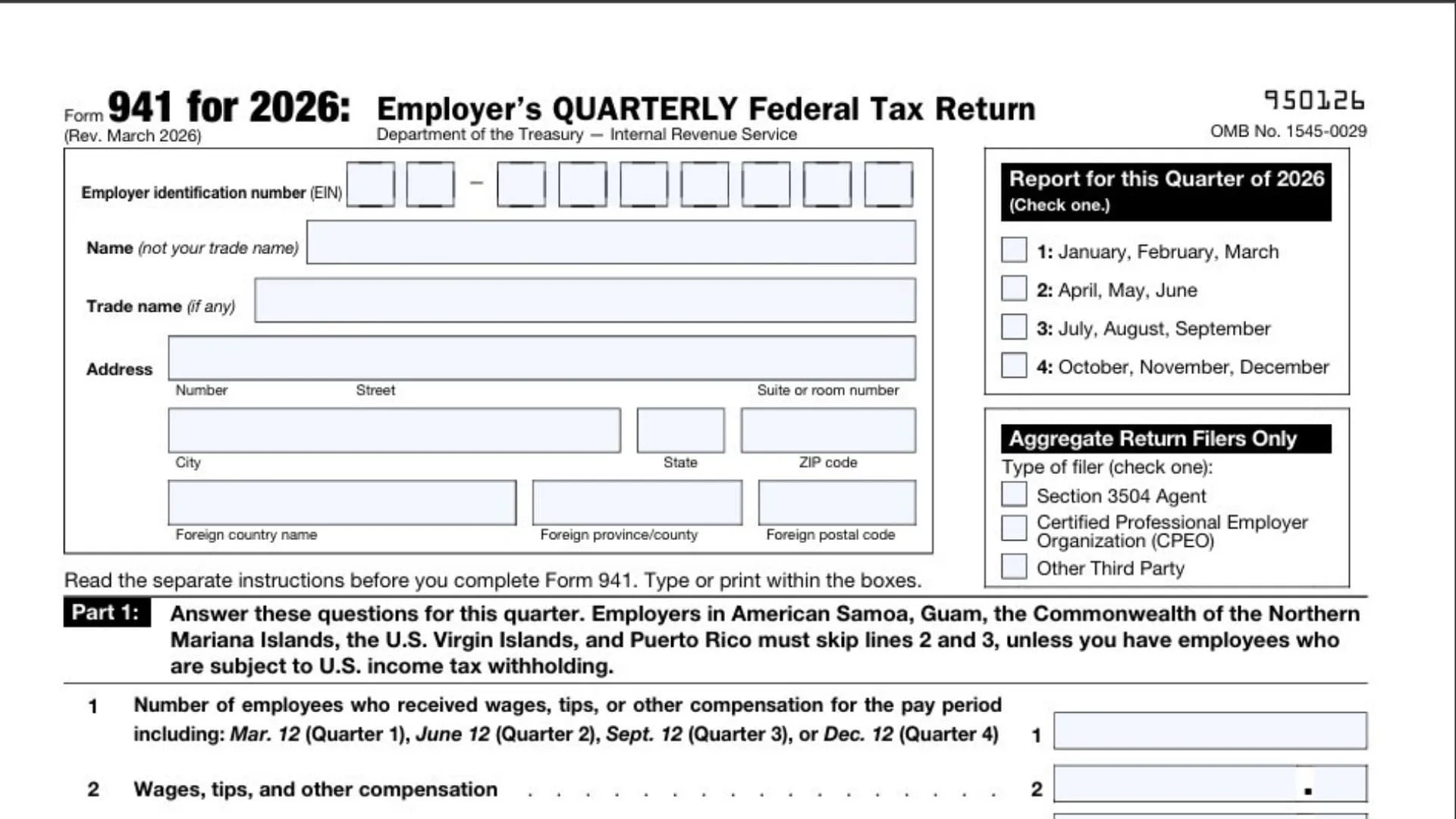
IRS Form 941 is the Employer’s Quarterly Federal Tax Return, a vital document used by businesses to report income taxes, Social Security taxes, and Medicare taxes withheld from their employees’ paychecks. Any employer who pays wages to employees must file this return four times a year to ensure they are accurately reporting the federal tax amounts collected as well as the employer’s corresponding portion of Social Security and Medicare taxes. The form is structured to calculate the total tax liability for the quarter, adjust for any variations like fractions of cents or sick pay, and compare the final liability against the deposits you have already made to the IRS. Filing this form accurately and on time is crucial for maintaining good standing with the tax authorities, avoiding penalties, and ensuring that your employees’ payroll taxes are properly credited to their federal accounts.
Getting Started: Basic Employer Information
Before diving into the numerical calculations, you must provide your basic identifying information at the top of the form. Enter your Employer Identification Number, which is the unique nine-digit number assigned to your business. Fill in your official business name along with any relevant trade names you operate under. Carefully input your full address, ensuring you include your street, suite or room number, city, state, and ZIP code. If your business is located outside the United States, provide your foreign country name, province or county, and postal code. Next, you must select the specific quarter of 2026 you are reporting for by checking the appropriate box: January through March, April through June, July through September, or October through December. If you are an aggregate return filer, indicate your filer type by checking whether you are a Section 3504 Agent, a Certified Professional Employer Organization, or another third party.

How to Complete Form 941
Part 1: Employee And Wage Details
Part 1 requires you to answer specific questions regarding your payroll for the selected quarter.
Line 1 asks for the total number of employees who received compensation during the pay period that includes the 12th day of the third month of the quarter.
Line 2 requires you to report the total amount of wages, tips, and other compensation paid out to your employees during the entire quarter.
Line 3 is where you enter the total federal income tax that you withheld from your employees’ paychecks.
Line 4 provides a checkbox to indicate if none of the wages or tips you paid are subject to Social Security or Medicare taxes; if this applies, you can check the box and skip directly to Line 6.
Part 1: Calculating Tax Liabilities
The next section involves calculating the specific Social Security and Medicare taxes owed based on the wages reported.
Line 5a requires you to enter your taxable Social Security wages in Column 1 and multiply them by 0.124 to determine the tax amount for Column 2.
Line 5b asks you to do the same for taxable Social Security tips, multiplying the total by 0.124.
Line 5c involves entering your taxable Medicare wages and tips, which are multiplied by 0.029 to find the tax due.
Line 5d is for reporting any taxable wages and tips that are subject to the Additional Medicare Tax withholding, multiplied by 0.009.
Line 5e calculates the total Social Security and Medicare taxes by adding the amounts calculated in Column 2 for lines 5a through 5d.
Line 5f is where you report any tax due on unreported tips based on a Section 3121(q) Notice and Demand.
Line 6 combines your total taxes before any adjustments by adding the amounts from Line 3, Line 5e, and Line 5f.
Part 1: Adjustments And Final Calculations
After calculating the base taxes, you must apply necessary adjustments to determine your final liability and compare it to your deposits.
Line 7 allows you to make an adjustment for fractions of cents to correct rounding differences.
Line 8 is for entering any current quarter adjustments related to third-party sick pay.
Line 9 provides a space for adjustments regarding tips and group-term life insurance.
Line 10 calculates your total taxes after adjustments by combining the amounts from Lines 6 through 9.
Line 11 lets you claim the qualified small business payroll tax credit for increasing research activities by attaching Form 8974.
Line 12 determines your total taxes after adjustments and nonrefundable credits by subtracting Line 11 from Line 10.
Line 13 is where you enter the total tax deposits you have made for this quarter, including any overpayments applied from previous quarters or related correction forms.
Line 14 calculates your balance due; if the amount on Line 12 is greater than your deposits on Line 13, you enter the difference here.
Line 15a calculates any overpayment if your deposits on Line 13 exceed your liability on Line 12.
Line 15b asks you to choose how to handle an overpayment by checking a box to either apply it to your next return or have it sent as a refund.
Lines 15c, 15d, and 15e require your routing number, account type, and account number if you are opting for a direct deposit refund.
Part 2: Deposit Schedule And Tax Liability
Part 2 requires you to classify your deposit schedule and report your tax liability breakdown for the quarter.
Line 16 asks you to check one of three boxes to define your deposit status. The first box is for businesses with a tax liability on Line 12 of less than $2,500 for the current or prior quarter, provided no next-day deposit obligation was incurred. The second box is for monthly schedule depositors, requiring you to break down your tax liability for Month 1, Month 2, and Month 3, ensuring the total matches Line 12. The third box is for semiweekly schedule depositors, which requires you to complete and attach Schedule B to report your liability.
Part 3: Business Status Updates
Part 3 asks two simple questions regarding changes to your business operations.
Line 17 provides a checkbox to indicate if your business has closed or if you have permanently stopped paying wages. If checked, you must enter the final date wages were paid and attach an explanatory statement.
Line 18 includes a checkbox for seasonal employers who are not required to file a return for every quarter of the year.
Part 4: Third-Party Designee
Part 4 determines who is authorized to communicate with the tax authorities about this return.
You must check “Yes” if you want to allow an employee, a paid tax preparer, or another individual to discuss this specific form with the authorities. If you select “Yes,” you must provide the designee’s name, their phone number, and a five-digit personal identification number that they will use for verification. If you do not want to authorize a third party, simply check “No.”
Part 5: Signatures And Preparer Information
The final section ensures the document is legally binding and accurately filed.
You must sign the form under penalties of perjury, declaring that the information provided is true and correct. Include your signature, the date, your printed name, your official title, and your best daytime phone number. If a paid preparer completed the form on your behalf, they must fill out the designated section with their name, signature, date, and Preparer Tax Identification Number. The preparer must also provide their firm’s name, Employer Identification Number, full address, and phone number, checking the appropriate box if they are self-employed. Ensure both pages are completed and that the signature is physically present before submitting the return.