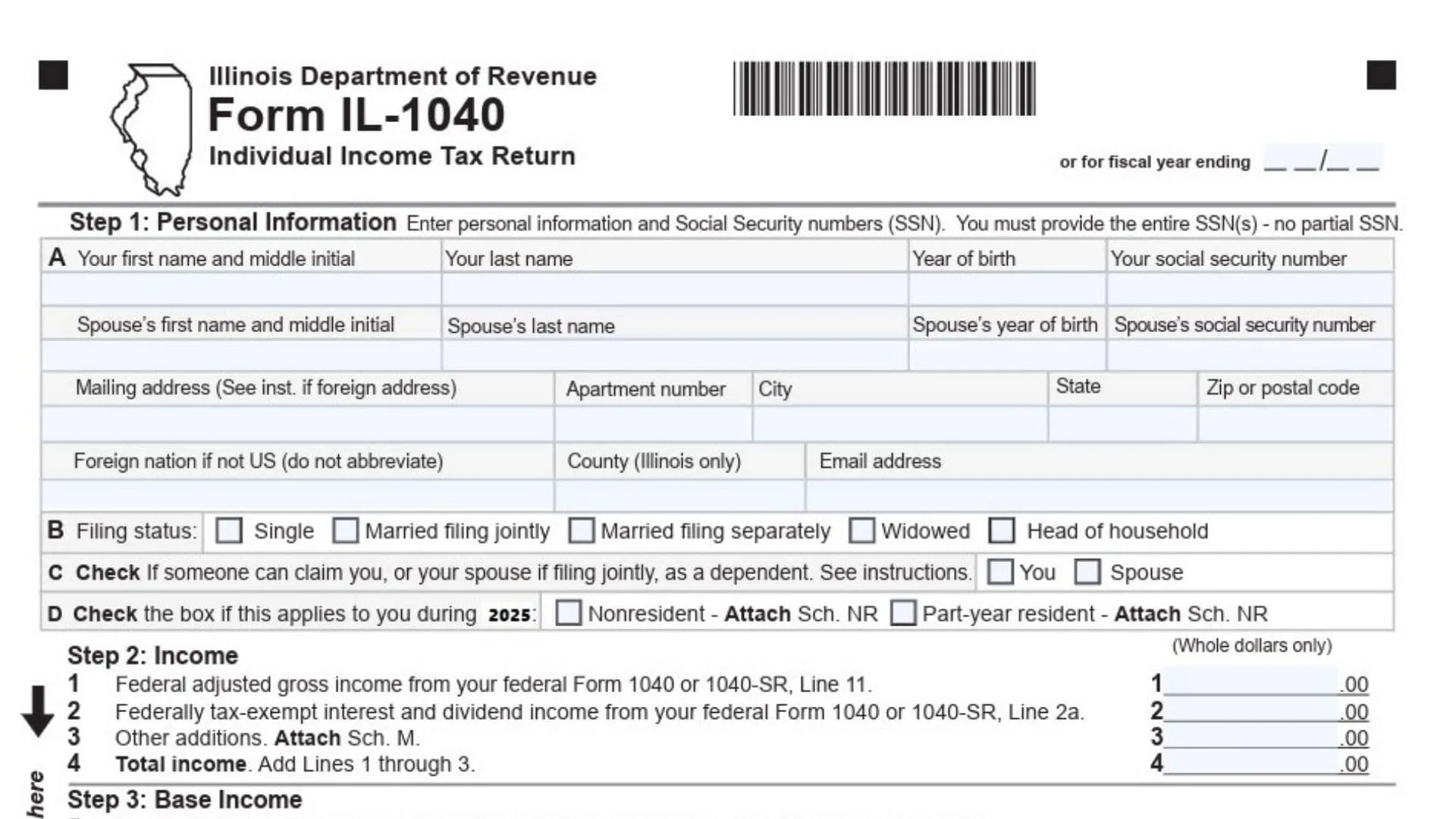
Form IL-1040 is the Illinois Individual Income Tax Return, used by residents and non-residents of Illinois to report income and calculate their state income tax obligations. It includes sections for reporting income, claiming exemptions, calculating taxable income, applying tax credits, and determining any tax due or refund owed. Filing this form ensures you comply with Illinois state income tax laws.

How to Complete Form IL-1040
Step 1: Personal Information
Line A: Name and Social Security Number
- Enter your first and middle name (as listed on your Social Security card) along with your Social Security number (SSN).
Line B: Spouse’s Information (if applicable)
- If you are married, enter your spouse’s full name, year of birth, and Social Security number.
Line C: Filing Status
- Check the appropriate box to indicate your filing status:
- Single
- Married filing jointly
- Married filing separately
- Widowed
- Head of household
Line D: Claim as a Dependent
- Check the box if someone else can claim you or your spouse as a dependent.
Line E: Residency Status
- Check whether you are a resident, part-year resident, or nonresident. If you are not a full-year resident, attach Schedule NR.
Line F: Foreign Address (if applicable)
- If you have a foreign address, enter it here (do not abbreviate country name).
Line G: Email Address
- Enter your email address (optional but recommended).
Line H: County (Illinois Only)
- Fill in the county name for Illinois residents.
Step 2: Income
Line 1: Federal Adjusted Gross Income (AGI)
- Enter your federal AGI from your federal Form 1040 or 1040-SR, Line 11. This is the starting point for calculating your Illinois income.
Line 2: Tax-Exempt Interest and Dividends
- Enter the amount of federally tax-exempt interest and dividend income from your federal Form 1040, Line 2a.
Line 3: Other Additions
- Report any other additions to your income as required. Attach Schedule M if needed.
Line 4: Total Income
- Add Lines 1 through 3 to find your total income.
Step 3: Base Income
Line 5: Social Security and Retirement Income Subtractions
- Enter any subtractions related to Social Security benefits or retirement income that are included in Line 1. These values are typically found on federal Forms 1040, Lines 4b, 5b, and 6b.
Line 6: Illinois Income Tax Overpayment Subtraction
- Report the amount of Illinois income tax overpayment included on your federal Form 1040, Schedule 1, Line 1.
Line 7: Other Subtractions
- Include any other allowable subtractions. Attach Schedule M to report these subtractions.
Line 8: Total Subtractions
- Add Lines 5, 6, and 7 to find your total subtractions.
Line 9: Illinois Base Income
- Subtract Line 8 from Line 4 to calculate your Illinois base income.
Step 4: Exemptions
Line 10a: Exemption for You and Your Spouse
- Enter the exemption amount for yourself and your spouse based on the instructions.
Line 10b: 65 or Older Exemption
- Check the box if you or your spouse are 65 or older. Multiply the number of checked boxes by $1,000 for each eligible person.
Line 10c: Legally Blind Exemption
- Check the box if you or your spouse are legally blind. Multiply the number of checked boxes by $1,000.
Line 10d: Dependent Exemption
- If you are claiming dependents, enter the exemption amount from Schedule IL-E/EITC, Step 2, Line 1.
Line 10: Exemption Allowance
- Add Lines 10a through 10d to calculate your total exemption allowance.
Step 5: Net Income and Tax
Line 11: Net Income (Residents Only)
- For Illinois residents, subtract Line 10 from Line 9 to calculate your net income.
Line 12: Tax Calculation
- Multiply your net income by the Illinois tax rate of 4.95% (0.0495). This will be your preliminary income tax.
Line 13: Investment Tax Credit Recapture
- Report any recapture of investment tax credits, if applicable. Attach Schedule 4255.
Line 14: Total Income Tax
- Add Lines 12 and 13 to determine your total income tax liability.
Step 6: Tax After Nonrefundable Credits
Line 15: Income Tax Paid to Another State
- Enter the amount of income tax paid to another state if applicable. Attach Schedule CR for proof.
Line 16: Property Tax, Education, and Volunteer Credit
- Report your credit for property tax, K-12 education expenses, or volunteer emergency worker credits. Attach Schedule ICR.
Line 17: Other Credits
- Report any other credits from Schedule 1299-C.
Line 18: Total Credits
- Add Lines 15, 16, and 17. The total credits cannot exceed the tax amount on Line 14.
Line 19: Tax After Nonrefundable Credits
- Subtract the total credits (Line 18) from the income tax (Line 14). This is your tax after nonrefundable credits.
Step 7: Other Taxes
Line 20: Household Employment Tax
- Enter any household employment tax that may apply. Refer to the instructions.
Line 21: Use Tax on Internet Purchases
- Enter the amount of use tax due on out-of-state internet, mail order, or other purchases.
Line 22: Compassionate Use of Medical Cannabis Program Surcharge
- Report any applicable surcharges from the Compassionate Use of Medical Cannabis Program or from gaming licensee sales.
Line 23: Total Tax
- Add Lines 19, 20, 21, and 22 to find your total tax liability.
Step 8: Payments and Refundable Credit
Line 25: Illinois Income Tax Withheld
- Enter the amount of Illinois income tax withheld, as reported on your W-2 or 1099 forms. Attach Schedule IL-WIT.
Line 26: Estimated Payments
- Include any estimated payments you made for the current tax year, including any overpayment from the prior year. Attach Forms IL-1040-ES or IL-505-I.
Line 27: Pass-Through Withholding
- Enter the amount of pass-through withholding, and attach Schedule K-1-P or K-1-T.
Line 28: Pass-Through Entity Tax Credit
- Report the pass-through entity tax credit. Attach Schedule K-1-P or K-1-T.
Line 29: Earned Income Tax Credit
- Enter the Earned Income Tax Credit from Schedule IL-E/EITC, Step 4, Line 9.
Line 30: Child Tax Credit
- Enter the Child Tax Credit from Schedule IL-E/EITC, Step 5, Line 12.
Line 31: Total Payments and Refundable Credits
- Add Lines 25 through 30 to determine the total payments and refundable credits.
Step 9: Total
Line 32: Overpayment
- If Line 31 is greater than Line 24 (Total Tax), subtract Line 24 from Line 31 to find your overpayment.
Line 33: Amount Owed
- If Line 24 is greater than Line 31, subtract Line 31 from Line 24 to determine the amount you owe.
Step 10: Underpayment of Estimated Tax Penalty and Donations
Line 34: Late Payment Penalty
- If applicable, report any late-payment penalty for underpayment of estimated taxes.
Line 35: Voluntary Charitable Donations
- Report any voluntary charitable donations. Attach Schedule G.
Line 36: Total Penalties and Donations
- Add Lines 34 and 35 to determine the total penalty and donations.
Step 11: Refund or Amount You Owe
Line 37: Overpayment
- If you have an overpayment (from Line 32), subtract Line 36 from Line 32 to calculate your refund.
Line 38: Refund
- Enter the amount of your refund. If you wish to receive a refund via direct deposit, complete the information below.
Line 39: Refund Method
- Choose whether you want your refund via direct deposit or paper check.
Line 40: Amount to Be Credited Forward
- If you wish to apply your refund to the next tax year, subtract Line 38 from Line 37.
Line 41: Amount You Owe
- If you owe taxes, add Lines 33 and 36, or subtract Line 32 from Line 36 if applicable.
Step 12: Health Insurance Checkbox and Signature
Line 42: Health Insurance Eligibility
- Check the box if IDOR may share your income information with other state agencies to determine eligibility for health insurance benefits.
Signature Section:
- Sign and date the form. If filing jointly, both spouses must sign.
- Include your daytime phone number.
- If you had a paid preparer, they must sign and provide their information.