
Form IT-2104 is a critical document that tells your employer exactly how much state and local income tax to withhold from your paycheck each pay period. While the federal form handles IRS taxes, the IT-2104 ensures you are covering your obligations for New York State, New York City, and Yonkers taxes. This form allows you to declare your filing status, residency, and the number of allowances you are claiming, which directly affects your take-home pay. It is typically completed when you start a new job, but you should also update it whenever your life circumstances change—such as getting married, having a child, or if you simply want to adjust your tax withholding to avoid owing money at the end of the year.
How To File Form IT-2104?
You do not mail Form IT-2104 to the tax department yourself. Instead, once you have filled out and signed the document, you simply hand it to your employer. They will use the data to update their payroll system. It is highly recommended that you keep a copy of the completed form for your own personal records. You should review this form once a year to verify that your withholding amounts are still appropriate for your financial situation.
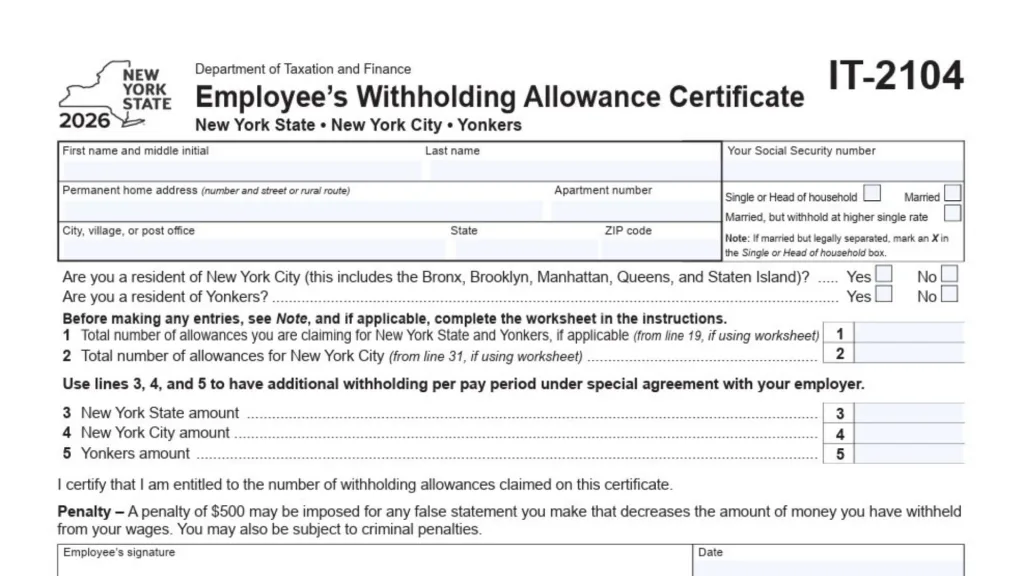
How To Complete Form IT-2104
Below is a detailed breakdown of every section found on the certificate, ensuring you don’t miss a single detail.
Personal Information
- Name: clearly print your First Name, Middle Initial, and Last Name in the designated boxes.
- Social Security Number: Enter your valid Social Security number. This is essential for your employer to report your earnings correctly.
- Home Address: Fill in your permanent home address, including the number, street, and rural route if applicable.
- Apartment Number: If you live in an apartment, ensure the unit number is listed here.
- City, State, ZIP Code: Complete the full mailing address details.
Residency Status Questions
You must answer “Yes” or “No” to the following specific residency questions to determine your local tax liability:
- New York City Resident: Mark “Yes” if you live in the Bronx, Brooklyn, Manhattan, Queens, or Staten Island. Mark “No” if you do not.
- Yonkers Resident: Mark “Yes” if you reside in Yonkers. Mark “No” if you do not.
Filing Status
Select the box that accurately describes your situation for tax purposes.
- Single or Head of Household: Choose this if you are single or qualify as a head of household. Note: If you are legally separated, you must mark this box (do not choose Married).
- Married: Select this if you are married and filing jointly.
- Married, but withhold at higher single rate: Select this if you are married but prefer to have taxes withheld at the higher rate typically used for single filers (often used to prevent under-withholding when both spouses work).
Withholding Allowances (Lines 1 And 2)
Before filling these lines, single taxpayers with one job and zero dependents can typically enter “0”. Others may need to complete the worksheet provided in the official instructions to calculate the specific number.
- Line 1: Enter the total number of allowances you are claiming for New York State and Yonkers. If you used the worksheet, this number usually comes from line 19 of that worksheet.
- Line 2: Enter the total number of allowances you are claiming for New York City. If you used the worksheet, this number usually comes from line 31.
Additional Withholding Amounts (Lines 3, 4, And 5)
Use this section only if you have a special agreement with your employer to have extra money taken out of each paycheck. This is often done by people who expect to owe more tax than the standard tables cover.
- Line 3: Enter the specific additional dollar amount you want withheld for New York State.
- Line 4: Enter the specific additional dollar amount you want withheld for New York City.
- Line 5: Enter the specific additional dollar amount you want withheld for Yonkers.
Employee Signature And Date
- Certification: Read the statement certifying that you are entitled to the allowances claimed.
- Signature: Sign your name on the line labeled “Employee’s signature.”
- Date: Write the current date.
- Penalty Warning: Be aware that making a false statement that decreases your withheld tax can result in a $500 penalty and potential criminal charges.
Employer Use Only Section
This bottom portion of the form is for your employer to complete, but it is important to verify the information they report about you.
- Employer’s Name and Address: Your employer will fill in their business name and location.
- Employer Identification Number: The employer enters their specific tax ID number here.
- Box A: The employer must mark this box if you, the employee, claimed more than 14 exemption allowances for New York State.
- Box B: The employer marks this box if you are a new hire or a rehire.
- First Date of Service: The employer will enter the first date (mm/dd/yyyy) that you performed services for pay.
- Health Insurance Availability: The employer must check “Yes” or “No” to indicate if dependent health insurance benefits are available to you.
- Qualification Date: If health insurance is available, the employer enters the date you qualify for it.