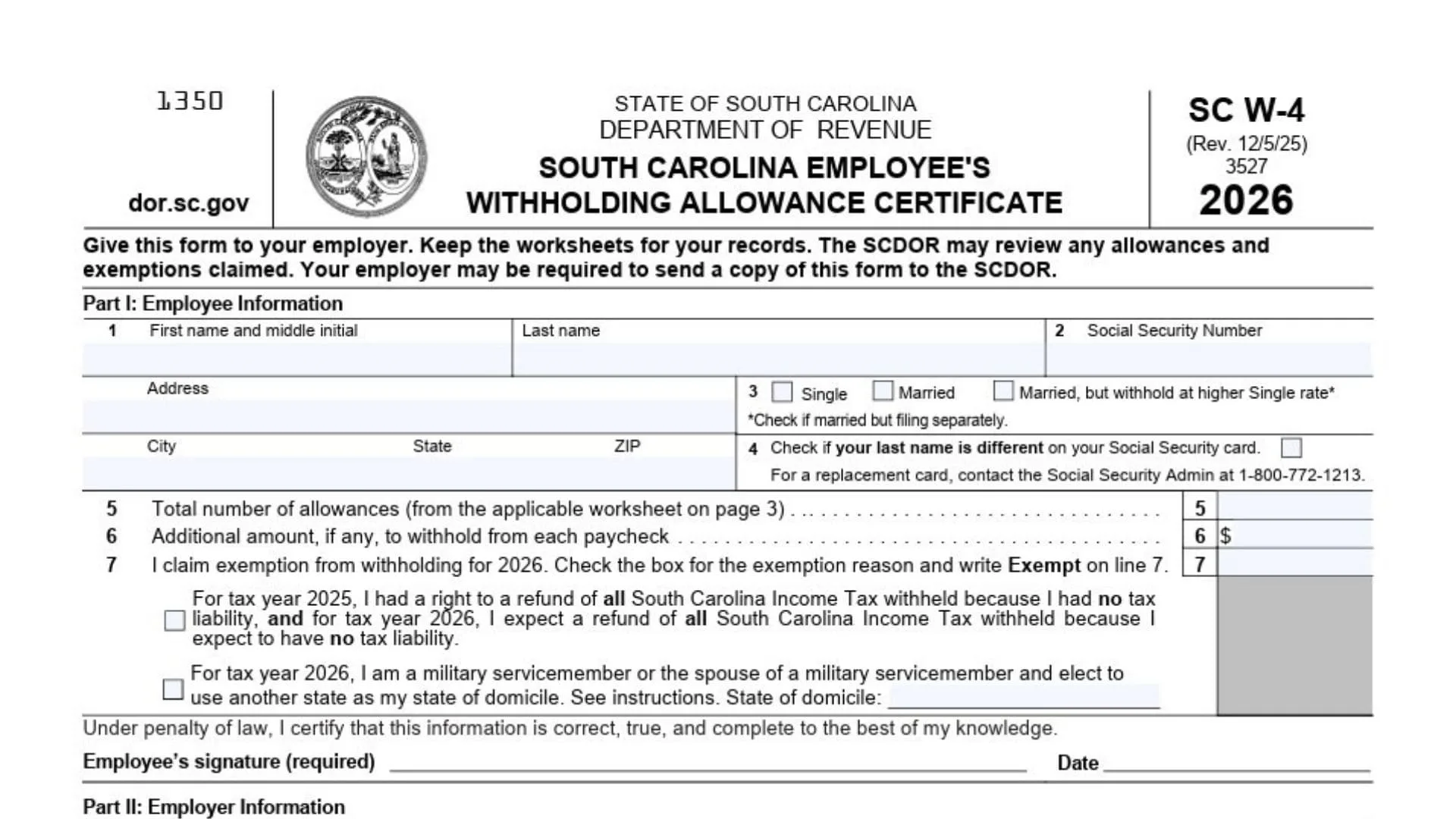
Form SC W-4 is the form you give to your employer so they can figure out how much South Carolina Income Tax to take out of each paycheck. Think of it as your “withholding settings” for state taxes: you provide your identity details, choose a filing status, claim a number of withholding allowances, optionally request an extra dollar amount to be withheld each pay period, or (if you truly qualify) claim an exemption from withholding for the year. The choices you make here affect your take-home pay now and what happens later when you file your South Carolina individual income tax return: if too much is withheld, you’ll usually get a refund; if too little is withheld, you may owe money at filing time and might also face a penalty in some cases. It’s also not a “set it and forget it” document—updating it when your life changes (marriage, divorce, a new dependent, a second job, your spouse starts working, or a big jump in non-wage income like interest/dividends) helps keep your withholding aligned with reality. Finally, this form is mainly between you and your employer’s payroll department: you complete the employee section, sign it, hand it in, and keep the worksheets for your own records so you can remember how you arrived at your allowances.
How To File Form SC W-4
Complete the employee section first, sign and date it, and submit it directly to your employer (HR/payroll). Do not attach it to your income tax return. Keep the worksheet pages for your records. If you have more than one job, you generally need to complete and submit a separate SC W-4 for each employer. Consider submitting a new SC W-4 each year and any time your personal or financial situation changes so your withholding stays accurate.

How To Complete Form SC W-4
Part I: Employee Information
Line 1 (Name And Address): Enter your first name and middle initial, last name, street address, city, state, and ZIP code. Use your legal name and a reliable address where you receive mail.
Filing Status Check Boxes: Choose the one that matches how you expect to file. Select Single if you’ll file single. Select Married if you’ll file married filing jointly. Select Married, But Withhold At Higher Single Rate if you’re married but want withholding calculated more aggressively (often used when both spouses work or when you want to reduce the chance of owing later). If there is a note to check if married but filing separately, use it only if that is actually how you will file.
Line 2 (Social Security Number): Enter your full Social Security Number carefully. Double-check the digits; an error can cause payroll and reporting problems.
Line 3 (If Your Copy Labels The Status Block As Line 3): Some versions visually place the marital status selection as “Line 3.” If yours does, treat it the same way as the filing status check boxes above: pick exactly one option and make sure it matches your expected filing status.
Line 4 (Last Name Different From Social Security Card): Check this box if your last name does not match the last name on your Social Security card record. This is a name/identity matching step, and it matters for payroll reporting. If you need to correct your Social Security record, follow the form’s guidance to contact the Social Security Administration.
Line 5 (Total Number Of Allowances): Enter the total number of South Carolina withholding allowances you are claiming. You calculate this from the worksheets (the Personal Allowances Worksheet, and the optional Deductions, Adjustments, And Additional Income Worksheet if it applies to you). After you compute the total, write that final number on line 5. This number is what your employer uses to calculate withholding for regular wages.
Line 6 (Additional Amount To Withhold From Each Paycheck): If you want extra South Carolina tax withheld each paycheck, enter a dollar amount here (for example, $10, $25, or $50). This is useful if you have multiple jobs, if your spouse works and you want to avoid under-withholding, or if you have meaningful non-wage income and want to cover it through payroll withholding. If you do not want additional withholding, leave it blank (or enter 0 if your payroll system requires a value).
Line 7 (Exemption From Withholding For 2026): Use this line only if you qualify to be exempt from South Carolina withholding for 2026. If you qualify, check the box that matches your exemption reason and write “Exempt” on line 7. If you are claiming exempt, complete only line 1 through line 4 and line 7 (do not complete line 5 or line 6 when properly claiming exemption). The exemption reasons include: (1) you had no South Carolina tax liability in 2025 and had the right to a refund of all South Carolina income tax withheld, and you expect no South Carolina tax liability in 2026 so you expect a refund of all South Carolina income tax withheld; and (2) a military servicemember or eligible spouse domicile election situation where you provide the state of domicile on the line provided. If the military domicile situation changes during the year, submit an updated form so withholding stays correct for the rest of the year. An exemption claim is time-limited and typically expires at the end of the year unless you submit a new form.
Certification, Signature, And Date: Read the certification statement, then sign and date the form. Your signature is required; without it, your employer may not be able to apply your instructions.
Part II: Employer Information
Box 8 (Employer’s Name And Address): This is completed by your employer. If the form is being sent to the State Directory of New Hires, the employer may use an address where income withholding orders should be sent.
Box 9 (First Date Of Employment): This is completed by your employer. It is the date you first performed services for pay. If you were rehired after being separated for at least 60 days, the employer may enter the rehire date.
Box 10 (FEIN): This is completed by your employer. It is the Federal Employer Identification Number.
Personal Allowances Worksheet (Keep For Your Records)
Line A: Enter 1 for yourself.
Line B: Enter 1 if you will file as married filing jointly.
Line C: Enter 1 if you will file as head of household. In general terms, head of household typically applies when you are unmarried and pay more than 50% of the cost of keeping up a home for yourself and a qualifying individual.
Line D: Enter 1 if any of these apply: you are single (or married filing separately) and have only one job; or you are married filing jointly, have only one job, and your spouse does not work; or your wages from a second job or your spouse’s wages (or the total of both) are $1,500 or less. This line is meant to cover common household/work setups that affect withholding.
Line E (Dependents): Enter the number of dependents you will claim on your 2026 federal return. The dependents you claim for South Carolina should match the dependents on your federal return (including qualifying children and qualifying relatives).
Line F (Dependents Under Age 6): Enter how many of the dependents from line E will be under age 6 as of December 31, 2026.
Line G (Total): Add lines A through F. This total is your personal allowances result. If you are not using the optional worksheet below, this is the number you put on line 5 of the main SC W-4.
Deductions, Adjustments, And Additional Income Worksheet (Optional) (Keep For Your Records)
Use this worksheet only if you plan to itemize deductions, claim certain adjustments to income, or have a large amount of non-wage income not subject to withholding. It helps you fine-tune allowances so your withholding better matches your expected tax situation.
Line 1 (Estimated Itemized Deductions For 2026): Enter your estimate of 2026 itemized deductions. These generally include qualifying home mortgage interest, charitable contributions, state and local taxes up to the stated cap, and medical expenses above the stated threshold. Enter a dollar amount.
Line 2 (Federal Standard Deduction For 2026): Enter the federal standard deduction amount for your filing status. Enter a dollar amount.
Line 3 (Itemized Minus Standard): Subtract line 2 from line 1. If the result is zero or less, enter 0.
Line 4 (Adjustments To Income And Additional Standard Deduction): Enter an estimate of your 2026 adjustments to income and any additional standard deduction amount for age or blindness (if applicable). Enter a dollar amount.
Line 5 (Total Of Line 3 And Line 4): Add line 3 and line 4. Enter a dollar amount.
Line 6 (Non-Wage Income Not Subject To Withholding): Enter an estimate of your 2026 non-wage income not subject to withholding (such as dividends or interest). Enter a dollar amount.
Line 7 (Line 5 Minus Line 6): Subtract line 6 from line 5. If the result is zero, enter 0. If the result is negative, enter the negative number in brackets (for example, (2500)).
Line 8 (Convert To Allowances): Divide line 7 by 5,200. If the result is negative, show it in brackets. Round decimals down (drop the decimal portion rather than rounding up).
Line 9 (Personal Allowances Carryover): Enter the number from the Personal Allowances Worksheet, line G.
Line 10 (Final Allowances): Add line 8 and line 9. If the result is zero or less, enter 0. This line 10 result is the allowance number you transfer to line 5 of the main SC W-4 (instead of using line G directly).
Final Check Before Submitting To Your Employer
Confirm your name and address are complete, your filing status selection is correct, your SSN is accurate, and you checked the name-mismatch box only if it truly applies. Make sure Line 5 matches the correct worksheet result (line G if you didn’t use the optional worksheet, or line 10 if you did). If you used Line 6, verify the extra dollar amount is intentional and realistic per paycheck. If you claimed exempt on Line 7, verify you met the exemption requirements, wrote “Exempt,” checked the correct reason, and did not complete lines that don’t apply. Finally, ensure you signed and dated the form before handing it to payroll.