The W-4 form, known as the Employee’s Withholding Certificate, serves as your key tool to tell your employer exactly how much federal income tax to deduct from each paycheck based on your personal situation, filing status, dependents, and other financial factors. Fillable versions make it simple to type directly into a digital PDF before printing or submitting electronically, saving time and reducing errors compared to handwriting. Whether you are starting a new job, getting married, welcoming a child, or noticing over or under-withholding on your paystubs, updating this form helps avoid surprises at tax time, like owing a big bill or waiting too long for a refund. It factors in everything from multiple jobs and spouse income to child credits, other dependents, extra earnings like dividends, planned deductions beyond the standard amount, and even requests for more tax taken out per pay period. Designed for 2026 use, the form skips outdated allowances and instead uses straightforward steps to customize withholding precisely, with optional worksheets for complex scenarios like multiple jobs or itemized deductions. New employees must complete it on day one, but anyone can submit a fresh one anytime life changes occur, and employers must honor it while the IRS reserves the right to review for accuracy. Using the IRS online estimator tool can fine-tune entries, especially mid-year or with self-employment income, ensuring your take-home pay aligns closely with your actual tax liability throughout the year.
How To File The W-4 Form
Complete the form digitally or by hand using the fillable PDF version. Provide the finished form to your employer either on paper, via their HR portal, or through an electronic system if offered. Your employer uses it to adjust withholding starting from your next paycheck, and it remains effective until you submit a new one or your employment ends. Keep a copy for your records, and update it within 10 days of any major life changes like marriage, divorce, birth of a child, or job loss to keep withholding current.
How To Complete The W-4 Form
Form Title And Purpose
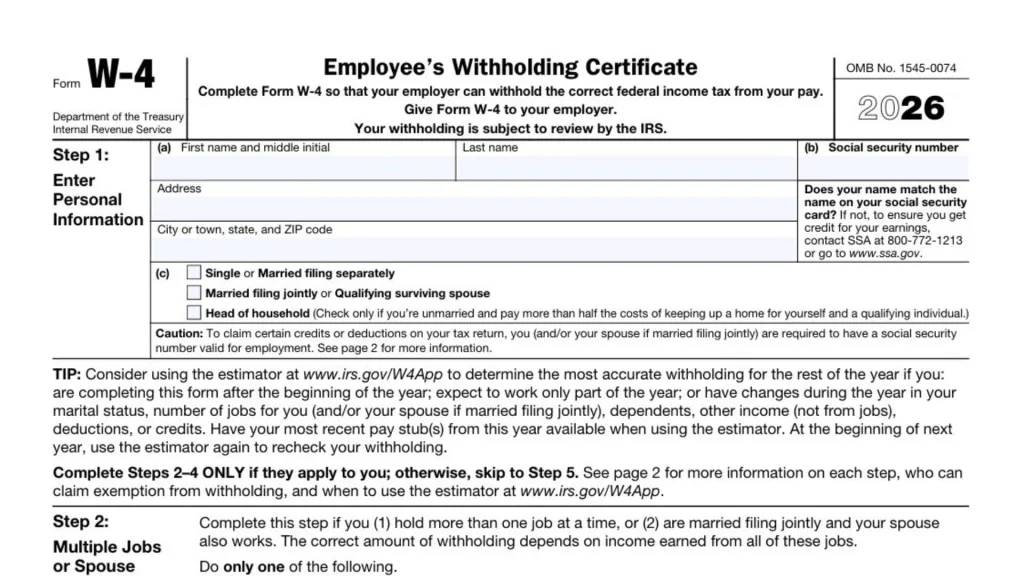
Enter your details in Form W-4, the 2026 Employee’s Withholding Certificate, so your employer withholds the right amount of federal income tax from your wages. Submit it to your employer, noting that the IRS may review your withholding setup.
OMB Number
Note the OMB No. 1545-0074 at the top, which identifies the form for government tracking purposes. No action needed here.
Step 1: Personal Information
Fill out Step 1 with your basic details to identify you correctly for withholding calculations.
Step 1(a): Name And Address
Write your first name and middle initial, last name, full address, city or town, state, and ZIP code in the spaces provided.
Step 1(b): Social Security Number
Enter your Social Security number accurately in the box.
Name Match Note
Verify your name matches the one on your Social Security card. If it does not match, call SSA at 800-772-1213 or visit www.ssa.gov to update it and ensure proper credit for your earnings.
Step 1(c): Filing Status
Select one box for your filing status: Single or Married filing separately; Married filing jointly or Qualifying surviving spouse; or Head of household. Choose Head of household only if unmarried and you cover more than half the costs of maintaining a home for yourself and a qualifying person.
SSN Caution
Remember, you and your spouse if filing jointly need a valid Social Security number for employment to claim specific credits or deductions on your tax return. More details appear on page 2.
Estimator Tip
Use the estimator at www.irs.gov/W4App for precise withholding if you start this form after January 1, work only part-year, or face changes in marital status, job count for you and spouse if joint, dependents, non-job income, deductions, or credits. Have recent pay stubs ready, and recheck next year.
Steps 2 Through 4 Note
Tackle Steps 2 to 4 only if relevant to your situation. Otherwise, jump to Step 5. Page 2 explains each step, exemption rules, and estimator use.
Step 2: Multiple Jobs Or Spouse Works
Use Step 2 if you hold more than one job simultaneously or are married filing jointly with a working spouse, since total income from all sources affects correct withholding.
Step 2 Options
Pick just one option below.
Step 2(a): Estimator
Run the estimator at www.irs.gov/W4App for top accuracy across this step and Steps 3 to 4. Choose this if you or your spouse have self-employment earnings.
Step 2(b): Worksheet
Complete the Multiple Jobs Worksheet on page 3, then add the result to Step 4(c).
Step 2(c): Two-Job Checkbox
If exactly two jobs exist total, check this box on both W-4 forms. This works better than Step 2(b) when lower-job pay exceeds half the higher-job pay; otherwise, use Step 2(b).
Steps 3 To 4(b) Note
Do Steps 3 through 4(b) on just one W-4, ideally the highest-paying job. Skip them on others for best results.
Step 3: Claim Dependents And Other Credits
Calculate credits here if total income stays at $200,000 or less, or $400,000 or less if married filing jointly.
Step 3(a): Qualifying Children
Count qualifying children under 17 by year-end, multiply by $2,200, and enter the dollar amount on line 3(a).
Step 3(b): Other Dependents
Count other dependents, multiply by $500, and enter the dollar amount on line 3(b).
Step 3 Total
Combine 3(a) and 3(b), add any other credits, and write the total on line 3.
Step 4: Other Adjustments
Adjust withholding here for extra factors.
Step 4(a): Other Income
List expected non-job income like interest, dividends, or retirement pay that lacks its own withholding. Enter the annual estimate on 4(a).
Step 4(b): Deductions
Figure extra deductions with the page 4 worksheet, then enter the amount on 4(b). Skipping means standard deduction applies.
Step 4(c): Extra Withholding
Add any desired extra tax per pay period on 4(c).
Exempt From Withholding Checkbox
Check if claiming exemption for 2026, confirming you meet both conditions: no 2025 tax liability and none expected in 2026. See page 2 details. Submit a new W-4 for 2027.
Step 5: Sign Here
Sign under penalty of perjury, declaring the info true, correct, and complete. Date it. This form needs your signature to be valid.
Employers Only: Name And Address
Employer fills in their name and address.
Employers Only: First Date Of Employment
Employer notes your start date.
Employers Only: EIN
Employer enters their Employer Identification Number.
Page 2: General Instructions
Follow these for background on completing the form accurately.
Future Developments
Check www.irs.gov/FormW4 for updates like new laws after printing.
Purpose Recap
This sets employer withholding to match your tax needs. Too little means owing at filing plus possible penalties; too much means a refund. Update with life or money shifts. See Pub. 505 for details.
Exemption Details
Exempt for 2026 if no 2025 tax on Form 1040 line 24 or below filing threshold, and expect none in 2026. Check the box, do Steps 1(a), 1(b), 5 only. No withholding occurs; refile by February 16, 2027.
Privacy Note
Steps 2(c) and 4(a) cover non-job income. If uneasy, pick Step 2(b) or add to 4(c) instead.
Estimator When
Use www.irs.gov/W4App if mid-year filing, part-year work, status or dependent changes, non-wage income, or extra taxes apply.
Self-Employment Note
Withhold for self-employment taxes via estimator if needed.
Nonresident Alien
See Notice 1392 before filling if nonresident alien.
Step 1(c) Specifics
Pick status to set standard deduction and tax rates for withholding.
Step 2 Specifics
Separate W-4 per job. Option (a) best; (b) close. For two jobs, box in (c) halves brackets if pay similar.
Multiple Jobs Caution
Limit Steps 3 to 4(b) to highest-pay job’s W-4.
Step 3 Specifics
Child credit needs under-17 dependent living over half-year with SSN. Other dependents qualify differently. Add credits like foreign or education. See Pub. 501.
Step 4 Specifics
4(a) for non-job income avoids estimates. Use 1040-ES otherwise. 4(b) for non-standard deductions with SSN. 4(c) for extras including worksheet results.
Page 3: Multiple Jobs Worksheet
Use for Step 2(b); do once on highest-pay job’s W-4.
Note On Jobs
For over $120,000 or three-plus jobs, see Pub. 505 or estimator.
Line 1: Two Jobs
For two jobs or joint with one each, use page 5 table for higher vs lower pay intersection. Enter on line 1, skip to 3.
Line 2a: Three Jobs Highest Pair
Table highest vs next-highest pay.
Line 2b: Combined Highest Vs Third
Add top two pays for higher row vs third.
Line 2c: Total
Add 2a and 2b.
Line 3: Pay Periods
Note periods for top job: 52 weekly, 26 biweekly, 12 monthly.
Line 4: Per Period
Divide line 1 or 2c by line 3; enter on this W-4’s Step 4(c) plus extras.
Page 4: Deductions Worksheet
For Step 4(b); see Schedule 1-A instructions.
Line 1a: Qualified Tips
Under $150,000 single or $300,000 joint, up to $25,000 tips.
Line 1b: Qualified Overtime
Under limits, up to $12,500 single or $25,000 joint of time-and-a-half portion.
Line 1c: Vehicle Loan Interest
Under $100,000 single or $200,000 joint, up to $10,000.
Line 2: Total Special
Add 1a to 1c.
Line 3a: Senior You
Under $75,000 single or $150,000 joint, $6,000 if 65+ by year-end.
Line 3b: Senior Spouse
Same limits, $6,000 if spouse 65+ with SSN.
Line 4: Seniors Total
Add 3a and 3b.
Line 5: Other Adjustments
Estimate student loan interest, IRA, educator costs, alimony, etc. from Schedule 1 Part II. See Pub. 505.
Line 6a: Medical Expenses
Over 7.5% of income.
Line 6b: State/Local Taxes
Under $505,000 single or $252,500 separate, up to $40,400 or $20,200.
Line 6c: Mortgage Interest
Under $750,000 single or $375,000 separate debt.
Line 6d: Charities
Over 0.5% of income.
Line 6e: Other Itemized
Any rest.
Line 7: Itemized Total
Add 6a to 6e.
Line 8a: Total Income
Estimate full income.
Line 8b: Subtract Seniors
Line 8a minus line 4; zero if negative.
Line 9: Limitation Base
$768,700 joint/QSS; $640,600 single/HOH; $384,350 separate.
Line 10: Limited Itemized
Full line 7 if 9 over 8b; else 94% of 7.
Line 11: Standard Deduction
$32,200 joint/QSS; $24,150 HOH; $16,100 single/separate.
Line 12: Cash Charity
With standard, up to $1,000 single or $2,000 joint.
Line 13: Standard Plus Charity
Add 11 and 12.
Line 14: Excess Deductions
If 10 over 13, then 10 minus 11; else line 12.
Line 15: Grand Total
Add 2, 4, 5, 14 for Step 4(b).
Privacy And Paperwork Notice
Info required by law for withholding; failure defaults to single zero entries. Used for audits, state taxes, etc. Retain records. Confidential per Code. Time varies. Suggest improvements via tax instructions.