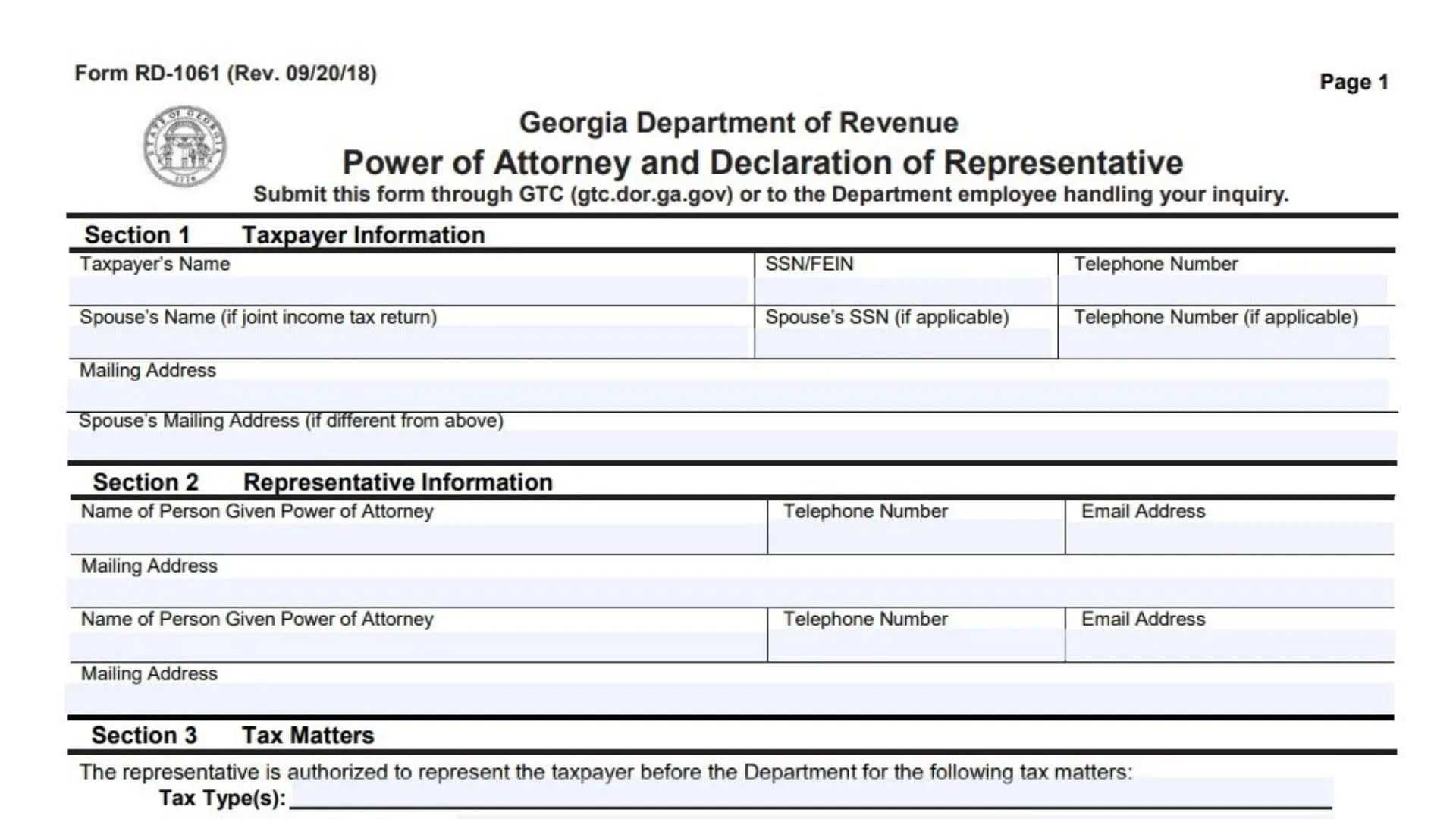
The Georgia Form RD-1061 is a formal legal document utilized by taxpayers to authorize an individual or multiple individuals to represent them before the Georgia Department of Revenue. This authorization allows the appointed representative to discuss confidential tax matters, access sensitive information, and perform specific acts on behalf of the taxpayer for designated tax periods. Taxpayers can use this form to grant permission for a professional, such as a certified public accountant or an attorney, to handle tasks like making payments, executing waivers, filing protests, or receiving refund checks. It acts as a necessary safeguard, ensuring that the state only communicates private tax details to explicitly trusted agents while the taxpayer maintains ultimate responsibility for their tax obligations. The document is strictly limited to the specific tax types and years outlined within it and automatically revokes prior authorizations unless you indicate otherwise.
How To File The Document
Taxpayers have two primary methods to submit this paperwork. The preferred and most efficient method is uploading it through the Georgia Tax Center online portal. To do this, you need to log into your account, navigate to the specific links menu to find the submission option for this document, and follow the system prompts to upload your completed pages. Alternatively, you can directly provide the paperwork to the specific Department of Revenue employee who is actively handling your current tax inquiry or case.

How To Complete Georgia Form RD-1061
Line 1: Taxpayer Name. Enter the full legal name of the individual or the registered name of the business entity granting authorization.
Line 2: SSN or FEIN. Provide the full Social Security Number for individual taxpayers or the Federal Employer Identification Number for business entities.
Line 3: Telephone Number. Input the primary contact number where the main taxpayer can be reached.
Line 4: Spouse Name. If this authorization applies to a jointly filed income tax return, print the full legal name of your spouse.
Line 5: Spouse SSN. Provide the full Social Security Number of the spouse if you are granting access to joint tax records.
Line 6: Spouse Telephone Number. Enter the direct contact number for the spouse if it differs from the primary taxpayer phone number.
Line 7: Mailing Address. Write the current and complete postal address of the primary taxpayer.
Line 8: Spouse Mailing Address. Fill in the postal address of the spouse if they reside at a different physical location than the primary taxpayer.
Line 9: Representative Name. Clearly print the full name of the individual you are appointing as your agent. This must be a specific person and not a corporate entity.
Line 10: Representative Telephone Number. Provide the direct phone number where your appointed agent can be contacted.
Line 11: Representative Email Address. Enter a valid professional or personal email address for the representative.
Line 12: Representative Mailing Address. Write the complete postal address for the person you are authorizing.
Line 13: Second Representative Details. If you wish to appoint a second person, fill in their full name, phone number, email address, and physical mailing address in the provided secondary spaces.
Line 14: Tax Types. Specify the exact categories of taxes the representative is allowed to handle, such as corporate tax, sales tax, or individual income tax.
Line 15: Tax Periods or Years. Indicate the specific timeframes, quarters, or annual tax years that this authorization covers.
Line 16: Authorized Acts Checkboxes. Mark the specific boxes corresponding to the powers you want to grant your agent. Options include making payments, receiving refund checks without endorsing them, executing waivers, extending statutory assessment periods, filing protests, executing refund claims, receiving confidential data, and performing other lawful acts.
Line 17: Retention of Prior Power of Attorney Checkbox. Mark this box only if you want to keep previously filed authorization forms active. If left blank, filing this new document automatically cancels all older ones for the identical tax matters.
Line 18: Retained Representatives List. If you checked the previous box, explicitly write down the names of the prior agents whose authority should remain intact.
Line 19: Taxpayer Signature. The taxpayer must sign the document here to make it legally binding. For businesses, an authorized corporate officer, partner, or member must sign.
Line 20: Print Name. Neatly write the name of the person who just signed the document.
Line 21: Date. Enter the exact date the document is signed by the taxpayer.
Line 22: Title. If signing on behalf of a corporation, partnership, or estate, state your official role or job title.
Line 23: Spouse Signature. If granting access to a joint return, the spouse must sign their name in this space.
Line 24: Print Spouse Name. Neatly write the name of the spouse who provided their signature.
Line 25: Spouse Date. Enter the date the spouse signed the paperwork.
Line 26: Notary Sworn Date. A notary public must fill in the day, month, and year you appeared before them to acknowledge the document.
Line 27: Notary Signature and Seal. The notary public will sign their name, date the section, and apply their official seal. This entire section is skipped if your agent is a licensed professional listed in the final section.
Line 28: Representative Designation Number. The agent must enter a number from one to four representing their professional status, such as an attorney, certified public accountant, enrolled agent, or registered public accountant.
Line 29: Licensing Jurisdiction. The agent must list the state or licensing authority that issued their professional credentials.
Line 30: License Number. The representative needs to input their official bar, certification, registration, or enrollment number.
Line 31: Representative Signature and Date. The professional agent must sign and date the declaration to confirm their eligibility and accept the appointment under penalty of perjury.