
Minnesota Form M1PR is used to claim the Homestead Credit Refund and the Property Tax Refund for qualifying individuals and families in Minnesota. It allows taxpayers to receive a refund based on the amount of property taxes they pay and their household income. If you qualify, filling out this form can provide a valuable refund to help offset your property tax burden. The form is especially useful for homeowners who meet income thresholds and pay significant property taxes. In this article, we will explain how to properly complete Form M1PR line by line, ensuring you get the maximum refund possible without confusion.
How to File Minnesota Form M1PR
Filing Minnesota Form M1PR involves gathering your property tax statements, household income details, and other relevant information. Once you have these documents ready, follow the instructions outlined below to fill out the form correctly.
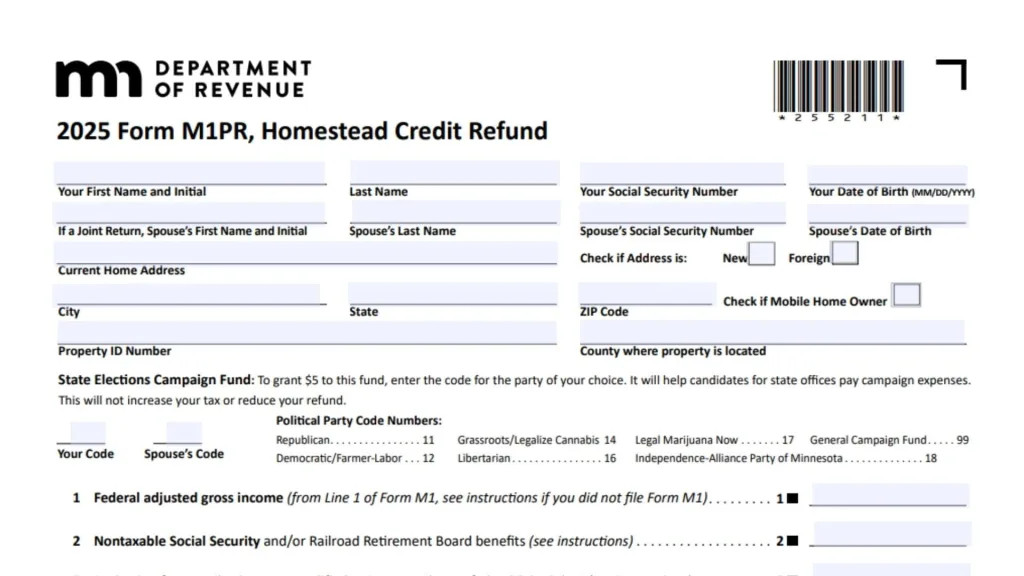
How to Complete Minnesota Form M1PR
Line 1: Federal Adjusted Gross Income (AGI)
Enter your federal adjusted gross income (AGI) from Line 1 of Form M1. If you did not file Form M1, refer to the instructions for guidance.
Line 2: Nontaxable Social Security and/or Railroad Retirement Benefits
Enter the amount of nontaxable Social Security benefits or Railroad Retirement Board benefits received by you or your spouse. If this amount is not taxable, it must be deducted.
Line 3: Deduction for Contributions to a Qualified Retirement Plan
Enter the amount of contributions to a qualified retirement plan on Federal Schedule 1.
Line 4: Total Government Assistance Payments
Enter the total amount of government assistance payments you have received, as per the form’s instructions.
Line 5: Co-occupant Income
If applicable, enter the co-occupant income from Line 13 of Worksheet 5 for Co-occupant Income. If the income is negative, enter it as a negative number.
Line 6: Additional Nontaxable Income
Here, add the amounts of additional nontaxable income that you received. This includes various income types, which will be listed in column B on the form. Add all the amounts and enter the total on this line.
Line 7: Add Lines 1 through 6
Sum the amounts from Lines 1 to 6 and enter the total here.
Line 8: Subtraction for 65 or Older or Disabled
If you or your spouse are 65 or older or are disabled, enter $5,200. Make sure to check the box if either of you meets these criteria.
Line 9: Dependent Subtraction
Enter the dependent subtraction for your dependents. You will need to use the worksheet provided in the instructions to calculate this amount. List the number of dependents, along with their names and Social Security numbers.
Line 10: Retirement Account Subtraction
If applicable, enter the amount for your retirement account subtraction, as per the form’s instructions.
Line 11: Total Other Subtractions
Enter the total of all other subtractions that apply to you, as listed in the instructions. Be sure to follow the specific types and amounts outlined.
Line 12: Add Lines 8 through 11
Add up the amounts from Lines 8 to 11 and enter the total here.
Line 13: Subtract Line 12 from Line 7
Subtract the amount from Line 12 from the total on Line 7. Enter the result here.
Line 14: Property Tax from Statement of Property Taxes Payable
Enter the property tax amount from Line 1 of the Statement of Property Taxes Payable for the upcoming year.
Line 15: Special Refund Amount
If you are claiming the special refund, enter the amount from Line 13 of Schedule M1PR-SR.
Line 16: Subtract Line 15 from Line 14
Subtract the amount from Line 15 from the amount on Line 14. If the result is zero or less, leave this line blank.
Line 17: Homestead Credit Refund
Enter the amount for the Homestead Credit Refund as specified in the instructions.
Line 18: Add Lines 15 and 17
Add the amounts from Lines 15 and 17 and enter the total here. This is the combined amount of your refunds.
Line 19: Nongame Wildlife Fund Contribution
If you are making a Nongame Wildlife Fund contribution, enter that amount here. This will reduce your refund by the amount of your contribution.
Line 20: Your Refund
Subtract the amount from Line 19 from the total on Line 18 to determine your final refund.
Line 21: Direct Deposit of Your Refund
If you want to have your refund directly deposited into your account, provide your account details:
- Choose either Checking or Savings
- Enter the Routing Number and Account Number.
Mailing Address:
Mail the completed form to Minnesota Property Tax Refund, Mail Station 0020, 600 Robert St. N., St. Paul, MN 55146-0020.
Signature Section:
- Taxpayer’s Signature: Sign and date the form.
- Spouse’s Signature: If filing jointly, your spouse must also sign.
- Paid Preparer’s Information: If you had a paid preparer assist with your filing, enter their signature, PTIN number, and contact information.