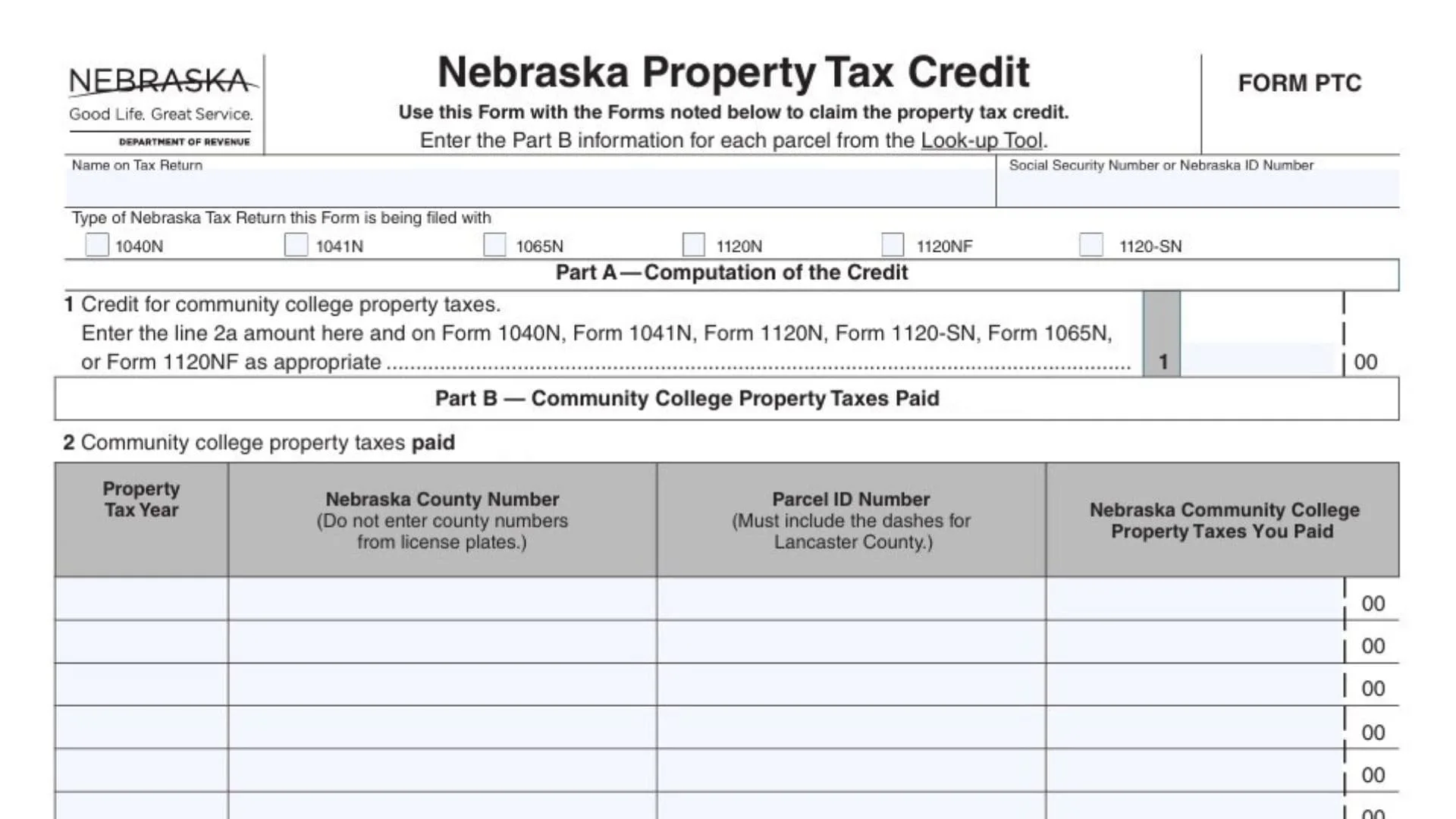
Nebraska’s Property Tax Credit is a credit you claim on your Nebraska income tax return (or certain business/fiduciary returns) to get tax relief for eligible community college property taxes you paid during the calendar year. Form PTC is the worksheet-style form used to identify the parcel(s) you paid taxes on and to total up the eligible community college property tax amounts that qualify for the credit. In plain terms: you list each parcel and the related eligible community college property taxes paid in the year, add them up, and then carry that total to both Form PTC (Part A) and to the appropriate line on your Nebraska tax return. A key point is timing—what matters is when the county treasurer received or applied the property tax payment (not necessarily when you sent money to a lender or paid at closing), and certain situations like escrow payments, sale reimbursements, and tax certificate redemptions can change whether you can claim the credit. Also, for tax years beginning on or after January 1, 2024, this form is used only to claim a credit for community college property taxes paid (not broader school district relief that may show directly on property tax statements).
Before You Start: What You Need
- Your Nebraska income tax return type (individual, fiduciary, partnership, corporation, S corporation, or financial institution) so you select the right checkbox.
- Your name and Social Security Number or Nebraska ID Number as shown on the return you’ll file.
- Parcel-by-parcel data from the Nebraska Property Tax Look-up Tool (recommended) or equivalent records, especially the eligible community college property taxes paid in the calendar year.
- If you paid for multiple parcels and/or multiple property tax years during the calendar year, you must be ready to enter separate rows.
How To File Form PTC
Form PTC is not typically filed by itself; you submit it with the Nebraska tax return on which you’re claiming the credit. Complete Part B first (the parcel listing and the community college property taxes paid), then complete Part A (the credit computation) and transfer the final total to the correct spot on your Nebraska return. If Part B doesn’t have enough rows for all parcels/years, you attach an additional schedule in the same format as Part B and include those totals in your line 2a sum.

How To Complete Nebraska PTC Form
Follow the form from top to bottom, and complete Part B before Part A.
Top Section: Return Type And Taxpayer Identification
Type Of Nebraska Tax Return This Form Is Being Filed With
Select the checkbox that matches the Nebraska return you are filing:
- 1040N (individual)
- 1041N (fiduciary)
- 1065N (partnership)
- 1120N (C corporation)
- 1120NF (financial institution)
- 1120-SN (S corporation)
Name On Tax Return
Enter the name exactly as it appears on the Nebraska return you checked above (individual name, entity name, trust/estate name, etc.).
Social Security Number Or Nebraska ID Number
Enter the identification number used on the same Nebraska return (SSN for many individuals; Nebraska ID for certain entities).
Nebraska Property Tax Credit (Form Heading Area)
This area is informational; the key action item is that you will claim the credit by completing Part B parcel data and then carrying the total to Part A and your return.
Part B — Community College Property Taxes Paid In 2025 (Complete This First)
Part B is where you list every parcel and the eligible community college property taxes you paid during calendar year 2025. You must enter parcel information separately for each parcel, and also separately for each property tax year where you paid amounts during 2025 (for example, if you paid both 2024 and 2025 property tax year installments during 2025, those go on different rows).
Line 2: Community College Property Taxes Paid In 2025 (The Table Rows)
You will fill in the row columns as follows:
Property Tax Year (For Most This Will Be 2024.)
Enter the property tax year the tax was levied for (many people pay the year after the levy, so payments made in 2025 often relate to the 2024 property tax year). If you paid more than one property tax year in calendar year 2025, you must use separate rows—one row per property tax year per parcel.
Nebraska County Number (Do Not Enter County Numbers From License Plates.)
Enter the county number assigned for the county where the parcel is located. Use the county number shown by the look-up source you used; do not copy the number format used on license plates.
Parcel ID Number (Must Include The Dashes For Lancaster County.)
Enter the parcel ID assigned by the county assessor for the parcel. If the parcel is in Lancaster County, you must include the dashes as part of the parcel ID. For many other counties, parcel IDs may be 9–10 digits without dashes.
Nebraska Community College Property Taxes You Paid
Enter the eligible community college property tax amount you paid for that specific parcel (and that specific property tax year) during calendar year 2025. Enter whole dollars only, using standard rounding (amounts of 50–99 cents round up; amounts under 50 cents round down). Do not include amounts that don’t qualify (for example, taxes that were five years or more delinquent at the time of payment are not included in the credit calculation).
If You Have More Parcels/Years Than Rows
Create and attach a separate schedule that mirrors the Part B table format (same columns, same type of entries), then include those amounts in your total.
Part B Total: Line 2a
Line 2a: Total Eligible Community College Property Taxes You Paid In 2025
Add up every “Nebraska Community College Property Taxes You Paid” amount you entered in Part B (including any continuation schedule), and put the sum on line 2a. This line 2a figure is the key total you’ll carry into Part A line 1 and onto your Nebraska return.
Part A — Computation Of The Credit (Do This After Part B)
Part A turns your Part B total into the credit amount you claim.
Line 1: Credit For Community College Property Taxes
Enter the exact amount from line 2a on this line. Then enter that same amount on the appropriate Nebraska return you selected (1040N, 1041N, 1065N, 1120N, 1120NF, or 1120-SN), following that return’s credit section placement.
Buttons (If You’re Using The Fillable Form)
Print Form / Reset Form
These are form controls for printing and clearing entries; they do not change your credit calculation, but “Reset” will erase what you entered, so use it carefully.
Timing Rules That Affect Whether A Payment Counts
Use these rules to decide which payments belong in the 2025 calendar year for Form PTC purposes (because “paid” is based on when the county treasurer receives or applies the funds, not necessarily when money left your account).
- Mortgage escrow: the payment date that matters is when the county treasurer receives the payment from the escrow account.
- Taxes funded at closing: you can claim the credit only for the calendar year the county treasurer receives the money from the closing/escrow process.
- Reimbursements between buyer/seller: if you reimburse someone for taxes already paid to the county, that reimbursement doesn’t create a new eligible “paid” tax for you.
- County treasurer escrow for partial payments: if partial payments are held and later applied, the “paid” date is when they’re applied to the parcel in the county’s records.
- Tax sale certificates: amounts collected from the certificate purchaser count when received by the county treasurer; a redeemer generally cannot claim the credit for redemption amounts.
Practical Checklist Before You Submit
- You completed Part B first and listed every parcel and each relevant property tax year separately.
- You used whole-dollar amounts with proper rounding.
- Your line 2a total equals the sum of all Part B entries (plus any attached schedule).
- Your Part A line 1 equals line 2a, and you carried the same number to your Nebraska return.
- You saved or printed your parcel look-up results and other supporting records and kept them for at least three years.