Navigating the shifting landscape of QuickBooks Online Pricing can feel like trying to solve a puzzle where the pieces keep changing shape, but understanding these costs is absolutely vital for any small business owner or freelancer trying to keep their budget in the green. As we move into 2026, Intuit has updated its subscription tiers, meaning that finding the sweet spot between accounting software cost and necessary features like payroll integration, inventory tracking, and multi-user access is more important than ever. This guide dives deep into every single monthly subscription tier—from the basic Simple Start to the robust Advanced plan—ensuring you don’t overpay for tools you don’t need while making sure you have the bookkeeping firepower to stay compliant. We will uncover hidden fees, explain the difference between Solopreneur and Essentials, and help you decide if bundling QuickBooks Payroll is the financial hack your business needs right now.

QuickBooks Solopreneur
Designed specifically for the one-person show, the QuickBooks Solopreneur plan is the most entry-level option available. Priced at approximately $20 per month, this tier is perfect for freelancers and gig workers who need to separate personal and business finances without the complexity of a full double-entry accounting system. It allows you to track income and expenses, send professional invoices, and estimate quarterly taxes, making it a massive upgrade from a messy spreadsheet. However, keep in mind that this plan does not offer bill management or multi-user access, so it is strictly for the solo operator.
QuickBooks Online Simple Start
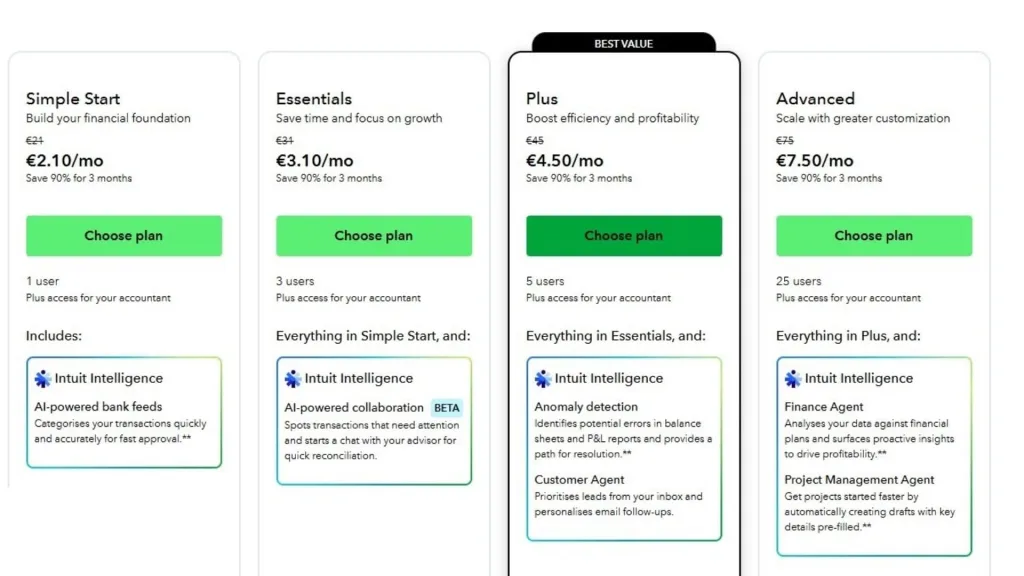
Stepping up to the first true small business plan, QuickBooks Online Simple Start costs $38 per month. This is the bread-and-butter tier for new businesses that need to track sales, sales tax, and run basic reports like Profit & Loss. Unlike the Solopreneur plan, this tier opens the door to more comprehensive bookkeeping tools, including the ability to manage 1099 contractors and capture receipts via the mobile app. It is an ideal starting point if you need to grant access to your accountant, although it still limits you to one internal user.
QuickBooks Online Essentials
If your business has a partner or you need to track time, QuickBooks Online Essentials is likely your best bet at $75 per month. This plan introduces multi-user access (up to 3 users), allowing you and your office manager to work in the file simultaneously. The standout feature here is bill management, which lets you track what you owe vendors and pay bills directly through the software. It also includes time tracking capabilities, which is a lifesaver for service-based businesses that need to bill clients by the hour.
QuickBooks Online Plus
The most popular plan for established small businesses is QuickBooks Online Plus, which comes in at $115 per month. This tier is a significant jump in functionality, offering inventory tracking and project profitability features that are non-negotiable for retailers and contractors. You get up to 5 user seats and the ability to track budgets, allowing you to forecast future growth. If you sell products or need to tag transactions by class or location to see which parts of your business are making money, this is the standard choice.
QuickBooks Online Advanced
For rapidly scaling companies that need data-driven insights, QuickBooks Online Advanced is the powerhouse option at $275 per month. This plan supports up to 25 users and comes with exclusive features like batch invoicing, automated workflows, and an integrated Excel spreadsheet tool for complex reporting. It is built for businesses that have outgrown the “small” label and need granular control over user permissions, custom fields, and dedicated customer support to handle higher transaction volumes.
QuickBooks Payroll Pricing
Most businesses eventually need to pay a team, and bundling payroll can simplify your life.
- Payroll Core: $50/mo + $6.50/employee. The basics: automated tax payments and forms.
- Payroll Premium: $88/mo + $10/employee. Adds same-day direct deposit and time tracking.
- Payroll Elite: $134/mo + $12/employee. The VIP treatment with tax penalty protection and 24/7 expert support.
Additional Costs To Consider
While the subscription covers the software, don’t forget the extras. If you use QuickBooks Payments to accept credit cards, you will pay transaction fees (typically around 2.9% + 25¢ per invoice). Ordering physical checks, buying 1099 e-file forms, or integrating third-party apps can also add to your monthly overhead. Always budget a buffer of $20-$50 monthly for these incidental bookkeeping costs.
Is QuickBooks Online Worth The Cost?
Despite the price hikes in 2026, QuickBooks Online remains the industry standard for a reason. Its ecosystem of integrations and accountant-friendly interface makes it “worth it” for businesses that want to ensure their books are audit-ready. If you are just cutting grass on weekends, the Solopreneur plan is plenty. But if you are managing inventory and employees, the automation provided by the Plus or Advanced plans will likely save you more in administrative hours than the monthly fee costs.

Frequently Asked Questions
Q: Can I switch QuickBooks plans later?
A: Yes, you can upgrade or downgrade your subscription at any time instantly through the account settings menu.
Q: Is there a free trial for QuickBooks Online?
A: Yes, Intuit typically offers a 30-day free trial, but you usually have to choose between the trial OR a discounted monthly rate for the first 3 months.
Q: Does the monthly price include payroll?
A: No, payroll is an add-on service with its own monthly base fee plus a per-employee cost.