
TurboTax Home And Business Download is a popular search for freelancers, independent contractors, self-employed professionals, and small business owners who want to prepare their personal income tax returns using desktop software. TurboTax Home & Business combines personal tax preparation with additional guidance for reporting self-employment income, business expenses, and eligible deductions. The software helps users organize information from W-2s, 1099 forms, business activities, investments, and other financial records. If you operate a small business from home, work as an independent contractor, or earn money through freelance services, this edition provides tools designed to simplify your tax preparation process. Intuit offers downloadable desktop versions for Windows and Mac, depending on the tax year and system requirements. The 2026 edition is available through the official Intuit website, where users can purchase the software and access the installation file. You will need an Intuit account, an internet connection, and your product license code to complete installation and activation. Before downloading, it is important to select the correct tax year and verify that your computer supports the software. Following the official installation process helps you avoid incorrect versions, activation problems, and potentially unsafe third-party downloads.
What Is TurboTax Home & Business?
TurboTax Home & Business is desktop tax preparation software designed primarily for individuals with self-employment or small business income.
It provides guidance for reporting different types of income and identifying potentially eligible deductions.
Some of its useful features include:
- Self-Employment Income: Report income from freelance work, independent contracting, and selling products or services.
- Business Expense Tracking: Identify eligible expenses, including supplies, utilities, and home office costs.
- Vehicle Deductions: Compare standard mileage and actual vehicle expenses.
- Rental Property Guidance: Get assistance with rental income and depreciation.
- Investment Reporting: Enter investment information and calculate capital gains or losses.
- Tax Form Support: Prepare relevant individual tax forms, including Schedule C and Schedule SE.
These features make the software useful for people who manage both personal and business finances.
How To Download TurboTax Home And Business
Downloading the software from Intuit is straightforward. Follow these steps to get started.
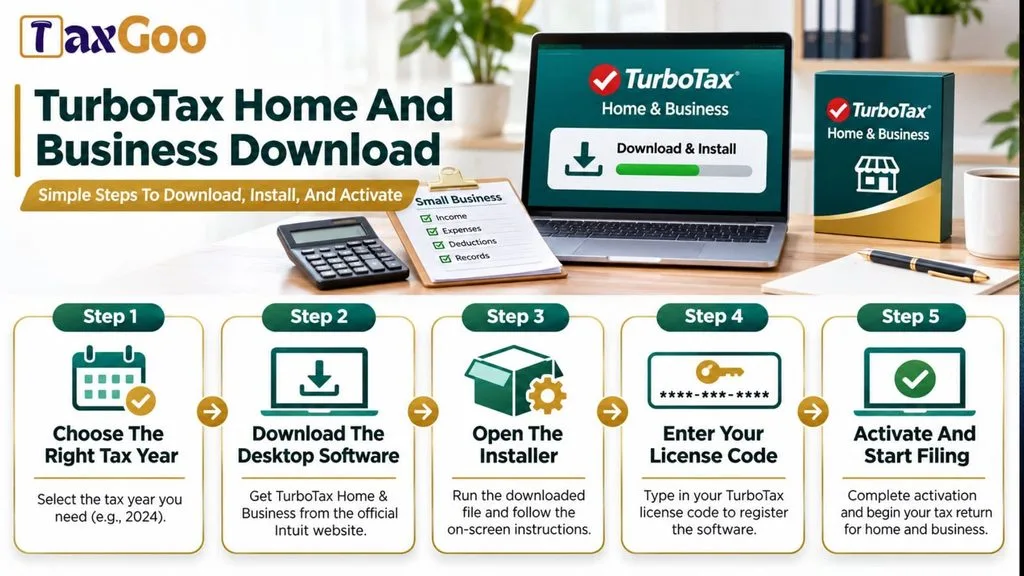
- Visit the official TurboTax Home & Business website.
- Review the available desktop version.
- Select the Home & Business edition.
- Purchase the software if you have not already purchased it.
- Open the TurboTax Desktop Download Page.
- Select the appropriate tax year.
- Choose TurboTax Home & Business from the available products.
- Download the installation file to your computer.
Once the download finishes, you can begin installing the software.
How To Install TurboTax Home & Business
After downloading the installation file, follow these instructions:
- Open your computer’s Downloads folder.
- Locate the TurboTax installation file.
- Double-click the downloaded file.
- Follow the installation instructions on your screen.
- Sign in with your Intuit account when prompted.
- Enter your product license code.
- Complete the activation process.
Keep your license code somewhere safe because you may need it again if you reinstall the software.
Intuit also requires an internet connection for product activation and software updates.
TurboTax Home & Business System Requirements
Before downloading, check whether your computer meets the requirements for the 2026 edition.
| Requirement | Windows | Mac |
|---|---|---|
| Operating System | Windows 11 (64-bit) | macOS Sequoia 15 or later |
| RAM | 4 GB recommended | 4 GB recommended |
| Storage | 1 GB, plus additional space for .NET if needed | 2 GB |
| Internet | Required | Required |
| Administrator Access | Required | Required |
The 2026 desktop edition does not support Windows 10 or macOS Sonoma 14 and earlier. Check the official system requirements before purchasing.
Which Tax Year Should You Download?
Choosing the correct tax year is important because different versions support different tax returns.
For example:
- TurboTax 2026: Designed for 2026 tax returns, generally filed in 2027.
- TurboTax 2025: Designed for 2025 tax returns, generally filed in 2026.
- TurboTax 2024: Designed for 2024 tax returns and prior-year filing needs.
Intuit’s download page provides access to multiple tax-year versions. Always select the year that matches the return you intend to prepare.
TurboTax Home & Business Vs. TurboTax Business
These two products are not interchangeable.
TurboTax Home & Business is designed for individuals who need to prepare personal tax returns involving self-employment and small business income.
TurboTax Business is intended for business entities such as partnerships, S corporations, C corporations, and multi-member LLCs. It also supports certain trusts and estates.
Choosing the correct edition helps ensure that you have the appropriate forms and reporting features for your tax situation.
Common TurboTax Download Problems And Solutions
Sometimes users experience problems when downloading or installing desktop tax software.
Here are a few common issues and possible solutions:
- Download Not Starting: Check your internet connection and try downloading again from the official Intuit website.
- Installation Error: Verify that your operating system meets the current requirements.
- License Code Not Working: Check the code carefully and confirm that it is associated with the correct Intuit account.
- Activation Problems: Make sure your internet connection is active and sign in with the account associated with your license.
- Insufficient Storage: Remove unnecessary files or free up disk space before installation.
If the problem continues, visit the official TurboTax Support Center.
Final Thoughts
Downloading TurboTax Home & Business does not have to be complicated. By choosing the correct tax year, checking your computer requirements, and following the official installation instructions, you can get the software ready for tax preparation. Whether you are a freelancer, independent contractor, or small business owner, the software provides useful tools for organizing income, reporting expenses, and preparing your individual tax return.
Frequently Asked Questions
Where Can I Download TurboTax Home & Business?
You can download it from the official Intuit website or access the installation page through your Intuit account.
Is TurboTax Home & Business Available For Mac?
Yes. The 2026 desktop edition supports macOS Sequoia 15 or later.
Can I Download TurboTax Home & Business For Free?
The desktop software is a paid product. You need to purchase a license to download and activate the full edition.
Do I Need A License Code To Install TurboTax?
Yes. A valid product license code is required to complete installation and activation.
Can I Use TurboTax Home & Business For Multiple Tax Years?
You need the appropriate edition for each tax year you want to prepare. Previous-year versions may be available separately.
Is TurboTax Home & Business The Same As TurboTax Business?
No. Home & Business is designed for individual tax returns involving self-employment income, while TurboTax Business supports certain business entities.