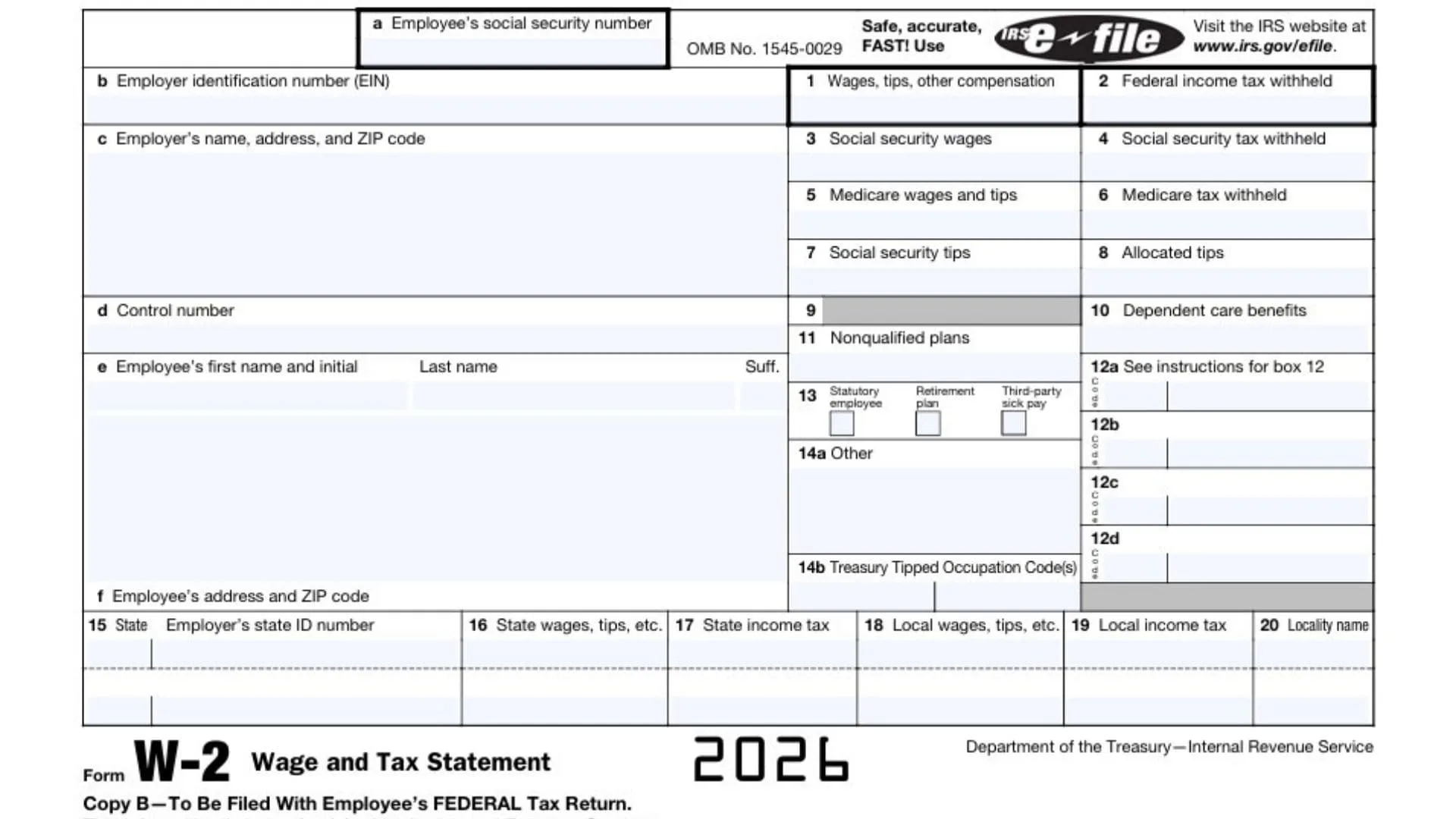
If you’re searching for how to read a W-2, you’re in the right place—because this one form is the hub for your employee income, payroll taxes, federal income tax withholding, Social Security wages and tax, Medicare wages and tax, state withholding, and local tax details for the year. Your Form W-2 (often called the Wage And Tax Statement) is what your employer gives you so you can file your tax return accurately, confirm how much you were paid, and see exactly how much tax was already withheld from your paycheck. It’s also where many of the “mystery” payroll items live—like pre-tax retirement contributions, health benefits, dependent care benefits, and other payroll codes that can change your taxable wages without changing your take-home pay in an obvious way. And because you may have more than one W-2 (job changes, multiple employers, side jobs as an employee), understanding the structure helps you avoid common mistakes like entering the wrong wage box, missing a state line, or confusing Social Security wages with federal taxable wages. By the end of this guide, you’ll be able to look at a W-2 and immediately know what’s informational, what affects your tax return, and which numbers should “match” the story of your year.
What A W-2 Is And Who Gets One
A W-2 is a year-end summary of pay and payroll-related taxes for people classified as employees. If you were paid as an employee (even part-time), your employer generally issues a W-2 showing your wages, tips, and other compensation plus the taxes withheld and certain benefits.
If you did freelance/contract work, you typically won’t get a W-2 for that income—you might receive a different tax form instead. Some people have both: a W-2 job (employee) and non-employee income on the side, which means you’ll use multiple documents when filing.
When You Receive It And What To Do With It
Most employees receive their W-2 after the end of the year, often in January. Keep your W-2 in a safe place because you’ll use it to file your federal and state tax returns, confirm your income, and verify withholding.
If you don’t receive it, first check your payroll portal or ask HR/payroll. If you received it but lost it, request a reprint (many employers can provide a digital copy).
How The W-2 Is Organized (Copies And Key Areas)
Your W-2 includes:
- Employer information (who paid you).
- Employee information (who was paid).
- Wage and tax boxes (the numbers you use when filing).
- State and local sections (if applicable).
- Copies labeled for different uses.
Common copies you may see:
- Copy B (often used for your federal tax return records or filing, depending on how you file).
- Copy C (your personal records).
- Copy 1 (state/city/local copy, if relevant).
- Copy 2 (sometimes used for state/local filing, depending on your situation).
You don’t usually “mail” all copies yourself if you e-file, but you should keep copies for your records.

W-2 Boxes Explained (Field-By-Field)
Below is a practical walkthrough of the typical W-2 layout, focusing on what each line means and why you should care.
Employee And Employer Information (Top Section)
Employer Name, Address, And Identification Numbers
This identifies the company that paid you and includes their tax ID numbers. If you worked for a large organization, the name might be a parent company or payroll entity—still normal.
Employee Name And Address
This should match your current legal name and mailing address. A small typo might not change your taxes, but it can cause paperwork headaches—especially if your name is significantly wrong.
Social Security Number (SSN)
Make sure it’s correct. A wrong SSN can cause mismatches when your wages are credited to your earnings record.
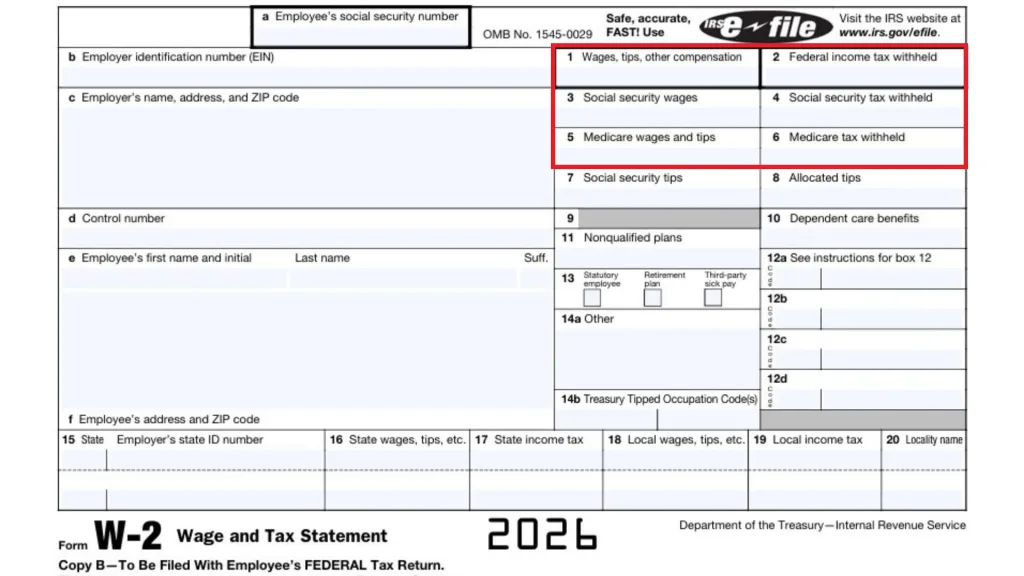
Box 1 Through Box 6 (Core Wage And Payroll Tax Numbers)
Box 1: Wages, Tips, Other Compensation
This is your federal taxable wage amount for income tax purposes. It often differs from your total salary because certain benefits or deductions (like some retirement contributions or pre-tax insurance) can reduce what’s taxable.
Box 2: Federal Income Tax Withheld
This is the total federal income tax your employer withheld from your paychecks. It’s a key number used to calculate whether you’ll get a refund or owe more when you file.
Box 3: Social Security Wages
This shows wages subject to Social Security tax. It can be higher than Box 1 in some cases, and it may cap out if you’re above the Social Security wage limit for the year.
Box 4: Social Security Tax Withheld
This is the Social Security tax taken out of your pay, calculated from Box 3 (up to the wage limit). If Box 4 looks unusually high or low, it could be a signal to double-check your pay history.
Box 5: Medicare Wages And Tips
This is wages subject to Medicare tax. Unlike Social Security wages, Medicare wages generally don’t stop at a wage limit, so high earners may see Medicare wages exceed Social Security wages.
Box 6: Medicare Tax Withheld
This is Medicare tax withheld based on Box 5. Some employees may also have Additional Medicare Tax withholding depending on total earnings.
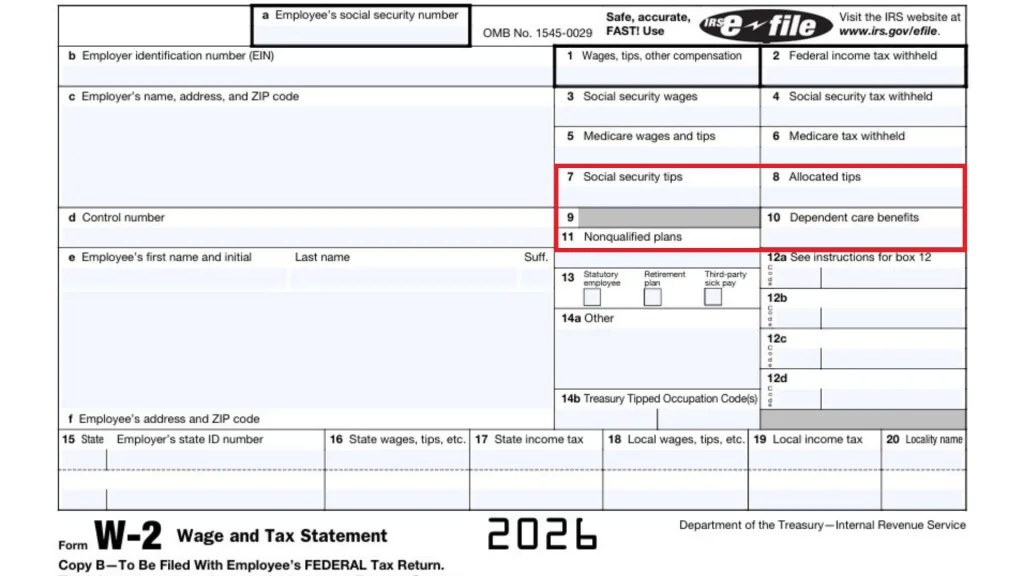
Box 7 Through Box 11 (Tips And Certain Benefit Items)
Box 7: Social Security Tips
Tips you reported to your employer that are subject to Social Security tax may appear here.
Box 8: Allocated Tips
These are tips your employer “assigned” to you (often in tip-heavy industries) if reported tips were below a required amount. Allocated tips can affect your tax filing, so don’t ignore this box if it has a number.
Box 9
This box is often unused on modern W-2s. If it’s blank, that’s typically normal.
Box 10: Dependent Care Benefits
This may show amounts related to employer-provided dependent care assistance. This can matter for tax credits or exclusions depending on your situation.
Box 11: Nonqualified Plans
This can reflect distributions or deferrals from certain nonqualified deferred compensation plans. If you see an amount here, it’s worth extra attention because it can affect how income is treated.
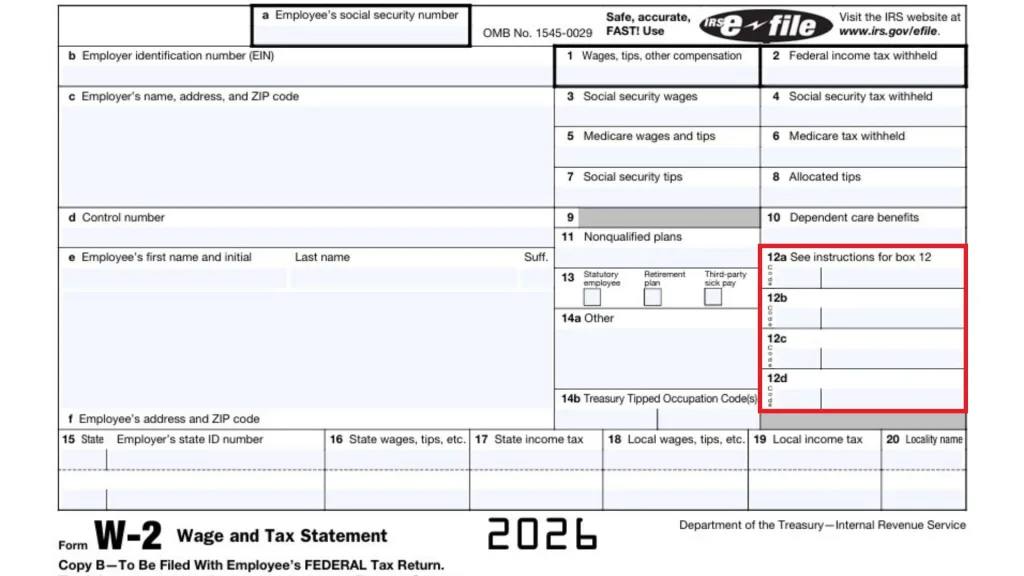
Box 12 (Codes That Explain “Hidden” Details)
Box 12: Codes And Amounts
This box uses letter codes to describe specific payroll items (for example, retirement plan contributions or certain benefits). The code tells you what the number represents, and the number shows the amount.
Tip: If Box 1 feels “lower than expected,” Box 12 codes often explain why—because they can represent pre-tax contributions or other adjustments.
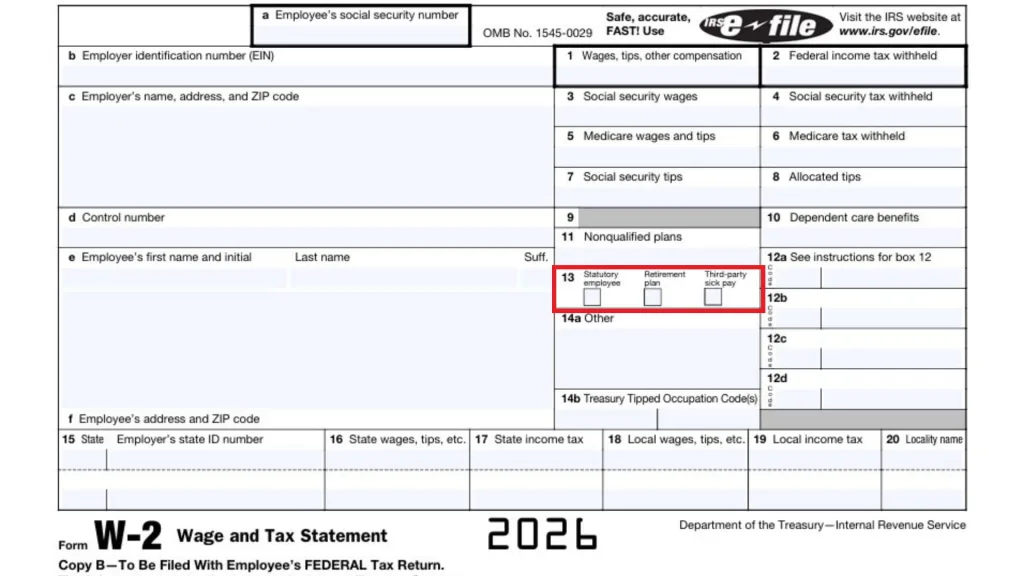
Box 13 (Checkboxes)
Box 13 Checkboxes
These checkboxes flag common situations, such as:
- Participation in a retirement plan.
- Certain types of pay classification.
- Other special reporting flags.
If the “retirement plan” box is checked, it can affect IRA deduction rules for some taxpayers, so don’t skip it.
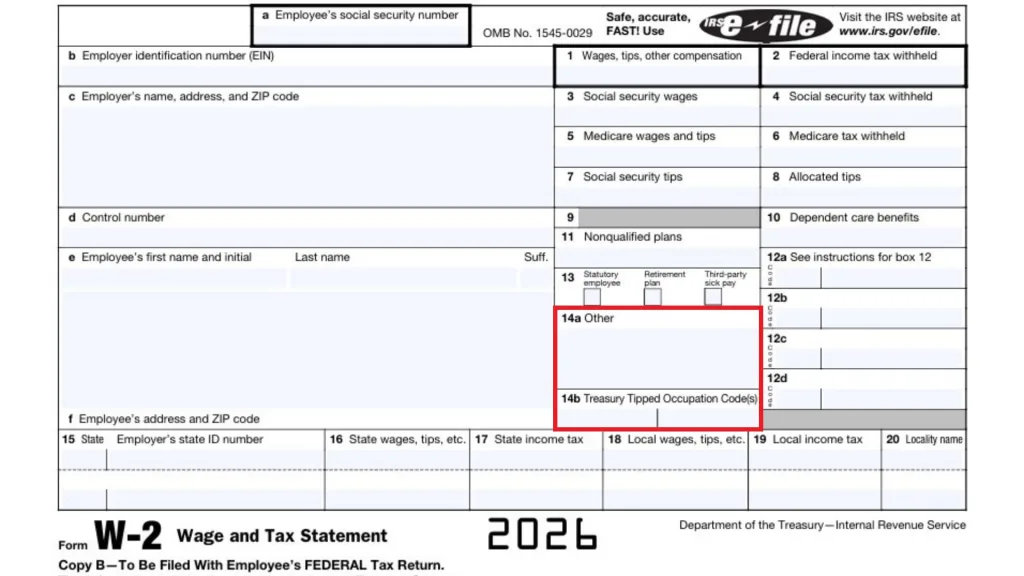
Box 14 (Other Information)
Box 14: Other
Employers use this area for additional payroll details that don’t fit elsewhere (for example, union dues, after-tax deductions, or informational items). The labels vary by employer, so read the description next to the number.
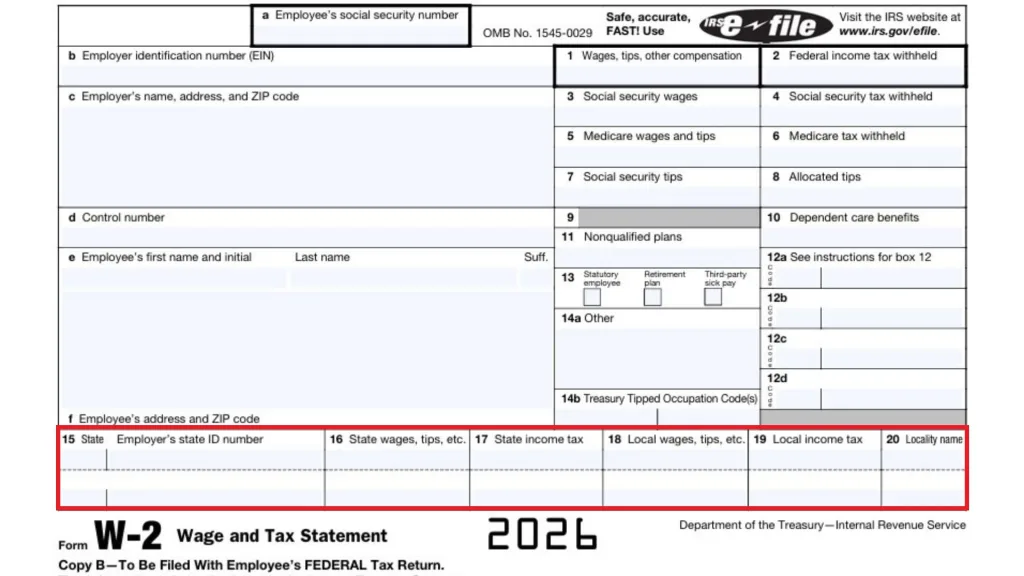
Boxes 15 Through 20 (State And Local Tax Section)
These boxes matter if you had state or local withholding.
Box 15: State And Employer’s State ID Number
Shows which state the wages relate to and your employer’s state tax ID.
Box 16: State Wages, Tips, Etc.
Your taxable wages for state income tax purposes. It may differ from Box 1 because states don’t always follow the same rules for deductions and exemptions.
Box 17: State Income Tax
State tax withheld from your paychecks.
Box 18: Local Wages, Tips, Etc.
Wages subject to local tax (city/county).
Box 19: Local Income Tax
Local tax withheld.
Box 20: Locality Name
The name of the city/county/local taxing area.
If you worked in more than one state or locality, you might see multiple state lines.
Common W-2 “Confusions” That Are Actually Normal
- Box 1 is not your gross pay: It’s often your taxable wage after certain pre-tax deductions.
- Box 3 and Box 5 can differ from Box 1: Social Security and Medicare wage rules aren’t identical to federal income tax rules.
- Multiple W-2s happen: Changing jobs, working two jobs, or company payroll changes can generate more than one W-2.
What To Do If Your W-2 Is Wrong
If you spot an error—misspelled name, wrong SSN, incorrect wages, missing state withholding—contact your employer’s payroll department as soon as possible and request a corrected form (often called a W-2c). Don’t “guess and file” if key identity or wage numbers are wrong, because corrections after filing can create delays and extra paperwork.

FAQs
What Do I Do If I Have Two W-2s?
You generally include both when you file, because each W-2 reports income and withholding from a different employer or payroll source.
Why Is Box 1 Lower Than What I Earned?
Box 1 is often reduced by certain pre-tax deductions (like some retirement or health plan contributions), so it may be less than your gross pay.
Can I File Taxes Without My W-2?
You may be able to file using pay stubs or year-end payroll summaries in a pinch, but it’s usually best to get the official W-2 (or a corrected one if needed) to avoid errors.
What Is A W-2c?
A W-2c is a corrected wage and tax statement issued by your employer when something on the original W-2 needs to be fixed.