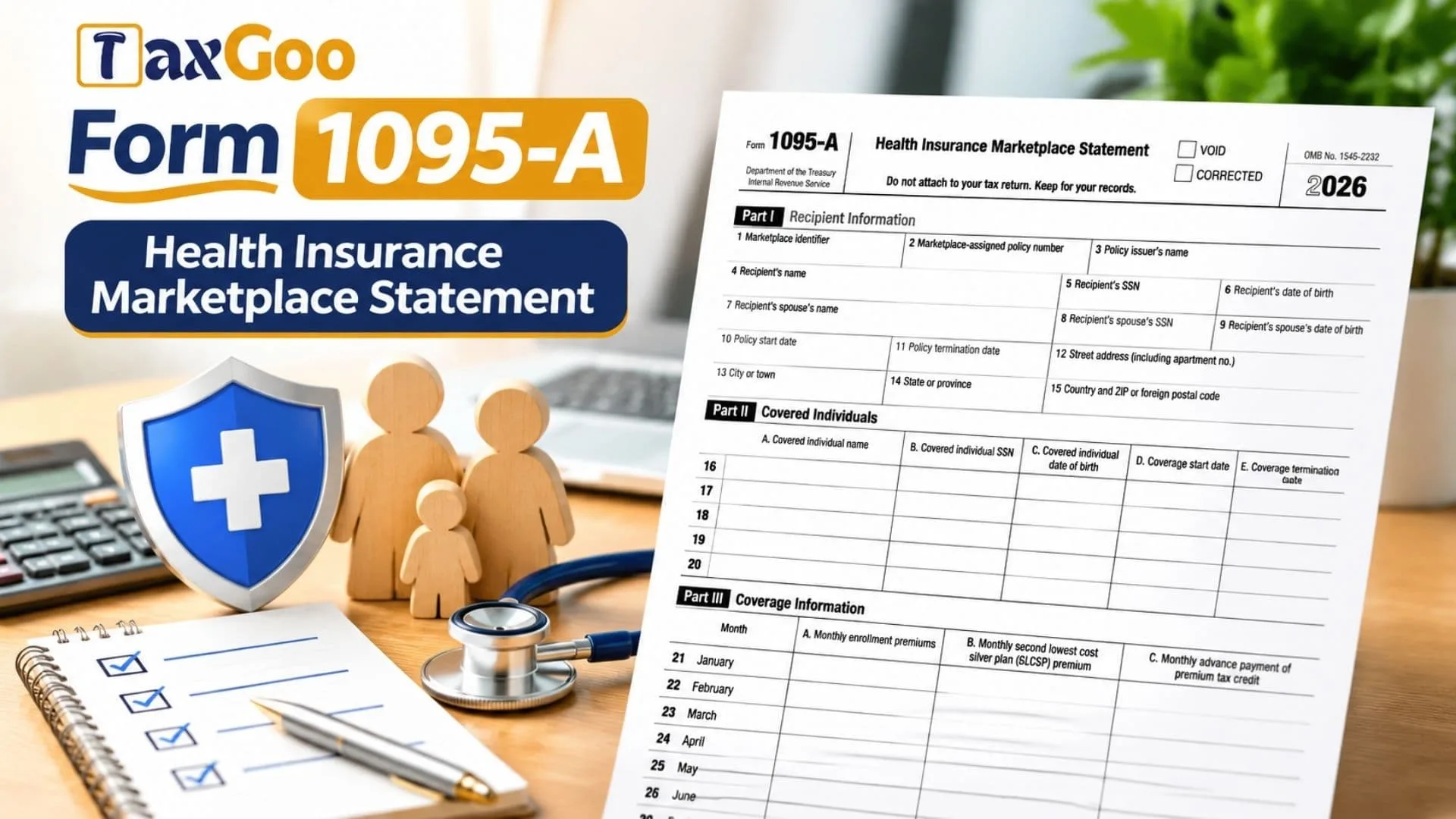
Form 1095-A, officially known as the Health Insurance Marketplace Statement, is a tax document issued to individuals and families who enrolled in health insurance coverage through the Health Insurance Marketplace. It provides important information about the insurance policy, the people covered under the plan, monthly insurance premiums, and any advance payments of the Premium Tax Credit (APTC) made on the policyholder’s behalf. The information is particularly important for taxpayers who received financial assistance to reduce their monthly health insurance costs because they may need to reconcile that assistance with the actual Premium Tax Credit they qualify for when filing their annual federal income tax return. Form 1095-A also provides the monthly Second Lowest Cost Silver Plan (SLCSP) premium, which is used to calculate the applicable credit. The Marketplace sends this information to both the recipient and the IRS, making it an important document for preparing Form 8962, Premium Tax Credit. Reviewing the statement carefully helps taxpayers identify incorrect personal information, verify coverage dates, confirm premium amounts, and avoid mistakes when reporting health insurance assistance. Individuals who received more than one qualified Marketplace health insurance policy during the year may receive a separate Form 1095-A for each policy.
How To File Form 1095-A
Form 1095-A is generally not submitted directly with your federal income tax return. Instead, it provides the information needed to complete Form 8962, Premium Tax Credit. You should keep Form 1095-A with your tax records and use its figures when preparing your annual return.
If any amount other than zero appears in Part III, Column C, or you want to claim the Premium Tax Credit, you must complete Form 8962 and file it with your federal income tax return. This requirement applies even if you would not otherwise be required to file a tax return.
Form 8962 must accompany one of the following returns:
- Form 1040, U.S. Individual Income Tax Return.
- Form 1040-SR, U.S. Tax Return for Seniors.
- Form 1040-NR, U.S. Nonresident Alien Income Tax Return.
If you are required to file Form 8962, you cannot use Form 1040-NR-EZ, Form 1040-SS, or Form 1040-PR.
Before preparing your tax return, gather the following information:
- Every Form 1095-A received for the tax year.
- Personal and household information.
- Health insurance coverage dates.
- Monthly enrollment premium amounts.
- Monthly Second Lowest Cost Silver Plan premiums.
- Advance Premium Tax Credit payments.
- Other income and tax information needed to prepare Form 8962.
Check every statement carefully, particularly if your family enrolled in more than one Marketplace health insurance policy.

How To Complete Form 1095-A
Form 1095-A contains three main sections: Recipient Information, Covered Individuals, and Coverage Information. Each section provides details needed to determine the correct Premium Tax Credit and reconcile any advance assistance received during the year.
Form Header And Status Information
Before reviewing the individual fields, check the information printed at the top of the statement.
Tax Year
The tax year identifies the period covered by the insurance statement. The 2026 version reports health insurance information for the 2026 coverage year.
VOID Checkbox
This box indicates that the statement was issued incorrectly and should not be used. If VOID is selected, you previously received a Form 1095-A for the same policy, but the earlier statement was also sent in error. Do not use either statement to calculate your Premium Tax Credit on Form 8962.
CORRECTED Checkbox
This box indicates that the Marketplace has issued a corrected statement. If it is selected, use the corrected information when preparing Form 8962 and reconciling advance credit payments. Do not use the figures from the original statement.
OMB Number
The OMB number is an administrative identification number printed on the form. It is not an amount or personal information field that the recipient needs to complete.
Recipient Notice
The statement is intended to be retained with your tax records rather than attached to your federal income tax return.
Part I: Recipient Information
Part I identifies the primary recipient of the Marketplace insurance statement, the insurance policy, the insurance provider, and the recipient’s contact information.
Line 1: Marketplace Identifier
This field identifies the state Marketplace through which you enrolled in the health insurance coverage. It helps establish where your insurance policy was purchased.
Line 2: Marketplace-Assigned Policy Number
Enter or verify the policy identification number assigned by the Marketplace. This number distinguishes your insurance policy from other policies.
If you complete Part IV of Form 8962, you may need this policy number in the appropriate box on line 30, 31, 32, or 33, depending on the applicable entry.
Line 3: Policy Issuer’s Name
This field identifies the insurance company that issued your Marketplace health insurance policy. Check that the name corresponds to your actual insurance provider.
Line 4: Recipient’s Name
This field identifies the person the Marketplace recognized as the primary recipient when the insurance enrollment was completed.
Generally, this is the individual expected to file a federal income tax return and potentially claim the Premium Tax Credit for the coverage year, if eligible.
Line 5: Recipient’s Social Security Number (SSN)
This field contains the recipient’s Social Security Number. For privacy protection, the statement may display only the last four digits.
The Marketplace has reported the complete Social Security Number to the IRS.
Line 6: Recipient’s Date Of Birth
This field contains the recipient’s date of birth when a Social Security Number has not been entered on line 5.
If an SSN is provided on line 5, the date of birth may not appear here.
Line 7: Recipient’s Spouse’s Name
This field identifies the recipient’s spouse. Spouse information is included only when advance Premium Tax Credit payments were made for the insurance coverage.
Line 8: Recipient’s Spouse’s SSN
This field reports the spouse’s Social Security Number when applicable. Review the number for accuracy if it appears on the statement.
Line 9: Recipient’s Spouse’s Date Of Birth
This field contains the spouse’s date of birth only when the Social Security Number field on line 8 is blank.
Line 10: Policy Start Date
This field identifies the date the health insurance policy became effective. Use it to confirm when the reported coverage began.
Line 11: Policy Termination Date
This field identifies the date the insurance policy ended, if applicable. Compare it with your actual coverage records to verify the termination date.
Line 12: Street Address
This field contains the recipient’s street address, including the apartment or unit number when applicable.
Check that the address matches your current or relevant mailing information.
Line 13: City Or Town
This field identifies the city or town associated with the recipient’s address.
Line 14: State Or Province
This field reports the state or province associated with the recipient’s mailing address.
Line 15: Country And ZIP Or Foreign Postal Code
This field contains the recipient’s country and ZIP code or applicable foreign postal code. Verify that the information is accurate.
Part II: Covered Individuals
Part II identifies the individuals included in the Marketplace health insurance coverage. It contains five rows, numbered 16 through 20, and five information columns.
Each row represents a covered individual. The columns identify the person’s name, Social Security Number, date of birth, and the dates their insurance coverage started and ended.
Understanding The Part II Columns
Column A: Covered Individual Name
This column identifies the name of each person covered under the insurance policy.
Column B: Covered Individual SSN
This column reports the Social Security Number of the covered individual.
Column C: Covered Individual Date Of Birth
This column reports the person’s date of birth when a Social Security Number has not been entered in Column B.
Column D: Coverage Start Date
This column identifies the date the individual’s health insurance coverage began.
Column E: Coverage Termination Date
This column identifies the date the individual’s coverage ended, when applicable.
Individual Covered Person Entries
Line 16: First Covered Individual
This row contains the identifying information and coverage dates for the first individual listed under the Marketplace policy. Review all five columns to confirm the person’s details.
Line 17: Second Covered Individual
This row identifies the second person covered by the insurance policy. Verify the name, identification details, and applicable coverage dates.
Line 18: Third Covered Individual
This row contains the information for the third covered individual, if applicable. Check the identifying information and coverage period.
Line 19: Fourth Covered Individual
This row reports the information for the fourth person enrolled in the policy. Confirm that the coverage dates are consistent with the actual enrollment period.
Line 20: Fifth Covered Individual
This row identifies the fifth covered individual, including their personal details and applicable coverage dates.
If more than five individuals are covered under one policy, the Marketplace will issue one or more additional Forms 1095-A to continue reporting Part II information.
Important Rules For Covered Individuals
When advance Premium Tax Credit payments are involved, Part II generally lists only the individuals the recipient identified to the Marketplace as members of the tax family for the coverage year. This generally includes the recipient, spouse, and dependents.
If an enrolled individual was identified at enrollment as someone who would not belong to the recipient’s tax family for that year, that person will not appear in Part II. The individual may receive a separate Form 1095-A.
When advance credit payments were made and some enrolled individuals are not part of the recipient’s tax family, the coverage amounts in Part III of the recipient’s statement apply only to the individuals listed on that statement. Separate Forms 1095-A report the applicable information for the other individuals.
If no advance credit payments were made and the recipient did not identify the members of the tax family during enrollment, all individuals enrolled in the policy will generally appear in Part II.
Part III: Coverage Information
Part III is one of the most important sections of Form 1095-A because it reports the monthly financial information needed to calculate and reconcile the Premium Tax Credit.
It contains three columns:
Understanding The Part III Columns
Column A: Monthly Enrollment Premiums
This column reports the monthly premium amount for the health insurance plan.
It includes premiums paid directly by the recipient as well as amounts paid through advance Premium Tax Credit payments.
If a separate dental plan providing pediatric benefits was purchased, the applicable portion of those premiums may also be included.
However, premiums attributable to nonessential benefits, such as adult dental or vision coverage, are excluded from the reported amount.
The figures in this column are used when completing Form 8962.
Column B: Monthly Second Lowest Cost Silver Plan (SLCSP) Premium
This column reports the monthly premium for the Second Lowest Cost Silver Plan that the Marketplace determined applies to the covered members of the recipient’s family.
The SLCSP amount is important because it helps determine the Premium Tax Credit available to the household.
It is also used when calculating the advance payments made toward the insurance premium.
If this column is blank or shows zero for a particular month, consult the Form 8962 instructions to determine how that month should be reported.
Column C: Monthly Advance Payment Of Premium Tax Credit
This column reports the monthly amount of advance Premium Tax Credit payments sent directly to the insurance company on the recipient’s behalf.
These payments help cover part or all of the monthly health insurance premium.
If Column C is the only column containing an amount other than zero for a particular month, it indicates that the insurance company terminated the policy because premiums were not paid.
In that situation, the recipient cannot claim a Premium Tax Credit for that month. However, the entire advance payment made on their behalf for that month must still be reconciled using Form 8962.
If no advance Premium Tax Credit payments were made, this column will generally be blank.
Monthly Coverage Entries: Lines 21–32
The Marketplace reports the amounts for each month separately. Every monthly row contains the same three financial columns: enrollment premiums, SLCSP premiums, and advance Premium Tax Credit payments.
Line 21: January
This row reports the January enrollment premium, the applicable Second Lowest Cost Silver Plan premium, and any advance Premium Tax Credit payments made for that month.
Line 22: February
This row contains the three monthly coverage amounts for February. Review the premium and credit information against your insurance coverage for the month.
Line 23: March
This row reports March’s enrollment premium, SLCSP premium, and advance credit payment amount, where applicable.
Line 24: April
This row identifies the monthly insurance premium, applicable SLCSP amount, and advance Premium Tax Credit payment for April.
Line 25: May
This row reports the corresponding Marketplace insurance figures for May. Check that the amounts reflect the coverage applicable to your household.
Line 26: June
This row contains the June premium information, including the monthly enrollment premium, SLCSP premium, and advance credit payment.
Line 27: July
This row reports the three applicable coverage amounts for July. Use these figures when completing the corresponding monthly calculations on Form 8962.
Line 28: August
This row identifies the August enrollment premium, Second Lowest Cost Silver Plan premium, and advance Premium Tax Credit payment, if applicable.
Line 29: September
This row contains the monthly coverage and financial information for September. Review all three columns before using the figures in your tax calculations.
Line 30: October
This row reports the October enrollment premium, SLCSP premium, and advance credit payment amount.
Line 31: November
This row contains the corresponding insurance premium and Premium Tax Credit information for November.
Line 32: December
This row reports the final month’s enrollment premium, SLCSP amount, and advance Premium Tax Credit payment for December.
Annual Totals
Line 33: Annual Totals
Line 33 summarizes the total amounts reported throughout the year in Columns A, B, and C.
The annual totals provide a consolidated view of your health insurance premiums, applicable SLCSP premiums, and advance Premium Tax Credit payments.
These amounts are important when completing Form 8962. The information is used on line 11 or lines 12 through 23 of Form 8962, depending on the applicable calculation.
Compare the annual totals with the individual monthly entries to ensure that all reported amounts are consistent.
Special Situations And Important Filing Considerations
What To Do If Form 1095-A Contains Incorrect Information
If your statement contains incorrect personal details, coverage dates, policy information, or premium amounts, contact the Marketplace Call Center.
If you enrolled through the federally facilitated Marketplace, you can find its contact information through the HealthCare.gov contact service.
If you enrolled through a state-based Marketplace, contact the appropriate state Marketplace using its official website.
If neither you nor anyone in your family enrolled in Marketplace health insurance but you received Form 1095-A, contact the Marketplace to investigate the statement.
Receiving More Than One Form 1095-A
A household may receive multiple Forms 1095-A when it enrolls in more than one qualified health plan policy during the year.
Each statement relates to a particular policy. Review every statement and use the applicable information when preparing Form 8962.
Do not assume that one statement contains all the coverage information for your household.
Marketplace Catastrophic Plans And Separate Dental Policies
Receiving Form 1095-A does not automatically mean that the insurance coverage qualifies for the Premium Tax Credit.
Individuals enrolled in a Marketplace catastrophic health plan or a separate dental policy are not entitled to claim the Premium Tax Credit for that coverage, even if they receive Form 1095-A.
Review the type of coverage before including any amounts in your Premium Tax Credit calculation.
Final Review Before Filing
Before completing your federal income tax return, review the entire Form 1095-A carefully. Accurate information is essential when calculating the Premium Tax Credit and reconciling any advance assistance received during the year.
Use the following checklist:
- Confirm that the statement covers the correct tax year.
- Check whether the VOID box is selected.
- Check whether the CORRECTED box is selected and use the corrected statement when applicable.
- Verify the recipient’s name and Social Security Number.
- Review spouse information, when applicable.
- Confirm the Marketplace policy number and insurance company name.
- Check the policy start and termination dates.
- Verify the recipient’s address.
- Review every individual listed in Part II.
- Confirm the Social Security Numbers or dates of birth provided for covered individuals.
- Verify the coverage start and termination dates for each person.
- Review all monthly enrollment premiums in Part III, Column A.
- Check the monthly SLCSP premiums in Column B.
- Verify all advance Premium Tax Credit payments in Column C.
- Review the annual totals on line 33.
- Confirm whether multiple Forms 1095-A were issued for different policies.
- Contact the Marketplace if any information is incorrect.
- Complete Form 8962 if required or if claiming the Premium Tax Credit.
- Attach Form 8962 to the appropriate federal income tax return when required.
- Keep Form 1095-A with your tax records rather than attaching it to your return.
Form 1095-A plays an essential role in reporting Marketplace health insurance coverage and determining the correct Premium Tax Credit. Understanding Part I, Part II, and Part III helps taxpayers review their insurance information, identify potential errors, and prepare Form 8962 accurately. Taking time to verify every field and monthly amount can make the tax filing process more organized and help prevent avoidable reporting mistakes.