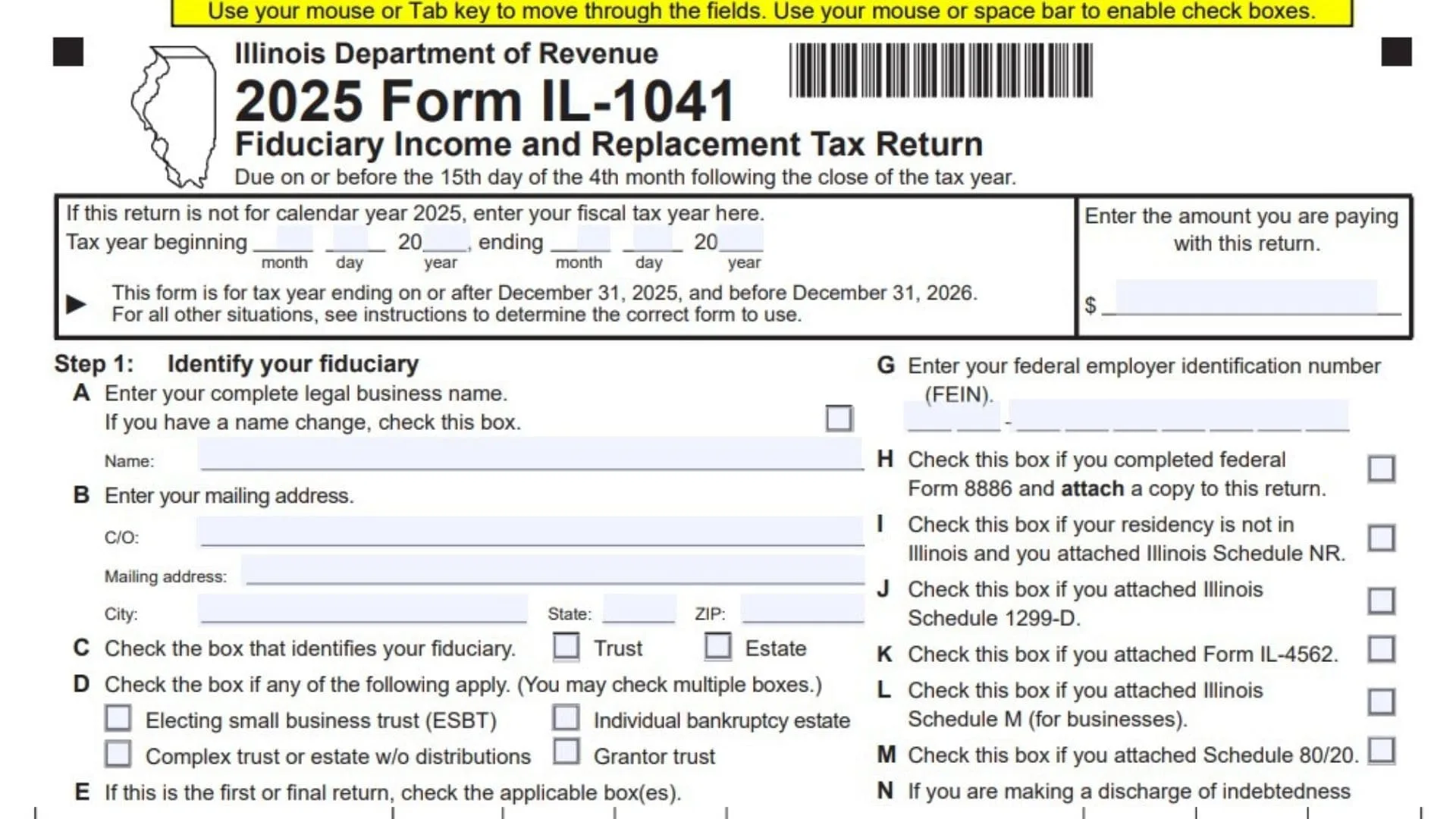
Illinois Form IL-1041, also known as the Fiduciary Income and Replacement Tax Return, is a tax return used by fiduciaries to report income, deductions, adjustments, credits, and taxes associated with an estate or trust in Illinois. It is administered by the Illinois Department of Revenue and is designed to calculate the Illinois income tax and replacement tax obligations of qualifying trusts and estates. A fiduciary is the person or entity responsible for managing the financial affairs and tax responsibilities of an estate or trust. This form collects identifying information about the fiduciary, federal taxable income, Illinois-specific additions and subtractions, beneficiary income allocations, applicable tax credits, withholding amounts, estimated tax payments, and any resulting refund or balance due. It also provides information about the beneficiaries who receive income from the estate or trust. Completing the return correctly is important because Illinois uses the reported information to determine the tax liability, verify beneficiary distributions, calculate applicable withholding, and process refunds or payments. The return also helps ensure that the fiduciary properly reports income and deductions under Illinois tax requirements. The 2025 Form IL-1041 is designated for tax years ending on or after December 31, 2025, and before December 31, 2026. Taxpayers with other tax-year ending dates should consult the applicable form instructions to determine which version to use.
How To File Form IL-1041
Form IL-1041 is submitted to the Illinois Department of Revenue. The filing deadline is generally the 15th day of the fourth month following the close of the tax year.
For example, a calendar-year filer generally has a filing deadline of April 15 following the end of that tax year.
Before completing the return, gather the information and supporting documents needed to report the estate or trust’s federal and Illinois tax information.
Documents And Information To Prepare
Prepare the following information before starting the return:
- The fiduciary’s complete legal name and mailing address.
- The fiduciary’s Federal Employer Identification Number (FEIN).
- The beginning and ending dates of the tax year.
- The applicable federal Form 1041.
- Federal taxable income and net operating loss information.
- Beneficiary information and applicable Schedule K-1-T forms.
- Illinois income and replacement tax information.
- Records of qualifying additions and subtractions.
- Supporting Illinois schedules and forms, when applicable.
- Information about tax credits, withholding, and estimated payments.
- Banking information if requesting a direct deposit refund.
- Paid preparer information, if a tax professional prepared the return.
Where To Mail Form IL-1041
The return provides different mailing addresses depending on whether payment is included.
If no payment is enclosed:
Illinois Department of Revenue
P.O. Box 19009
Springfield, IL 62794-9009
If payment is enclosed:
Illinois Department of Revenue
P.O. Box 19053
Springfield, IL 62794-9053
How To Make A Tax Payment
If Form IL-1041 shows an outstanding tax balance, the form directs taxpayers to make an electronic payment through Tax.Illinois.gov.
If mailing a payment, complete Form IL-1041-V, the payment voucher. Write the fiduciary’s FEIN, the tax year ending date, and IL-1041-V on the check or money order. Make the payment payable to the Illinois Department of Revenue.
Attach the payment voucher and payment to the first page of Form IL-1041. Also enter the payment amount in the designated payment box at the top of Page 1.
Supporting Schedules And Attachments
Depending on the information reported, the return may require additional schedules or federal forms. These include:
- Federal Form 982 for qualifying discharge of indebtedness adjustments.
- Federal Form 8886, when applicable.
- Illinois Schedule NR for nonresident fiduciaries.
- Illinois Schedule 1299-D for applicable tax credits.
- Illinois Schedule 1299-B for qualifying dividend subtractions.
- Illinois Schedule 80/20 for related-party expense adjustments.
- Illinois Schedule M for businesses.
- Illinois Schedule F for the valuation limitation adjustment.
- Illinois Schedule NLD for the Illinois net loss deduction.
- Illinois Schedule CR for income taxes paid to another state.
- Illinois Schedule 4255 for recapture of investment credits.
- Illinois Form IL-4562 for special depreciation adjustments.
- Illinois Form IL-477 for investment credits.
- Illinois Schedule D for beneficiary information and pass-through withholding.
- Schedule K-1-P and Schedule K-1-T, when applicable.
- Schedule K-1-T(3), when completing Schedule D.
Only include the schedules and attachments that apply to the fiduciary’s circumstances.

How To Complete Form IL-1041
Form IL-1041 contains eight main steps. Each step collects specific information or calculates an amount used to determine the final tax liability, refund, or balance due.
Complete the following sections in order.
Step 1: Identify Your Fiduciary
The first section identifies the fiduciary responsible for filing the return. Enter the required identifying information and select the applicable boxes.
Tax Year Beginning And Ending
If the return is not for calendar year 2025, enter the beginning and ending dates of the fiduciary’s fiscal tax year.
Provide the month, day, and year for both dates. Make sure the dates accurately represent the tax period covered by the return.
Payment Amount
At the top of Page 1, enter the amount being paid with the return. If no payment is being enclosed, do not enter an amount that is not being paid.
Item A: Complete Legal Business Name
Enter the fiduciary’s complete legal name. Use the name associated with the estate or trust’s tax identification records.
If the fiduciary’s name has changed, select the name-change checkbox provided beside this field.
Item B: Mailing Address
Enter the fiduciary’s mailing address.
Complete the following address fields:
- C/O: Enter the care-of information if the mail should be directed to another person or organization.
- Mailing Address: Provide the street address or appropriate mailing address.
- City: Enter the city.
- State: Enter the state abbreviation.
- ZIP: Enter the ZIP code.
Use an address where the Illinois Department of Revenue can send tax correspondence.
Item C: Type Of Fiduciary
Select the box that identifies the type of fiduciary filing the return.
Choose one of the following:
- Trust: Select this option if the return is being filed for a trust.
- Estate: Select this option if the return is being filed for an estate.
Item D: Additional Fiduciary Classification
Select all boxes that apply to the trust or estate.
The available classifications are:
- Electing Small Business Trust (ESBT): Select this option if the trust qualifies as an electing small business trust.
- Complex Trust Or Estate Without Distributions: Select this option when the trust or estate falls into this classification.
- Individual Bankruptcy Estate: Select this option if the return relates to an individual bankruptcy estate.
- Grantor Trust: Select this option if the trust is classified as a grantor trust.
More than one box may be selected when applicable.
Item E: First Or Final Return
Indicate whether the return is the first or final return for the trust or estate.
- First Return: Select this box if this is the first Illinois Form IL-1041 being filed for the entity.
- Final Return: Select this box if the return is the final return.
If filing a final return, enter the termination date in the month, day, and year fields provided.
Item F: Accounting Method
Select the accounting method used by the fiduciary.
The available options are:
- Cash: Select this option if the fiduciary uses the cash accounting method.
- Accrual: Select this option if the fiduciary uses the accrual accounting method.
- Other: Select this option if another accounting method is used. Specify the method in the space provided.
Item G: Federal Employer Identification Number (FEIN)
Enter the fiduciary’s nine-digit Federal Employer Identification Number.
Check the number carefully because it identifies the entity associated with the return.
Item H: Federal Form 8886
Select this checkbox if the fiduciary completed federal Form 8886.
If selected, attach a copy of the completed federal form to the Illinois return.
Item I: Nonresident Of Illinois
Select this checkbox if the fiduciary is not a resident of Illinois and has attached Illinois Schedule NR.
This checkbox identifies the nonresident filing situation.
Item J: Illinois Schedule 1299-D
Select this checkbox if Illinois Schedule 1299-D is attached to the return.
This schedule is used to report applicable Illinois income tax credits.
Item K: Illinois Form IL-4562
Select this checkbox if Form IL-4562 is attached.
This form supports the reporting of applicable Illinois special depreciation adjustments.
Item L: Illinois Schedule M
Select this checkbox if Illinois Schedule M for businesses is attached to the return.
Item M: Schedule 80/20
Select this checkbox if Schedule 80/20 is attached.
This schedule supports the reporting of related-party expense adjustments.
Item N: Discharge Of Indebtedness Adjustment
Select this checkbox if the fiduciary is making a discharge of indebtedness adjustment on Schedule NLD or Form IL-1041, Line 28.
If this adjustment applies, attach federal Form 982 to support the reported amount.
Item O: 52/53-Week Filer
Select this checkbox if the fiduciary uses a 52/53-week tax year rather than a standard calendar or fiscal year.
Step 2: Figure Your Income Or Loss
This section calculates the fiduciary’s income or loss using information from federal Form 1041 and applicable Illinois adjustments.
The section contains two reporting columns:
- Column A: Beneficiaries.
- Column B: Fiduciary.
Enter amounts in whole dollars only. Report the beneficiary and fiduciary portions in their respective columns wherever separate columns are provided.
Line 1: Federal Taxable Income
Enter the federal taxable income reported on federal Form 1041, Line 23.
Use the amount from the federal return and report it in the appropriate fiduciary column.
Line 2: Federal Net Operating Loss Deduction
Enter the federal net operating loss deduction from federal Form 1041, Line 15b.
The amount entered on this line cannot be negative. Do not enter a negative figure.
Line 3: Taxable Income Of ESBT
Enter the taxable income of an Electing Small Business Trust (ESBT), if applicable.
If the trust is not required to report this amount, follow the applicable instructions for this line.
Line 4: Federal Exemption
Enter the exemption claimed on federal Form 1041, Line 21.
Use the amount reported on the corresponding federal return.
Line 5: Illinois Income And Replacement Tax And Surcharge Deducted
Report Illinois income tax, replacement tax, and applicable surcharges that were deducted when calculating the federal taxable income reported on Line 1.
- Line 5a: Enter the portion attributable to beneficiaries.
- Line 5b: Enter the portion attributable to the fiduciary.
Line 6: Excluded Interest Income
Enter state, municipal, and other interest income that was excluded from the amount reported on Line 1.
- Line 6a: Enter the beneficiaries’ portion.
- Line 6b: Enter the fiduciary’s portion.
Line 7: Illinois Special Depreciation Addition
Enter the applicable Illinois special depreciation addition.
Separate the amount between beneficiaries and the fiduciary.
- Line 7a: Enter the beneficiaries’ portion.
- Line 7b: Enter the fiduciary’s portion.
Attach Form IL-4562 to support the reported adjustment.
Line 8: Related-Party Expenses Addition
Enter the applicable addition for related-party expenses.
Use Schedule 80/20 to determine and support the amount.
- Line 8a: Enter the beneficiaries’ portion.
- Line 8b: Enter the fiduciary’s portion.
Attach Schedule 80/20.
Line 9: Distributive Share Of Additions
Enter the distributive share of additions passed through from other entities.
Use the applicable Schedule K-1-P or Schedule K-1-T to determine the amount.
- Line 9a: Enter the beneficiaries’ portion.
- Line 9b: Enter the fiduciary’s portion.
Attach the applicable K-1 schedules.
Line 10: Other Additions
Enter other applicable Illinois additions that have not been reported on the previous lines.
Use Illinois Schedule M for businesses to determine the amount.
- Line 10a: Enter the beneficiaries’ portion.
- Line 10b: Enter the fiduciary’s portion.
Attach Schedule M when required.
Line 11: Total Income Or Loss
Add the amounts reported in Column B, beginning with Line 1 and continuing through Line 10b.
Enter the resulting total on Line 11.
This amount represents the fiduciary’s income or loss after the additions reported in this section.
The amounts in Column A, Lines 5a through 10a, must also be reported on Schedule K-1-T, Step 5.
Step 3: Figure Your Base Income Or Loss
This section begins with the income or loss calculated on Line 11 and applies the allowable Illinois subtractions.
Enter the appropriate amounts in the beneficiary and fiduciary columns where separate entries are provided.
Line 12: Income Or Loss From Line 11
Transfer the total income or loss from Line 11 to Line 12.
Use the amount already calculated in Step 2.
Line 13: August 1, 1969, Valuation Limitation Amount
Enter the applicable valuation limitation amount relating to August 1, 1969.
Use Illinois Schedule F to calculate and support this adjustment.
- Line 13a: Enter the beneficiaries’ portion.
- Line 13b: Enter the fiduciary’s portion.
Attach Schedule F.
Line 14: Payments From Certain Retirement Plans
Enter qualifying payments received from certain retirement plans, when applicable.
Follow the applicable instructions to determine the amount that can be subtracted.
- Line 14a: Enter the beneficiaries’ portion.
- Line 14b: Enter the fiduciary’s portion.
Line 15: Interest Income From U.S. Treasury And Other Exempt Federal Obligations
Enter qualifying interest income from U.S. Treasury obligations and other federal obligations that are exempt from Illinois income taxation.
Separate the amount between the beneficiaries and the fiduciary.
- Line 15a: Enter the beneficiaries’ portion.
- Line 15b: Enter the fiduciary’s portion.
Line 16: Retirement Payments To Retired Partners
Enter qualifying retirement payments made to retired partners.
- Line 16a: Enter the beneficiaries’ portion.
- Line 16b: Enter the fiduciary’s portion.
Use the applicable instructions to determine whether the payments qualify.
Line 17: River Edge Redevelopment Zone Dividend Subtraction
Enter the qualifying dividend subtraction related to a River Edge Redevelopment Zone.
Use Illinois Schedule 1299-B to determine the eligible amount.
- Line 17a: Enter the beneficiaries’ portion.
- Line 17b: Enter the fiduciary’s portion.
Attach Schedule 1299-B.
Line 18: High Impact Business Dividend Subtraction
Enter the qualifying dividend subtraction associated with a High Impact Business.
Use Schedule 1299-B to calculate the applicable amount.
- Line 18a: Enter the beneficiaries’ portion.
- Line 18b: Enter the fiduciary’s portion.
Attach Schedule 1299-B.
Line 19: Contributions To Certain Job Training Projects
Enter qualifying contributions made to certain job training projects.
Follow the applicable instructions to determine the allowable subtraction.
- Line 19a: Enter the beneficiaries’ portion.
- Line 19b: Enter the fiduciary’s portion.
Line 20: Illinois Special Depreciation Subtraction
Enter the applicable Illinois special depreciation subtraction.
Use Form IL-4562 to calculate the amount.
- Line 20a: Enter the beneficiaries’ portion.
- Line 20b: Enter the fiduciary’s portion.
Attach Form IL-4562.
Line 21: Related-Party Expenses Subtraction
Enter the qualifying subtraction for related-party expenses.
Use Schedule 80/20 to determine the allowable amount.
- Line 21a: Enter the beneficiaries’ portion.
- Line 21b: Enter the fiduciary’s portion.
Attach Schedule 80/20.
Line 22: Distributive Share Of Subtractions
Enter the distributive share of subtractions received from other entities.
Use the applicable Schedule K-1-P or Schedule K-1-T.
- Line 22a: Enter the beneficiaries’ portion.
- Line 22b: Enter the fiduciary’s portion.
Attach the applicable K-1 schedules.
Line 23: ESBT Loss Amount
Enter the applicable loss amount for an Electing Small Business Trust.
Follow the instructions to determine whether the trust qualifies to report this subtraction.
- Line 23a: Enter the beneficiaries’ portion, if applicable.
- Line 23b: Enter the fiduciary’s portion, if applicable.
Line 24: Other Subtractions
Enter other allowable Illinois subtractions that have not been included on the previous lines.
Use Illinois Schedule M for businesses to calculate the amount.
- Line 24a: Enter the beneficiaries’ portion.
- Line 24b: Enter the fiduciary’s portion.
Attach Schedule M when required.
Line 25: Total Subtractions
Add the amounts reported in Column B, Lines 13b through 24b.
Enter the total on Line 25.
This represents the total Illinois subtractions applied to the fiduciary’s income.
The amounts in Column A, Lines 13a through 24a, must be reported on Schedule K-1-T, Step 5.
Line 26: Base Income Or Loss
Subtract Line 25 from Line 12.
Enter the result on Line 26.
This amount represents the fiduciary’s base income or loss after the applicable Illinois subtractions.
If the fiduciary is a nonresident of Illinois, stop here and complete Schedule NR before continuing. Otherwise, proceed to Step 4.
Step 4: Figure Your Net Income
This section determines the adjusted base income and final net income after applying the applicable Illinois net loss deduction and standard exemption.
Line 27: Base Income Or Net Loss
Enter the appropriate base income or net loss amount.
The amount depends on the fiduciary’s residency status:
- Residents: Enter the amount from Form IL-1041, Line 26.
- Nonresidents: Enter the amount from Schedule NR, Line 51.
Line 28: Discharge Of Indebtedness Adjustment
Enter the applicable discharge of indebtedness adjustment.
Attach federal Form 982 to support the reported adjustment.
Refer to the applicable instructions when determining the amount.
Line 29: Adjusted Base Income Or Net Loss
Add Line 27 and Line 28.
Enter the result on Line 29.
This amount represents the adjusted base income or net loss before applying the Illinois net loss deduction and standard exemption.
Line 30: Illinois Net Loss Deduction
Enter the applicable Illinois net loss deduction.
If Line 29 is zero or negative, enter zero on this line.
Attach Schedule NLD to support the deduction.
Line 31: Standard Exemption
Enter the applicable standard exemption.
The entry depends on residency status:
- Residents: Review the applicable instructions before entering the exemption.
- Nonresidents: Enter the amount from Schedule NR, Line 54.
Line 32: Total Deductions And Exemption
Add Line 30 and Line 31.
Enter the combined amount on Line 32.
Line 33: Net Income
Subtract Line 32 from Line 29.
If the result is negative, enter zero.
The amount on Line 33 represents the net income used in the following tax calculations.
Step 5: Figure Your Net Replacement Tax
This section calculates the fiduciary’s Illinois replacement tax.
This step applies to trusts only. Estates should skip Step 5 and proceed directly to Step 6.
Line 34: Replacement Tax
Multiply the net income reported on Line 33 by 1.5%, or 0.015.
Enter the calculated replacement tax on Line 34.
Line 35: Recapture Of Investment Credits
Enter the applicable amount of investment credits that must be recaptured.
Use Schedule 4255 to calculate the recapture amount.
Attach Schedule 4255.
Line 36: Replacement Tax Before Credits
Add Line 34 and Line 35.
Enter the total on Line 36.
This represents the replacement tax before applying available credits.
Line 37: Replacement Tax Credit For Income Tax Paid To Another State
Enter the eligible replacement tax credit for income tax paid to another state while the fiduciary was an Illinois resident.
Attach Schedule CR and federal Form 1041, Page 1, including the breakdown for Line 11.
Line 38: Investment Credits
Enter the applicable investment credits.
Use Form IL-477 to determine the amount.
Attach Form IL-477.
Line 39: Total Credits
Add Line 37 and Line 38.
Enter the total available replacement tax credits on Line 39.
Line 40: Net Replacement Tax
Subtract Line 39 from Line 36.
If the result is negative, enter zero.
The amount on Line 40 represents the final net replacement tax for the trust.
Step 6: Figure Your Net Income Tax
This section calculates the income tax liability for both trusts and estates.
Unlike Step 5, this step applies to both types of fiduciaries.
Line 41: Net Income
Enter the net income amount from Line 33.
Transfer the amount without recalculating it.
Line 42: Income Tax
Calculate the applicable Illinois income tax using the instructions for Form IL-1041.
Enter the resulting income tax amount on Line 42.
Line 43: Recapture Of Investment Credits
Enter any investment credit recapture amount that applies to the fiduciary.
Use Schedule 4255 to calculate the amount.
Attach Schedule 4255.
Line 44: Income Tax Before Credits
Add Line 42 and Line 43.
Enter the total on Line 44.
This is the income tax amount before applying available tax credits.
Line 45: Income Tax Credit For Tax Paid To Another State
Enter the qualifying income tax credit for income taxes paid to another state while the fiduciary was an Illinois resident.
Attach Schedule CR and federal Form 1041, Page 1, including the Line 11 breakdown.
Line 46: Income Tax Credits
Enter applicable Illinois income tax credits.
Use Schedule 1299-D to determine the allowable credit amount.
Attach Schedule 1299-D.
Line 47: Total Credits
Add Line 45 and Line 46.
Enter the combined credit amount on Line 47.
Line 48: Net Income Tax
Subtract Line 47 from Line 44.
If the result is negative, enter zero.
The amount on Line 48 represents the net income tax after applicable credits.
Step 7: Figure Your Refund Or Balance Due
This section brings together the replacement tax, income tax, applicable surcharges, withholding, and payments to determine whether the fiduciary is entitled to a refund or owes additional tax.
Line 49: Net Replacement Tax
For trusts only, enter the net replacement tax from Line 40.
Estates do not complete the replacement tax calculation in Step 5.
Line 50: Net Income Tax
Enter the net income tax amount from Line 48.
Line 51: Medical Cannabis Program Act Surcharge
Enter the applicable surcharge under the Compassionate Use of Medical Cannabis Program Act.
Follow the form instructions to determine whether the surcharge applies and how much to report.
Line 52: Gaming Licensee Asset Sale Surcharge
Enter the applicable surcharge relating to the sale of assets by a gaming licensee.
Refer to the instructions to determine whether this surcharge applies.
Line 53: Pass-Through Withholding Owed On Behalf Of Members
Enter the pass-through withholding amount reported on Schedule D, Section A, Line 3.
This amount represents withholding owed on behalf of applicable nonresident beneficiaries or members.
Attach Schedule D to the return.
Line 54: Total Taxes, Surcharges, And Pass-Through Withholding
Add Lines 49, 50, 51, 52, and 53.
Enter the total on Line 54.
This represents the total amount of income tax, replacement tax, surcharges, and pass-through withholding owed before considering payments and credits.
Line 55: Payments
This section records payments and credits available to reduce the total tax liability.
Complete the following sublines separately.
Line 55a: Credits From Previous Overpayments
Enter any available credits carried forward from previous overpayments.
Use the applicable prior-year tax information to determine the amount.
Line 55b: Total Payments Made Before Filing
Enter the total payments made before the date the current return is filed.
Include applicable payments already made toward the fiduciary’s Illinois tax obligation.
Line 55c: Pass-Through Withholding Reported To You
Enter the pass-through withholding amount reported to the fiduciary.
Use Schedule K-1-P or Schedule K-1-T to determine the amount.
Attach the applicable K-1 schedules.
Line 55d: Pass-Through Entity Tax Credit Reported To You
Enter the pass-through entity tax credit reported to the fiduciary.
Use the applicable Schedule K-1-P or Schedule K-1-T.
Attach the supporting K-1 schedules.
Line 55e: Illinois Income Tax Withheld
Enter the Illinois income tax withheld from payments received by the fiduciary.
Use the applicable W-2, W-2G, and 1099 forms to determine the total withholding.
Attach all applicable withholding documents.
Line 56: Total Payments
Add Lines 55a through 55e.
Enter the total on Line 56.
This represents the combined payments and credits available to offset the tax liability.
Line 57: Overpayment
Compare Line 56 with Line 54.
If Line 56 is greater than Line 54, subtract Line 54 from Line 56.
Enter the difference on Line 57.
This amount represents the overpayment available for a refund or credit toward a future tax year.
If the payments do not exceed the total tax liability, there is no overpayment to report.
Line 58: Amount To Be Credited Forward
Enter the portion of the overpayment from Line 57 that should be applied to a future tax year.
Follow the applicable instructions when selecting the amount.
If the credit is being transferred to a different FEIN, select the checkbox provided and attach a detailed statement explaining the carryforward.
Line 59: Refund
Subtract Line 58 from Line 57.
Enter the remaining amount on Line 59.
This is the amount of overpayment requested as a refund.
Line 60: Direct Deposit Information
Complete this section if requesting the refund through direct deposit.
Provide the following banking details:
- Routing Number: Enter the bank’s routing number.
- Account Type: Select either Checking or Savings.
- Account Number: Enter the bank account number where the refund should be deposited.
Review the account information carefully before submitting the return to avoid payment delays or errors.
Line 61: Tax Due
Determine whether the total tax liability exceeds the available payments.
If Line 54 is greater than Line 56, subtract Line 56 from Line 54.
Enter the difference on Line 61.
This is the additional tax owed to the Illinois Department of Revenue.
If payment is required, follow the electronic payment or mailing instructions in the filing section. When mailing payment, complete Form IL-1041-V and attach it with the payment to the first page of the return.
Step 8: Sign The Return
The final section confirms that the fiduciary has reviewed the return and accepts responsibility for the information provided.
Fiduciary Signature
The fiduciary must sign the return to certify that the information is true, correct, and complete to the best of their knowledge.
Date
Enter the date the fiduciary signs the return using the month/day/year format.
Title
Enter the fiduciary’s title or official capacity in the space provided.
Phone
Provide a telephone number where the Illinois Department of Revenue can contact the fiduciary if necessary.
Paid Preparer Discussion Authorization
Select the checkbox if the fiduciary authorizes the Illinois Department of Revenue to discuss the return with the paid preparer identified in the preparer section.
If the checkbox is not selected, the form does not provide this authorization.
Paid Preparer Use Only
This section is completed by the paid tax preparer when a professional prepares the return.
Paid Preparer’s Name
Enter the printed or typed name of the paid preparer.
Paid Preparer’s Signature
The preparer must sign the return in the designated space.
Date
Enter the date the paid preparer signs the return.
Self-Employed Preparer Checkbox
Select this checkbox if the paid preparer is self-employed.
Paid Preparer’s PTIN
Enter the paid preparer’s Preparer Tax Identification Number (PTIN).
Firm’s Name
Enter the name of the tax preparation firm, if applicable.
Firm’s FEIN
Enter the firm’s Federal Employer Identification Number.
Firm’s Address
Provide the firm’s complete mailing address.
Firm’s Phone
Enter the firm’s telephone number.
If a paid preparer is not involved, the applicable paid preparer fields should be handled according to the form instructions.
Schedule D: Beneficiary Information
Schedule D is an additional schedule attached to Form IL-1041. It collects information about beneficiaries, their income allocations, and applicable pass-through withholding and pass-through entity tax credits.
The schedule consists of two sections:
- Section A: Total beneficiaries’ information.
- Section B: Beneficiaries’ individual information.
Schedule D must be completed using the applicable Schedule K-1-T and related beneficiary information.
Schedule D: Identification Information
Year Ending
Enter the tax year ending date associated with Form IL-1041.
Provide the applicable month and year.
Name
Enter the fiduciary’s name exactly as it appears on Form IL-1041.
Federal Employer Identification Number (FEIN)
Enter the same FEIN reported on the main Illinois fiduciary income tax return.
Make sure the information matches the primary return.
Important Instructions Before Completing Schedule D
Before completing Schedule D, read its applicable instructions.
The schedule requires the fiduciary to complete Schedule K-1-T and Schedule K-1-T(3) before preparing the beneficiary information.
Section B must also be completed before Section A.
This order is important because Section A uses totals taken from the beneficiary information recorded in Section B and the related K-1 schedules.
Failure to follow the required sequence or provide complete beneficiary information may delay the processing of the return or result in additional correspondence from the Illinois Department of Revenue.
Schedule D, Section A: Total Beneficiaries’ Information
Section A summarizes beneficiary-related amounts using information from Schedule K-1-T and Schedule D, Section B.
Complete the individual beneficiary information in Section B first. Then transfer the applicable totals into this section.
Totals From Schedule K-1-T
Line 1: Total Nonbusiness Income Or Loss
Enter the combined amount of all nonbusiness income or loss reported for beneficiaries on the applicable Schedule K-1-T forms.
Add the relevant amounts from all beneficiary schedules and enter the total on Line 1.
Totals From Schedule D, Section B
Line 2a: Nonresident Individual Beneficiaries
Enter the total pass-through withholding reported on Schedule D, Section B, Column G, for all nonresident individual beneficiaries.
Combine the applicable amounts from all pages of Section B.
Line 2b: Nonresident Estate Beneficiaries
Enter the total pass-through withholding reported for all nonresident estate beneficiaries.
Use the amounts recorded in Column G of Section B.
Line 2c: Partnership And S Corporation Beneficiaries
Enter the total pass-through withholding reported for partnership and S corporation beneficiaries.
Calculate the combined amount using the applicable beneficiary records in Section B.
Line 2d: Nonresident Trust Beneficiaries
Enter the total pass-through withholding reported for all nonresident trust beneficiaries.
Use the amounts from Column G of Section B.
Line 2e: C Corporation Beneficiaries
Enter the total pass-through withholding reported for C corporation beneficiaries.
Combine the applicable amounts from all Section B pages.
Line 3: Total Pass-Through Withholding
Add Lines 2a, 2b, 2c, 2d, and 2e.
Enter the combined amount on Line 3.
This amount represents the total pass-through withholding owed on behalf of all nonresident beneficiaries.
The total should match the combined withholding reported in Schedule D, Section B, Column G, for all nonresident beneficiaries across all pages.
Transfer this amount to Form IL-1041, Line 53.
Line 4: Total Pass-Through Entity Tax Credit
Enter the total pass-through entity tax credit received and distributed to beneficiaries.
Use the amounts reported in Schedule D, Section B, Column H.
Combine the applicable amounts from all pages of Section B and enter the total on Line 4.
Schedule D, Section B Attachment Requirement
Attach all completed pages of Schedule D, Section B behind the Section A page.
Make sure the beneficiary information on the additional pages agrees with the totals reported in Section A.
Schedule D, Section B: Beneficiaries’ Information
Section B collects individual information for each beneficiary of the trust or estate.
The form provides space for three beneficiaries on each page. If there are more than three beneficiaries, attach additional copies of Section B as necessary.
Enter the fiduciary’s name and FEIN at the top of each additional page.
Complete Columns A through H for every applicable beneficiary.
Column A: Beneficiary Name And Address
Enter the beneficiary’s identifying and mailing information.
Complete the following fields:
- Name: Enter the beneficiary’s full name or legal entity name.
- C/O: Enter the care-of information if correspondence should be directed through another person or organization.
- Address 1: Enter the beneficiary’s primary street address.
- Address 2: Enter any additional address information, such as an apartment, unit, or suite number.
- City: Enter the beneficiary’s city.
- State, ZIP: Enter the beneficiary’s state abbreviation and ZIP code.
Use the beneficiary’s correct mailing address.
Column B: Beneficiary Type
Enter the appropriate beneficiary classification.
Identify the beneficiary according to the applicable type shown in the Schedule D instructions.
The beneficiary classifications relevant to Section A include:
- Individual beneficiary.
- Estate beneficiary.
- Partnership beneficiary.
- S corporation beneficiary.
- Trust beneficiary.
- C corporation beneficiary.
Select or enter the appropriate classification based on the beneficiary’s legal status.
Column C: SSN/FEIN
Enter the beneficiary’s Social Security Number (SSN) or Federal Employer Identification Number (FEIN), as applicable.
Use the appropriate identification number for the beneficiary.
Check the number carefully because it is used to identify the beneficiary associated with the reported income and withholding information.
Column D: Beneficiary’s Amount Of Base Income Or Loss
Enter the beneficiary’s allocated amount of base income or loss.
Use the applicable Schedule K-1-T information to determine the amount assigned to the beneficiary.
Report the correct amount for each beneficiary separately.
Column E: Excluded From Pass-Through Withholding
Indicate whether the beneficiary is excluded from pass-through withholding.
Follow the applicable Schedule D instructions when determining whether the beneficiary qualifies for exclusion.
Column F: Share Of Illinois Income Subject To Pass-Through Withholding
Enter the beneficiary’s share of Illinois income that is subject to pass-through withholding.
Use the applicable income allocation information to determine the amount.
Report each beneficiary’s qualifying Illinois income separately.
Column G: Pass-Through Withholding Amount Before Credits
Enter the pass-through withholding amount applicable to the beneficiary before applying credits.
Calculate or transfer the amount using the applicable beneficiary withholding information.
The amount reported in this column is also used to calculate the totals reported in Schedule D, Section A, Lines 2a through 2e.
Column H: PTE Tax Credit Received And Distributed To Beneficiaries
Enter the pass-through entity (PTE) tax credit received and distributed to the beneficiary.
Use the applicable tax credit information to determine the amount allocated to each beneficiary.
The amounts reported in this column are combined and transferred to Schedule D, Section A, Line 4.
Additional Beneficiary Pages
If the estate or trust has more than three beneficiaries, prepare additional copies of Schedule D, Section B.
Enter the fiduciary’s name and FEIN on every additional page.
Complete Columns A through H for each additional beneficiary and attach all pages behind Schedule D, Section A.
Final Review Before Filing
Before submitting Form IL-1041, review the entire return and supporting schedules to make sure all required information is complete and accurate.
Use the following checklist as a final review.
Fiduciary Information
- The correct tax year beginning and ending dates are entered.
- The fiduciary’s legal name is correct.
- The mailing address is complete.
- The correct trust or estate classification is selected.
- Applicable fiduciary classification boxes are checked.
- First or final return status is correctly identified.
- The accounting method is selected.
- The FEIN is accurate.
- All applicable attachment checkboxes are selected.
Income And Tax Calculations
- Federal taxable income agrees with federal Form 1041.
- The federal net operating loss deduction is not negative.
- All applicable Illinois additions are reported.
- Beneficiary and fiduciary amounts are entered in the correct columns.
- All applicable Illinois subtractions are included.
- Total income or loss on Line 11 is calculated correctly.
- Base income or loss on Line 26 is accurate.
- Schedule NR is completed when required.
- The adjusted base income on Line 29 is correct.
- The Illinois net loss deduction and standard exemption are properly reported.
- Net income on Line 33 is calculated correctly.
- Replacement tax and income tax calculations are accurate.
- All applicable credits and surcharges are included.
- Total payments agree with the supporting payment and withholding records.
- The refund or balance due is calculated correctly.
Schedule And Attachment Review
- Federal Form 982 is attached when required.
- Federal Form 8886 is attached when applicable.
- Schedule 80/20 is attached when required.
- Form IL-4562 is attached when required.
- Schedule 1299-B is attached when applicable.
- Schedule 1299-D is attached when applicable.
- Schedule F is attached when required.
- Schedule NLD is attached when required.
- Schedule CR is attached when required.
- Schedule 4255 is attached when applicable.
- Form IL-477 is attached when applicable.
- Schedule M is attached when required.
- Schedule NR is completed when required.
- Schedule D is attached when beneficiary information or pass-through withholding applies.
- The applicable Schedule K-1-P and Schedule K-1-T forms are available.
- Schedule K-1-T(3) is completed before preparing Schedule D.
Schedule D Review
- The fiduciary’s name and FEIN match Form IL-1041.
- All beneficiary names and addresses are complete.
- Each beneficiary’s correct type is identified.
- SSNs or FEINs are entered accurately.
- Beneficiary income or loss allocations are correct.
- Pass-through withholding exclusions are properly identified.
- Illinois income subject to withholding is correctly reported.
- Pass-through withholding amounts are entered before credits.
- PTE tax credits are allocated correctly.
- Section A totals agree with the amounts reported in Section B.
- Line 3 agrees with Form IL-1041, Line 53.
- All additional beneficiary pages are attached.
Payment And Signature Review
- The refund routing number and account number are correct, if requesting direct deposit.
- The correct checking or savings account type is selected.
- The amount entered on Line 59 agrees with the requested refund.
- The amount entered on Line 61 agrees with the outstanding tax liability.
- Form IL-1041-V is completed if mailing a payment.
- The payment is made payable to the Illinois Department of Revenue.
- The fiduciary has signed and dated the return.
- The fiduciary’s title and telephone number are provided.
- The paid preparer section is completed when applicable.
- The correct mailing address is selected based on whether payment is enclosed.
- The payment amount is entered in the designated box at the top of Page 1 when applicable.
A final review helps reduce reporting errors, missing attachments, and processing delays. Make sure all calculations, beneficiary allocations, supporting schedules, and payment details agree before submitting Form IL-1041 to the Illinois Department of Revenue.